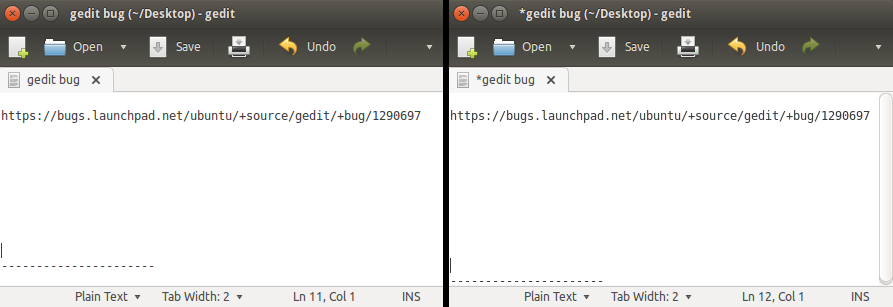
I'm having this issue too. I'm a web developer and use Gedit on a daily
basis so this is making life difficult.
I did determine a few things though... It only occurs when there is a
scrollbar present. When the document is short enough and doesn't require
a scrollbar the font renders correctly. The same issue also happens in
Synaptic.


** Attachment added: "Left side font rendered correctly, right side with
scrollbar has font rendering problems"

https://bugs.launchpad.net/ubuntu/+source/gedit/+bug/1290697/+attachment/4088295/+files/gedit.png

--
You received this bug notification because you are a member of Desktop
Packages, which is subscribed to gedit in Ubuntu.
https://bugs.launchpad.net/bugs/1290697

Title:
  Font rendering is broken

Status in “gedit” package in Ubuntu:
  Confirmed

Bug description:
  Font rendering in Gedit (version 3.10.4) in Trusty is blurry.

  Fonts are rendered normally in other programs, such as LibreOffice
  Writer, Tomboy notes, and various system uses like title bars.

  See attached image, thanks.

To manage notifications about this bug go to:
https://bugs.launchpad.net/ubuntu/+source/gedit/+bug/1290697/+subscriptions

--
Mailing list: https://launchpad.net/~desktop-packages
Post to     : [email protected]
Unsubscribe : https://launchpad.net/~desktop-packages
More help   : https://help.launchpad.net/ListHelp