This is a reply to my comment: https://bugs.launchpad.net/ubuntu/+source
/chromium-browser/+bug/1325498/comments/3
In fact, Chromium Version 34.0.1847.116 Ubuntu 14.04 aura (260972) on
Ubuntu GNOME 14.04 LTS is giving me hard time but it is different story
- not the google talk plugin - please see:
http://ubuntuforums.org/showthread.php?t=2230718

This is JUST to update the information here and to confirm that Chromium
is not working okay at all on both 12.04 and 14.04 :)

Also, I learned that Chromium on 14.04 is using:
http://dev.chromium.org/developers/design-documents/aura

It does NOT use that on 12.04 ...

I'd like also to add that on Xubuntu, my workaround for this issue was
installing Google Chrome BUT this is just a workaround, not a real fix.

As for Chromium on Ubuntu GNOME (while might be irreverent here), I
didn't install Google Chrome but rather this:
https://wiki.ubuntu.com/Chromium/Getting-Flash and Chromium is NOT yet
100% fine, still need to do some actions twice like uploading a picture
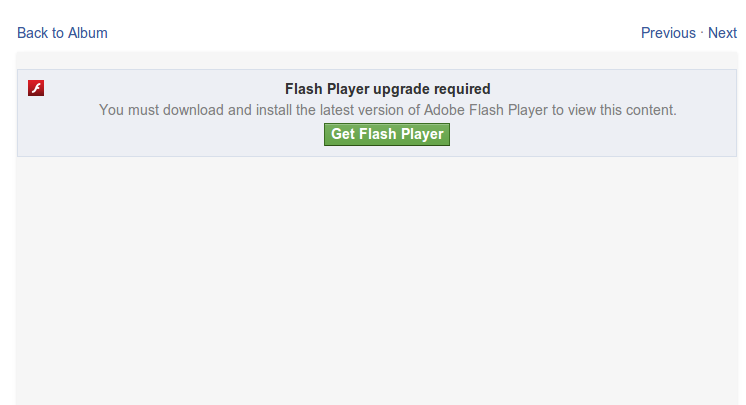
on Facebook or clicking a link. But yes, no more this screen - see
attached.

Luckily, I have Firefox as another browser I always use. However, I
really need two browsers and I'm more comfortable with Chromium than
Chrome but let's be honest here ... it seems that Chrome is working
better for some reason ...

That is all for now. Thought to provide the full picture from my side!

** Attachment added: "Screenshot from 2014-06-21 13:02:48.png"

https://bugs.launchpad.net/ubuntu/+source/chromium-browser/+bug/1325498/+attachment/4136726/+files/Screenshot%20from%202014-06-21%2013%3A02%3A48.png

--
You received this bug notification because you are a member of Desktop
Packages, which is subscribed to chromium-browser in Ubuntu.
https://bugs.launchpad.net/bugs/1325498

Title:
  A plug-in (google talk plugin) is not responding in chromium

Status in “chromium-browser” package in Ubuntu:
  Confirmed

Bug description:
  Steps to reproduce the problem:
  1. Open Chromium
  2. Visit Gmail (i am visiting already signed in so i do not enter login
information)
  3. While the page is partially loaded, after a few seconds i get a warning
that Google Talk plugin is not responding
  4. I keep getting the usuall Page unresponsive pop up unless i stop the plugin
  5. When stopping the plugin the page confirms that it has crashed

  See:
  https://code.google.com/p/chromium/issues/detail?id=379544

  ProblemType: Bug
  DistroRelease: Ubuntu 12.04
  Package: chromium-browser 34.0.1847.116-0ubuntu~1.12.04.0~pkg884
  ProcVersionSignature: Ubuntu 3.2.0-61.93-generic 3.2.55
  Uname: Linux 3.2.0-61-generic x86_64
  ApportVersion: 2.0.1-0ubuntu17.6
  Architecture: amd64
  Date: Mon Jun  2 13:01:42 2014
  Desktop-Session:
   DESKTOP_SESSION = xubuntu
   XDG_CONFIG_DIRS = /etc/xdg/xdg-xubuntu:/etc/xdg:/etc/xdg
   XDG_DATA_DIRS = /usr/share/xubuntu:/usr/local/share/:/usr/share/:/usr/share
  DetectedPlugins:

  DmesgChromium:
   [   22.469519] type=1400 audit(1401692568.108:6): apparmor="STATUS"
operation="profile_load"
name="/usr/lib/lightdm/lightdm/lightdm-guest-session-wrapper//chromium_browser"
pid=1006 comm="apparmor_parser"
   [ 1547.818184] chromium-browse[3129]: segfault at 18 ip 00007ff64683de20 sp
00007fffb5c1f790 error 4 in libc-2.15.so[7ff6467bf000+1b5000]
  Env:
   MOZ_PLUGIN_PATH = None
   LD_LIBRARY_PATH = None
  InstallationMedia: Xubuntu 12.04.3 LTS "Precise Pangolin" - Release amd64
(20130820)
  MarkForUpload: True
  ProcEnviron:
   LANGUAGE=en_US:en
   TERM=xterm
   PATH=(custom, no user)
   LANG=en_US.UTF-8
   SHELL=/bin/bash
  SourcePackage: chromium-browser
  UpgradeStatus: No upgrade log present (probably fresh install)
  chromium-default: CHROMIUM_FLAGS=""
  modified.conffile..etc.default.chromium.browser: [deleted]

To manage notifications about this bug go to:
https://bugs.launchpad.net/ubuntu/+source/chromium-browser/+bug/1325498/+subscriptions

--
Mailing list: https://launchpad.net/~desktop-packages
Post to     : [email protected]
Unsubscribe : https://launchpad.net/~desktop-packages
More help   : https://help.launchpad.net/ListHelp