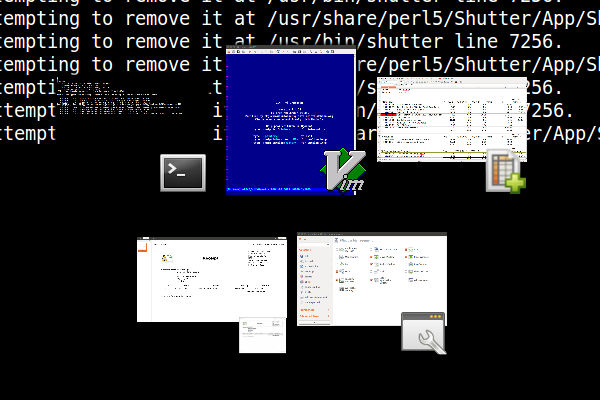
It is a bug, since in some circumstances, you cannot tell which window
is selected as the border has the same colour as the background.
Compiz's static window switcher should provide the following features:
- Optional background window (with transparency would be cool)
- Two coloured border to provide contrast.  Colours should be selectable.
Default, would be black and red according to me

In an ideal world, all of these options should be part of a theme.


** Attachment added: "Which window is selected?  You cannot tell."

https://bugs.launchpad.net/ubuntu/+source/compiz/+bug/1329811/+attachment/4289831/+files/compiz_static-window-manager_cannot-see-selected-window.png

--
You received this bug notification because you are a member of Desktop
Packages, which is subscribed to compiz in Ubuntu.
https://bugs.launchpad.net/bugs/1329811

Title:
  Static Application Switcher has no window/background / Cannot figure
  out what window is selected

Status in compiz package in Ubuntu:
  Confirmed

Bug description:

  There used to be a window containing all the application icons/mipmaps, but
on my system it's gone. It looks very odd. I will attach a screenshot of what
it looks like.


  Graphics card: Nvidia GeForce GTX 660 Ti
  Graphics driver: nvidia binary 331.38 from nvidia-331

  Compiz Version: 1:0.9.11+14.04.20140423-0ubuntu1

  Ubuntu 14.04 LTS x86_64

To manage notifications about this bug go to:
https://bugs.launchpad.net/ubuntu/+source/compiz/+bug/1329811/+subscriptions

--
Mailing list: https://launchpad.net/~desktop-packages
Post to     : [email protected]
Unsubscribe : https://launchpad.net/~desktop-packages
More help   : https://help.launchpad.net/ListHelp