Launchpad has imported 22 comments from the remote bug at
https://bugs.documentfoundation.org/show_bug.cgi?id=92218.
If you reply to an imported comment from within Launchpad, your comment
will be sent to the remote bug automatically. Read more about
Launchpad's inter-bugtracker facilities at
https://help.launchpad.net/InterBugTracking.

------------------------------------------------------------------------
On 2015-06-20T22:57:24+00:00 Yousuf 'Jay' Philips wrote:

Created attachment 116691
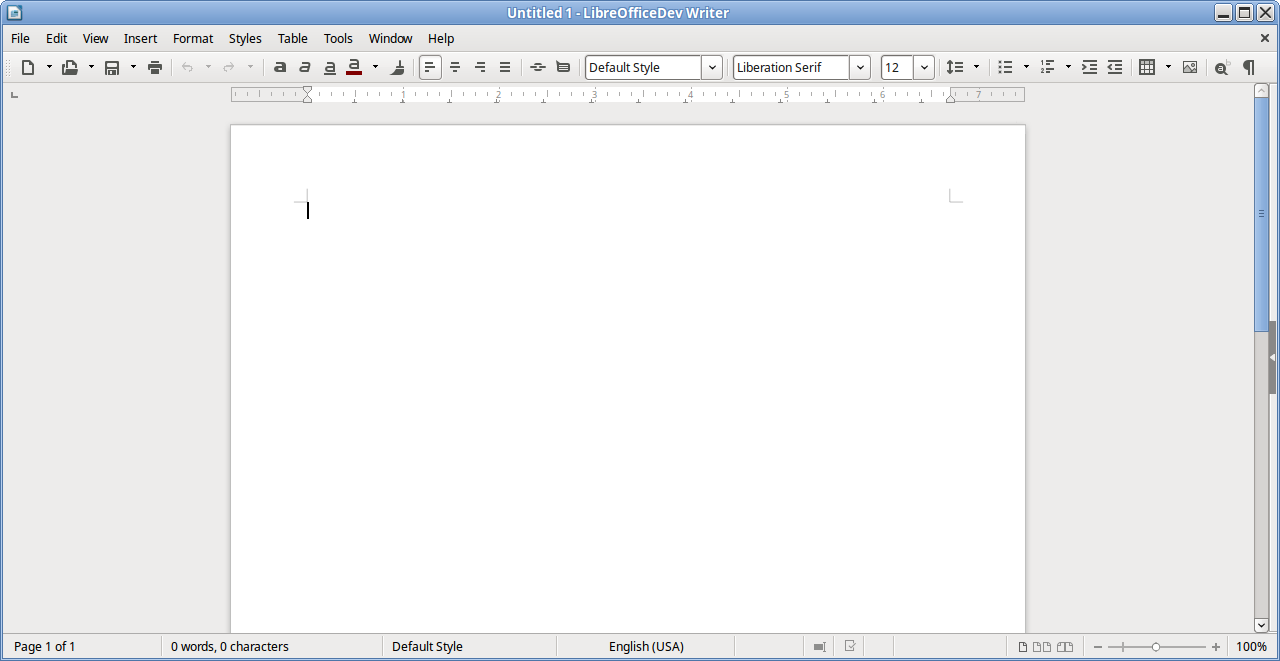
single toolbar

This was an enhancement that i had previously brought to a design
meeting in November 2014 after working on it and posting it in redmine (
https://redmine.documentfoundation.org/boards/1/topics/529 ).

The single toolbar concept can be found in apps like Google Docs and IBM
Symphony and it provides a simplified set of highly used toolbar buttons
so that the document can take up the majority of the screen and let
users focus on creating their documents.

Details of how IBM Symphony achieved this single toolbar mode can be
found in this redmine thread (
https://redmine.documentfoundation.org/boards/1/topics/163 ).

Reply at:
https://bugs.launchpad.net/ubuntu/+source/libreoffice/+bug/1573031/comments/0

------------------------------------------------------------------------
On 2015-06-24T04:50:32+00:00 Barta-c wrote:

hi Jay,
just to better understand this enhancement request...
do you propose to replace the actual multiple toolbar setup with a single
toolbar setup or do you want just to add a new toolbar with all the commands in
it (this can already be achieved manually creating a custom toolbar and hiding
all the others)

IMHO it would be great to have both things so user can decide which one
they prefer.

Reply at:
https://bugs.launchpad.net/ubuntu/+source/libreoffice/+bug/1573031/comments/1

------------------------------------------------------------------------
On 2015-06-24T16:52:34+00:00 Yousuf 'Jay' Philips wrote:

Created attachment 116810
single toolbar xml

Hey Tommy,

The current multiple toolbar setup is the default and a user would be
able to enable the single toolbar mode, if that is what they prefer.
Likely in View > Mode > Single Toolbar Mode.

The custom toolbar xml file used in the screenshot is attached for users
who want to play with it. This custom toolbar does handle a user's basic
writing needs, but it doesnt handle contextual things like when you
select an image and wanting to add a border or selecting a shape and
wanting to change its border color, though these things can be formatted
using the context menu.

So a decision has to be made to either do the single toolbar mode as a
single toolbar that doesnt change or a group of toolbars that fit on a
row that can handle context.

Reply at:
https://bugs.launchpad.net/ubuntu/+source/libreoffice/+bug/1573031/comments/2

------------------------------------------------------------------------
On 2016-03-01T19:27:58+00:00 Yousuf 'Jay' Philips wrote:

So the Writer toolbar is ready and sent as a patch:
https://gerrit.libreoffice.org/22818

So that is pending is the creation of an UNO command to do the
following.

On Click:
1) Backup to the user profile a list of the module toolbars where the Visible
property is true
2) Set all Visible=true toolbars to Visible=false
3) Enable single toolbar mode toolbar (singlemode.xml) by setting its
Visible=true
4) Backup the current user profile module 'ToolbarMode' entry in the user
profile
5) Set the user profile module 'ToolbarMode' entry to 'Single'
6) Backup the current icon theme name and size and set it to Breeze small

On Un-Click: (basically the opposite)
1) Restore the backed up user profile module 'ToolbarMode' entry
2) Clear the backed up 'ToolbarMode' entry
3) Hide single toolbar mode toolbar by setting its Visible=false
4) Restore the Visible=true to the backed up toolbars list
5) Clear the backed up toolbar list
6) Restore backed up icon theme name and size

The point of this functionality is so that when a user enables and then
disables single toolbar mode, all their previously set toolbars settings
wont be reset. The UNO command should be accessible in Writer and Calc
as Impress and Draw can easily be set to utilize a single toolbar. This
same UNO command functionality is intended for Sidebar Mode (bug 92220),
so ideally the code should be written with the intention that it can be
used reused/extended. It would be ideal if there was a single UNO
command (e.g. .uno:ToolbarMode) which could take an argument for the
toolbar mode to be done (e.g. .uno:ToolbarMode?Style:string=Single)

Reply at:
https://bugs.launchpad.net/ubuntu/+source/libreoffice/+bug/1573031/comments/3

------------------------------------------------------------------------
On 2016-03-09T07:13:46+00:00 Vasya-shipuchkin wrote:

Hi, Yousuf. this work will be continued? because, are working on
analogue ribbon https://smehrbrodt.wordpress.com/2015/11/24/improving-
the-toolbars-in-libreoffice/

Reply at:
https://bugs.launchpad.net/ubuntu/+source/libreoffice/+bug/1573031/comments/4

------------------------------------------------------------------------
On 2016-03-09T08:10:09+00:00 Yousuf 'Jay' Philips wrote:

Hi Vasya,

(In reply to vasya from comment #4)
> Hi, Yousuf. this work will be continued? because, are working on analogue
> ribbon
> https://smehrbrodt.wordpress.com/2015/11/24/improving-the-toolbars-in-
> libreoffice/

Notebookbar is another UI mode, but it wont be replacing the current
toolbars, but would be an alternative, similar to sidebar mode.

Reply at:
https://bugs.launchpad.net/ubuntu/+source/libreoffice/+bug/1573031/comments/5

------------------------------------------------------------------------
On 2016-03-09T14:28:23+00:00 kompilainenn wrote:

Yousuf,

1) May be in this mode also hide menu bar?

2) Add on Single toolbar icons "Normal view"

Reply at:
https://bugs.launchpad.net/ubuntu/+source/libreoffice/+bug/1573031/comments/6

------------------------------------------------------------------------
On 2016-03-09T15:29:38+00:00 Yousuf 'Jay' Philips wrote:

(In reply to kompilainenn from comment #6)
> 1) May be in this mode also hide menu bar?

Not a good idea as without the menu bar users wouldnt be able to access
the functions that arent available in the single toolbar.

> 2) Add on Single toolbar icons "Normal view"

As its activation would hopefully be in the menu bar as View > Mode >
Single Toolbar Mode, its deactivation would likely be in a similar
fashion.

Reply at:
https://bugs.launchpad.net/ubuntu/+source/libreoffice/+bug/1573031/comments/7

------------------------------------------------------------------------
On 2016-03-11T12:26:54+00:00 Yousuf 'Jay' Philips wrote:

Created attachment 123497
single toolbar xml for calc

For those wanting to test out what a single toolbar would be like on
Calc, here it is.

Reply at:
https://bugs.launchpad.net/ubuntu/+source/libreoffice/+bug/1573031/comments/8

------------------------------------------------------------------------
On 2016-03-22T07:18:46+00:00 Ljiljan Veselinović wrote:

*** Bug 96608 has been marked as a duplicate of this bug. ***

Reply at:
https://bugs.launchpad.net/ubuntu/+source/libreoffice/+bug/1573031/comments/9

------------------------------------------------------------------------
On 2016-03-22T07:25:39+00:00 Ljiljan Veselinović wrote:

Just additional idea. Is there any way to create drop-down list of all
other toolbars (or at least the most important one), which could be
selected and displayed over the current single-toolbar in single-toolbar
mode? Something I suggested in
https://bugs.documentfoundation.org/show_bug.cgi?id=80752 but
implementation does not need to include the "line" above single-toolbar
with toolbar names, yet simple drop-down list?

Reply at:
https://bugs.launchpad.net/ubuntu/+source/libreoffice/+bug/1573031/comments/10

------------------------------------------------------------------------
On 2016-03-27T16:17:32+00:00 Libreoffice-commits wrote:

Yousuf Philips committed a patch related to this issue.
It has been pushed to "master":

http://cgit.freedesktop.org/libreoffice/core/commit/?id=ba9783d36f4b9de07688c6883edfeecef8ccccb5

tdf#92218 Implement Writer single toolbar mode toolbar

It will be available in 5.2.0.

The patch should be included in the daily builds available at
http://dev-builds.libreoffice.org/daily/ in the next 24-48 hours. More
information about daily builds can be found at:
http://wiki.documentfoundation.org/Testing_Daily_Builds

Affected users are encouraged to test the fix and report feedback.

Reply at:
https://bugs.launchpad.net/ubuntu/+source/libreoffice/+bug/1573031/comments/11

------------------------------------------------------------------------
On 2016-03-29T15:25:28+00:00 Yousuf 'Jay' Philips wrote:

(In reply to Ljiljan from comment #10)
> Just additional idea. Is there any way to create drop-down list of all other
> toolbars (or at least the most important one), which could be selected and
> displayed over the current single-toolbar in single-toolbar mode? Something
> I suggested in https://bugs.documentfoundation.org/show_bug.cgi?id=80752 but
> implementation does not need to include the "line" above single-toolbar with
> toolbar names, yet simple drop-down list?

That is likely something that can be achieved with the notebookbar, so
i'd suggest passing your idea onto kendy or samuel along with some
mockups of how it would function.

Reply at:
https://bugs.launchpad.net/ubuntu/+source/libreoffice/+bug/1573031/comments/12

------------------------------------------------------------------------
On 2016-03-29T16:35:58+00:00 Yousuf 'Jay' Philips wrote:

As the suggested functionality in comment 3 is likely to be left for
implementation with the notebookbar, the single toolbar mode UNO command
should be a toggle/checkbox command that when toggled on enables (i.e.
Visible=true)

View > Toolbars > Standard (Single Mode)

and disables (i.e. Visible=false)

View > Toolbars > Standard
View > Toolbars > Formatting
View > Toolbars > Image
View > Toolbars > Drawing Object Properties
View > Toolbars > Frame (Writer)
View > Toolbars > Table (Writer)
View > Toolbars > Bullets and Numbering (Writer)
View > Toolbars > Text Object (Writer)
View > Toolbars > Text Formatting (Calc)

When the single toolbar mode UNO command is toggle off, it does the
reverse.

Reply at:
https://bugs.launchpad.net/ubuntu/+source/libreoffice/+bug/1573031/comments/13

------------------------------------------------------------------------
On 2016-04-18T07:38:58+00:00 kompilainenn wrote:

Yousuf, single toolbar in Writer does not fit in 1280 pixel width. It's
default resolution of my monitor 19" (1280х1024)

Reply at:
https://bugs.launchpad.net/ubuntu/+source/libreoffice/+bug/1573031/comments/14

------------------------------------------------------------------------
On 2016-04-18T20:20:25+00:00 Yousuf 'Jay' Philips wrote:

(In reply to kompilainenn from comment #14)
> Yousuf, single toolbar in Writer does not fit in 1280 pixel width. It's
> default resolution of my monitor 19" (1280х1024)

Kompilainenn, it fits if you use small icons, which is how it is
intended to fit for users by default, while users with larger screens
can use large icons if they choose.

https://wiki.documentfoundation.org/images/9/99/Single_Toolbar_Mode.png

Reply at:
https://bugs.launchpad.net/ubuntu/+source/libreoffice/+bug/1573031/comments/15

------------------------------------------------------------------------
On 2016-04-18T20:52:01+00:00 kompilainenn wrote:

(In reply to Yousuf (Jay) Philips from comment #15)
> (In reply to kompilainenn from comment #14)
> > Yousuf, single toolbar in Writer does not fit in 1280 pixel width. It's
> > default resolution of my monitor 19" (1280х1024)
>
> Kompilainenn, it fits if you use small icons, which is how it is intended to
> fit for users by default, while users with larger screens can use large
> icons if they choose.
>
> https://wiki.documentfoundation.org/images/9/99/Single_Toolbar_Mode.png

by default, Windows build uses large icons on Toolbars.
Maybe envisage verification before activation Single Toolbar? Or show
notification to the user..."Your monitor have aspect ratio 5:4. Use mode Single
Toolbar with small icons or not use it's!"?

Reply at:
https://bugs.launchpad.net/ubuntu/+source/libreoffice/+bug/1573031/comments/16

------------------------------------------------------------------------
On 2016-04-18T21:38:16+00:00 Vstuart-foote wrote:

(In reply to Yousuf (Jay) Philips from comment #15)
> (In reply to kompilainenn from comment #14)
> > Yousuf, single toolbar in Writer does not fit in 1280 pixel width. It's
> > default resolution of my monitor 19" (1280х1024)
>
> Kompilainenn, it fits if you use small icons, which is how it is intended to
> fit for users by default, while users with larger screens can use large
> icons if they choose.
>
> https://wiki.documentfoundation.org/images/9/99/Single_Toolbar_Mode.png

The Standard (Single Mode) toolbar already has the double >> showing a
drop menu of the remaining hidden widget buttons. So use on screens
narrower than 1280px or when sized narrow the buttons are available.

But can an action of the toggle into the Standard (Single Mode) include
adjustment of the Icon size to small? We set Icon Size to Auto by
default, can we make use of that?

Reply at:
https://bugs.launchpad.net/ubuntu/+source/libreoffice/+bug/1573031/comments/17

------------------------------------------------------------------------
On 2016-04-19T15:56:00+00:00 Yousuf 'Jay' Philips wrote:

(In reply to V Stuart Foote from comment #17)
> But can an action of the toggle into the Standard (Single Mode) include
> adjustment of the Icon size to small? We set Icon Size to Auto by default,
> can we make use of that?

Hopefully when a dev looks into creating the uno command mentioned in
comment 13, the code can check for the screen resolution and set the
icons to small if appropriate.

Reply at:
https://bugs.launchpad.net/ubuntu/+source/libreoffice/+bug/1573031/comments/18

------------------------------------------------------------------------
On 2016-04-20T07:06:37+00:00 Ljiljan Veselinović wrote:

Regarding default items in toolbar. I don't think that "New" and "Open"
should be there. It is not something you use often. You open the
document or create a new one and you are working on that document. So
most of the time, these two items are useless. On the other hand,
clicking on the "File" -> "New" or "Open" does not involve two many
steps.

The missing icon is PDF (dialog with "where to export" appears after
clicking, which is different than File -> Export to PDF). That is
something LibreOffice user have to use very often when sending files to
others since ODT is not standard everywhere yet and it allows us to send
document as designed in LibreOffice.

My recommendation is to rearrange font text items as well: Style, Font,
Size, Bold/ Italic/ underline and then Alignment. This was standard
order in LibreOffice so far as well as in other programs.

And about this discussion of large vs. small icon size. Large icons
provide better visual appearance so I think it should be default size
regardless of monitor size/ resolution. The other argument that goes for
large icon size is easier clicking. When icons are small, user have to
be very precise in order to select the icon. "16px" is two times smaller
place than "32px" which means that you have to be very patient with the
mouse.

Reply at:
https://bugs.launchpad.net/ubuntu/+source/libreoffice/+bug/1573031/comments/19

------------------------------------------------------------------------
On 2016-04-21T21:10:45+00:00 Vstuart-foote wrote:

*** Bug 99435 has been marked as a duplicate of this bug. ***

Reply at:
https://bugs.launchpad.net/ubuntu/+source/libreoffice/+bug/1573031/comments/35

------------------------------------------------------------------------
On 2016-04-22T16:00:07+00:00 Alberto Salvia Novella wrote:

As I mention in
(https://bugs.documentfoundation.org/show_bug.cgi?id=99435), one big
drawback of the current tool bars is simply that there are just too many
unused buttons used.

Please read that bug for further information.

Reply at:
https://bugs.launchpad.net/ubuntu/+source/libreoffice/+bug/1573031/comments/36


** Changed in: df-libreoffice
       Status: Unknown => Confirmed

** Changed in: df-libreoffice
   Importance: Unknown => Wishlist

** Bug watch added: Document Foundation Bugzilla #80752
   https://bugs.documentfoundation.org/show_bug.cgi?id=80752

--
You received this bug notification because you are a member of Desktop
Packages, which is subscribed to libreoffice in Ubuntu.
https://bugs.launchpad.net/bugs/1573031

Title:
  Most tool bar buttons are useless

Status in LibreOffice:
  Confirmed
Status in libreoffice package in Ubuntu:
  Triaged

Bug description:
  Most tool bar buttons are never or rarely used.

  Only frequently used buttons shall be shown by default. And only when
  it is not more intuitive than the right click menu, like when copying
  and pasting or per object action.

  The status bar can also be hidden in some of these applications, the
  same as the sidebar contracted by default.

  Here are some suggested defaults:
  https://launchpadlibrarian.net/254847787/Writer.png
  https://launchpadlibrarian.net/254849290/Impress.png
  https://launchpadlibrarian.net/254846207/Calc.png
  https://launchpadlibrarian.net/254849096/Math.png

  Good interface design shows what is currently in use in that very
  moment, or used constantly. And gets rid of everything else.

  ProblemType: Bug
  DistroRelease: Ubuntu 15.10
  Package: libreoffice (not installed)
  ProcVersionSignature: Ubuntu 4.2.0-35.40-generic 4.2.8-ckt5
  Uname: Linux 4.2.0-35-generic x86_64
  ApportVersion: 2.19.1-0ubuntu5
  Architecture: amd64
  CurrentDesktop: Unity
  Date: Thu Apr 21 15:05:57 2016
  InstallationDate: Installed on 2015-11-14 (159 days ago)
  InstallationMedia: Ubuntu 15.10 "Wily Werewolf" - Release amd64 (20151021)
  SourcePackage: libreoffice
  UpgradeStatus: No upgrade log present (probably fresh install)

To manage notifications about this bug go to:
https://bugs.launchpad.net/df-libreoffice/+bug/1573031/+subscriptions

--
Mailing list: https://launchpad.net/~desktop-packages
Post to     : [email protected]
Unsubscribe : https://launchpad.net/~desktop-packages
More help   : https://help.launchpad.net/ListHelp