Public bug reported:

Braswell + UBUNTU 15.10
when LVDS is enable in Bios,, a Device called "eDP1" appears connected
and this is the internal LVDS device with the right settings for the
1366x768 display that was set in the Bios and a "DP2" device is
connected also (this is the SVGA Monitor and shows all modes supported
by the SVGA monitor that I have plugged in the VGA port as well its EDID
information. All others devices (DP1, HDMI1, HDMI2 have their status as
"disconnected".See below this information that is in the
"xrandr_q_verbose_LVDS_Enable.txt file


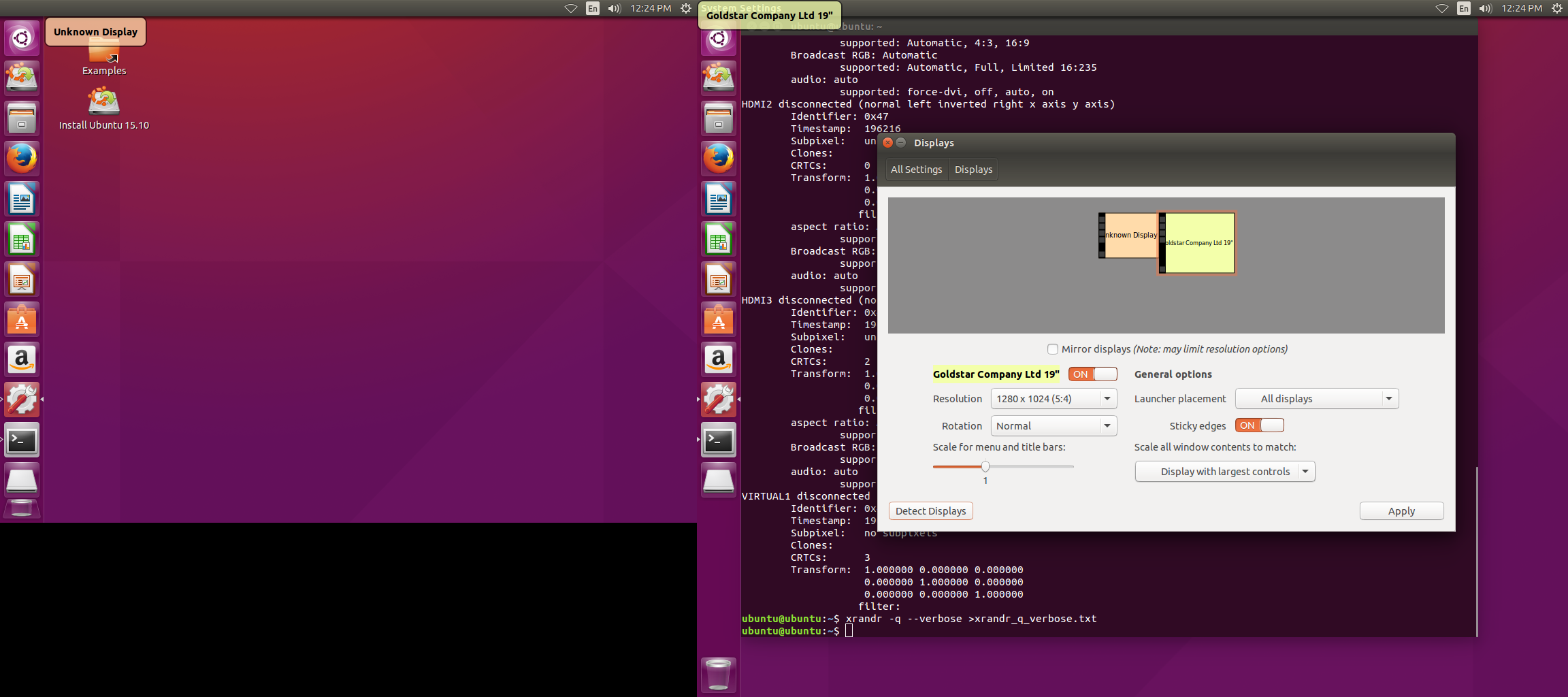
When the LVDS is disable in Bios, I didn't see the eDP1 device, but the device
"DP2" that was the VGA monitor when the LVDS was enable in BIOS, now appears as
"DP3" and the "DP2" device appears as connected (this is the device that
appears in the graphical monitor settings (1024x768 with no EDID information.
All other devices appear as disconnected (DP1, HDMI1, HDMI2 and another HDMI3
that was not in the system when LVDS was enable in Bios).
.See below this information that is in the "xrandr_q_verbose_LVDS_Disable.txt
file

** Affects: gnome-desktop3 (Ubuntu)
     Importance: Undecided
         Status: New

** Attachment added: "Screen_Capture_Disable.png"

https://bugs.launchpad.net/bugs/1578038/+attachment/4654974/+files/Screen_Capture_Disable.png

--
You received this bug notification because you are a member of Desktop
Packages, which is subscribed to gnome-desktop3 in Ubuntu.
https://bugs.launchpad.net/bugs/1578038

Title:
  ubuntu still can detect an unkown display(LVDS) after BIOS disable
  LVDS

Status in gnome-desktop3 package in Ubuntu:
  New

Bug description:
  Braswell + UBUNTU 15.10

  when LVDS is enable in Bios,, a Device called "eDP1" appears connected
  and this is the internal LVDS device with the right settings for the
  1366x768 display that was set in the Bios and a "DP2" device is
  connected also (this is the SVGA Monitor and shows all modes supported
  by the SVGA monitor that I have plugged in the VGA port as well its
  EDID information. All others devices (DP1, HDMI1, HDMI2 have their
  status as "disconnected".See below this information that is in the
  "xrandr_q_verbose_LVDS_Enable.txt file


  When the LVDS is disable in Bios, I didn't see the eDP1 device, but the
device "DP2" that was the VGA monitor when the LVDS was enable in BIOS, now
appears as "DP3" and the "DP2" device appears as connected (this is the device
that appears in the graphical monitor settings (1024x768 with no EDID
information. All other devices appear as disconnected (DP1, HDMI1, HDMI2 and
another HDMI3 that was not in the system when LVDS was enable in Bios).
  .See below this information that is in the "xrandr_q_verbose_LVDS_Disable.txt
file

To manage notifications about this bug go to:
https://bugs.launchpad.net/ubuntu/+source/gnome-desktop3/+bug/1578038/+subscriptions

--
Mailing list: https://launchpad.net/~desktop-packages
Post to     : [email protected]
Unsubscribe : https://launchpad.net/~desktop-packages
More help   : https://help.launchpad.net/ListHelp