I am still having this issue.  Just built two machines with a fresh
Ubuntu install for dual-booting with windows.  After an upgrade I
attempted to install both Chrome and Brackets.  The software manager
rarely appears to prompt for system password when attempting to install
3rd party packages, it just sits not doing much.
On occasion after reboot I am able to install a single 3rd party
package, which I get prompted for a password for, but most of the time I
receive no prompt and the package install hangs.

As OP notes, there is a shift in formating on the page when clicking
'install' for the first time.  On occasion I am then greeted with a
password input pop-up (although this has only occured with a Chrome
install, and even then only after multiple reboots, I have been unable
to install other 3rd party apps.)

Clicking on 'install' for a second time places a 'Waiting to install'
icon in the sidebar, right clicking on this icon give an empty menu, a
seperator, and then a 'Lock to launcher' menu item that does not appear
to do anything when clicked.

--
You received this bug notification because you are a member of Desktop
Packages, which is subscribed to gnome-software in Ubuntu.
https://bugs.launchpad.net/bugs/1573408

Title:
  GNOME Software does not install third-party .deb packages

Status in GNOME Software:
  Fix Released
Status in gnome-software package in Ubuntu:
  Fix Released
Status in gnome-software source package in Xenial:
  Fix Released

Bug description:
  Impact
  installing local debs from nautilus doesn't work

  Test case
  download a deb and double click on it nautilus

  Regression potential
  the changes are restoring a feature that was working, should regression other
parts of the code

  -----------------

  Unlike previous versions of Ubuntu Unity, I'm unable to install the
google-talk-plugin in Ubuntu 16.04, where it (the deb) can be downloaded here:
  https://www.google.com/tools/dlpage/hangoutplugin

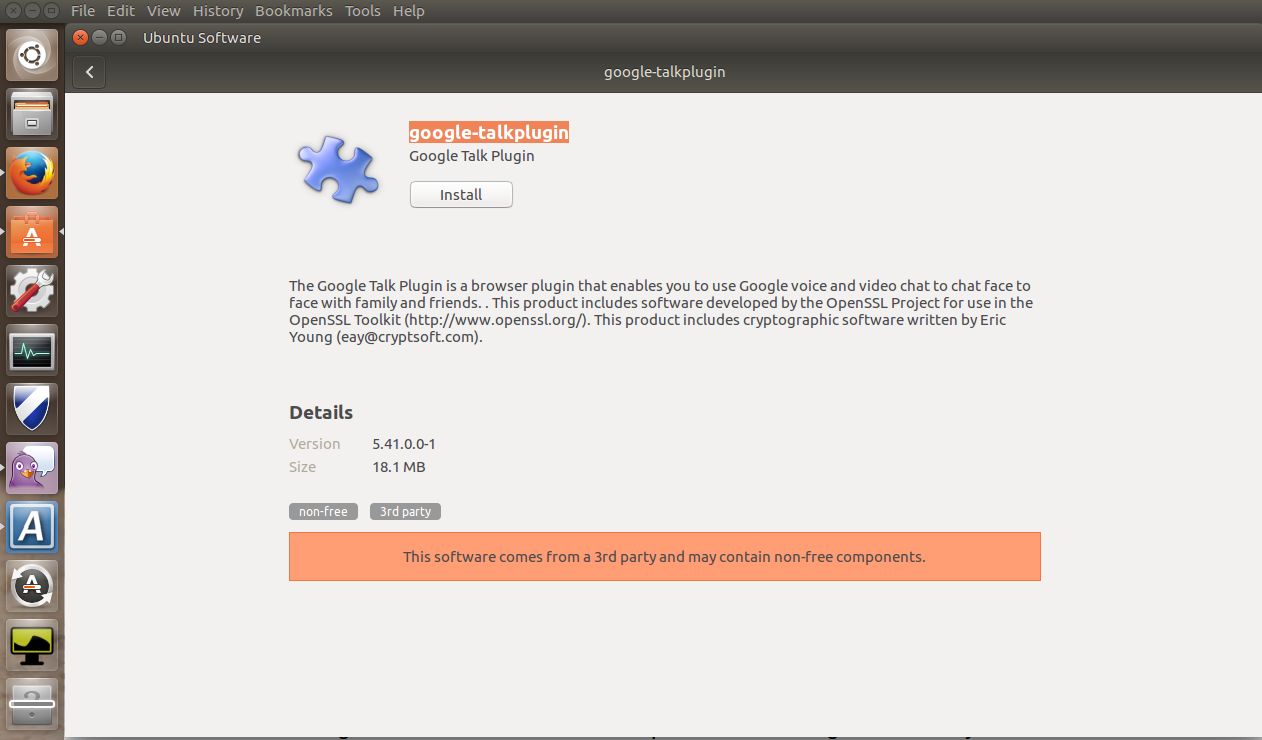
  After downloading, I open the deb file from Firefox and it launches
  the gnome-software package (used in Unity now).

  The first time I click the install button in gnome-software, I notice
  a strange repositioning of the layout, but nothing else happens.

  Clicking the install button a second time puts a
question-mark-progress-launcher onto the launcher (task) bar, but it never
progresses:
  http://neartalk.com/ss/2016-04-22_001_1262x740.png

  So far, no one has offered a workaround:

http://askubuntu.com/questions/760305/how-to-install-google-hangouts-plugin-in-ubuntu-16-04

  ProblemType: Bug
  DistroRelease: Ubuntu 16.04
  Package: gnome-software 3.20.1+git20160420.1.ca63436.ubuntu-xenial-0ubuntu2
  ProcVersionSignature: Ubuntu 4.4.0-21.37-generic 4.4.6
  Uname: Linux 4.4.0-21-generic x86_64
  ApportVersion: 2.20.1-0ubuntu2
  Architecture: amd64
  CurrentDesktop: Unity
  Date: Fri Apr 22 01:02:45 2016
  InstallationDate: Installed on 2016-04-22 (0 days ago)
  InstallationMedia: Ubuntu 16.04 LTS "Xenial Xerus" - Release amd64
(20160420.1)
  SourcePackage: gnome-software
  UpgradeStatus: No upgrade log present (probably fresh install)

To manage notifications about this bug go to:
https://bugs.launchpad.net/gnome-software/+bug/1573408/+subscriptions

--
Mailing list: https://launchpad.net/~desktop-packages
Post to     : [email protected]
Unsubscribe : https://launchpad.net/~desktop-packages
More help   : https://help.launchpad.net/ListHelp