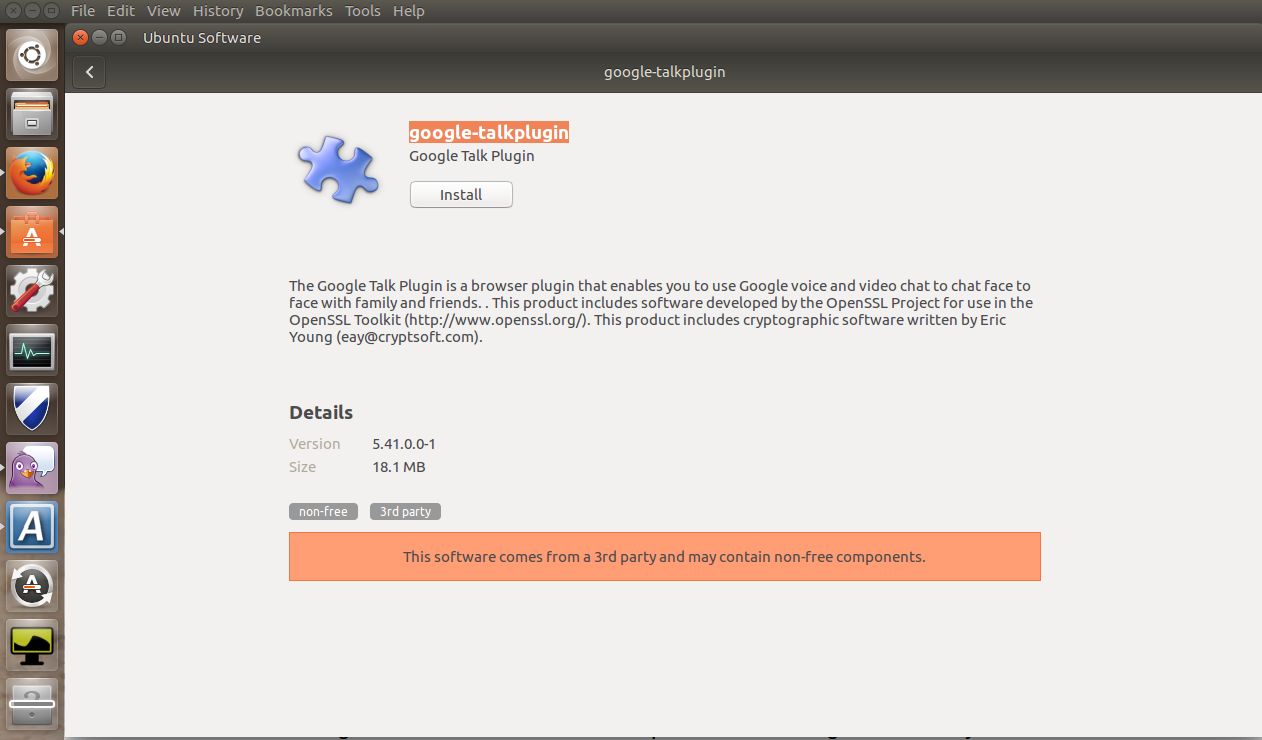
Hi all

See my outputs:
alex@alex-Latitude-7480:~$ apt-cache policy gnome-software
gnome-software:
  Installed: 3.20.5-0ubuntu0.16.04.5
  Candidate: 3.20.5-0ubuntu0.16.04.5
  Version table:
 *** 3.20.5-0ubuntu0.16.04.5 500
        500 http://se.archive.ubuntu.com/ubuntu xenial-updates/main amd64
Packages
        100 /var/lib/dpkg/status
     3.20.1+git20160420.1.ca63436.ubuntu-xenial-0ubuntu2 500
        500 http://se.archive.ubuntu.com/ubuntu xenial/main amd64 Packages
alex@alex-Latitude-7480:~$ sudo su
[sudo] password for alex:
root@alex-Latitude-7480:/home/alex# cat /etc/issue
Ubuntu 16.04.3 LTS \n \l
root@alex-Latitude-7480:/home/alex# apt update
Ign:1 http://dl.google.com/linux/chrome/deb stable InRelease
Hit:2 http://se.archive.ubuntu.com/ubuntu xenial InRelease


Hit:3 http://dl.google.com/linux/chrome/deb stable Release


Hit:4 http://se.archive.ubuntu.com/ubuntu xenial-updates InRelease


Hit:5 http://se.archive.ubuntu.com/ubuntu xenial-backports InRelease


Hit:6 http://archive.canonical.com/ubuntu xenial InRelease


Hit:7 http://linux-packages.resilio.com/resilio-sync/deb resilio-sync InRelease

Hit:8 http://ppa.launchpad.net/jtaylor/keepass/ubuntu xenial InRelease

Hit:9 https://repo.skype.com/deb stable InRelease

Hit:10 http://ppa.launchpad.net/remmina-ppa-team/remmina-next/ubuntu xenial
InRelease
Hit:11 http://ppa.launchpad.net/webupd8team/atom/ubuntu xenial InRelease
Hit:13 http://security.ubuntu.com/ubuntu xenial-security InRelease
Hit:14 https://dl.ring.cx/ring-nightly/ubuntu_16.04 ring InRelease
Hit:15 https://packagecloud.io/slacktechnologies/slack/debian jessie InRelease
Reading package lists... Done
Building dependency tree
Reading state information... Done
All packages are up to date.
root@alex-Latitude-7480:/home/alex# apt dist-upgrade
Reading package lists... Done
Building dependency tree
Reading state information... Done
Calculating upgrade... Done
0 upgraded, 0 newly installed, 0 to remove and 0 not upgraded.

--
You received this bug notification because you are a member of Desktop
Packages, which is subscribed to gnome-software in Ubuntu.
https://bugs.launchpad.net/bugs/1573408

Title:
  GNOME Software does not install third-party .deb packages

Status in GNOME Software:
  Fix Released
Status in gnome-software package in Ubuntu:
  Fix Released
Status in gnome-software source package in Xenial:
  Fix Released

Bug description:
  Impact
  installing local debs from nautilus doesn't work

  Test case
  download a deb and double click on it nautilus

  Regression potential
  the changes are restoring a feature that was working, should regression other
parts of the code

  -----------------

  Unlike previous versions of Ubuntu Unity, I'm unable to install the
google-talk-plugin in Ubuntu 16.04, where it (the deb) can be downloaded here:
  https://www.google.com/tools/dlpage/hangoutplugin

  After downloading, I open the deb file from Firefox and it launches
  the gnome-software package (used in Unity now).

  The first time I click the install button in gnome-software, I notice
  a strange repositioning of the layout, but nothing else happens.

  Clicking the install button a second time puts a
question-mark-progress-launcher onto the launcher (task) bar, but it never
progresses:
  http://neartalk.com/ss/2016-04-22_001_1262x740.png

  So far, no one has offered a workaround:

http://askubuntu.com/questions/760305/how-to-install-google-hangouts-plugin-in-ubuntu-16-04

  ProblemType: Bug
  DistroRelease: Ubuntu 16.04
  Package: gnome-software 3.20.1+git20160420.1.ca63436.ubuntu-xenial-0ubuntu2
  ProcVersionSignature: Ubuntu 4.4.0-21.37-generic 4.4.6
  Uname: Linux 4.4.0-21-generic x86_64
  ApportVersion: 2.20.1-0ubuntu2
  Architecture: amd64
  CurrentDesktop: Unity
  Date: Fri Apr 22 01:02:45 2016
  InstallationDate: Installed on 2016-04-22 (0 days ago)
  InstallationMedia: Ubuntu 16.04 LTS "Xenial Xerus" - Release amd64
(20160420.1)
  SourcePackage: gnome-software
  UpgradeStatus: No upgrade log present (probably fresh install)

To manage notifications about this bug go to:
https://bugs.launchpad.net/gnome-software/+bug/1573408/+subscriptions

--
Mailing list: https://launchpad.net/~desktop-packages
Post to     : [email protected]
Unsubscribe : https://launchpad.net/~desktop-packages
More help   : https://help.launchpad.net/ListHelp