Public bug reported:

Steps to reproduce:
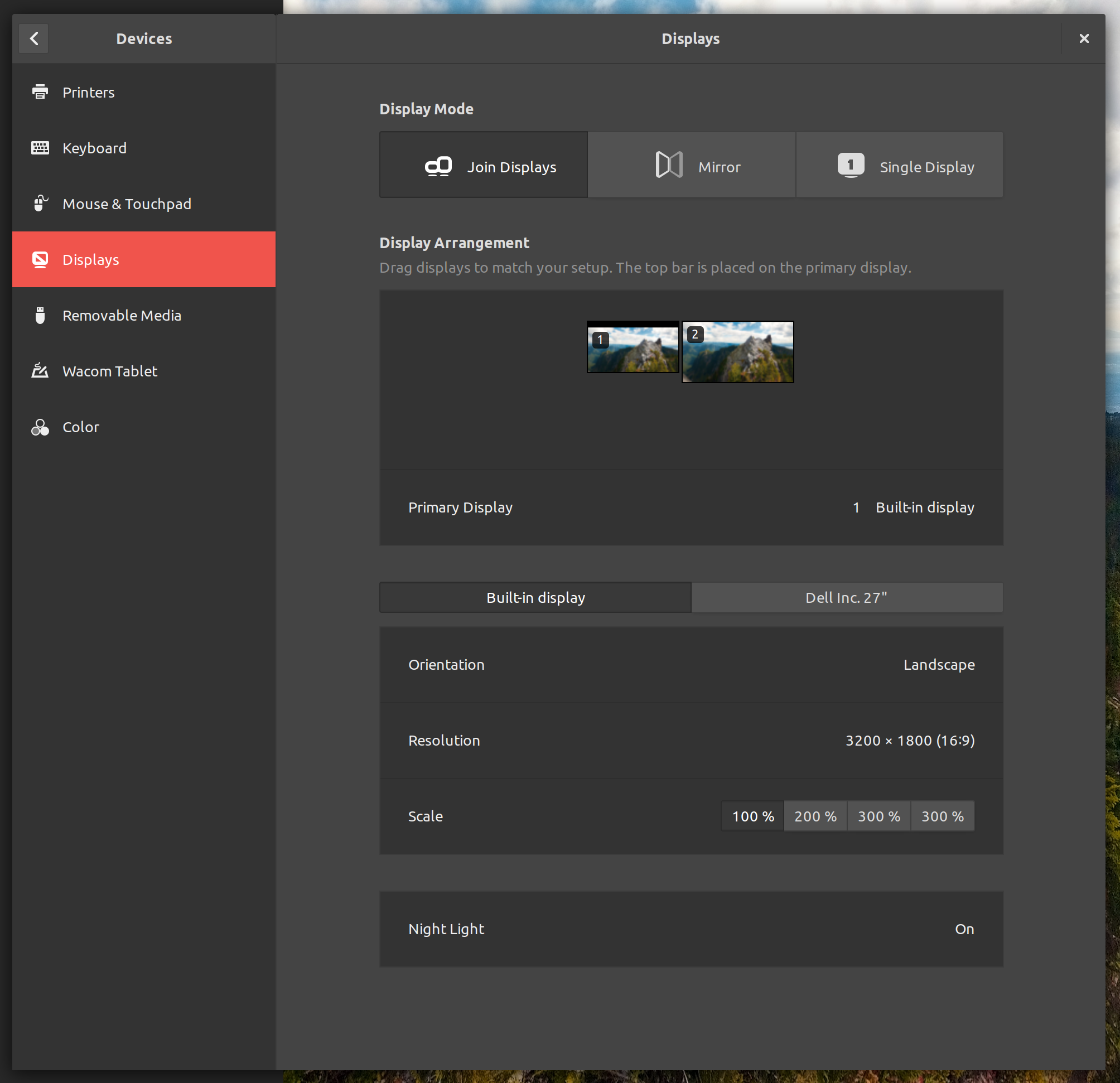
  1. Click [1] -> [2] -> Devices -> Displays -> Scale: 100 %.

Expected behavior:

  An "Apply" button appears.

Actual behavior:

  No "Apply" button appears. This behavior prevents me from changing
display settings.


[1]: the nameless menu in the top right corner of the screen labeled by five
images depicting a network, the Bluetooth logo, a speaker, a battery, and
downward pointing triangle
[2]: the nameless button labeled by an image of a socket screwdriver and wrench

ProblemType: Bug
DistroRelease: Ubuntu 17.10
Package: gnome-control-center 1:3.26.2-0ubuntu0.2
ProcVersionSignature: Ubuntu 4.13.0-31.34-generic 4.13.13
Uname: Linux 4.13.0-31-generic x86_64
ApportVersion: 2.20.7-0ubuntu3.7
Architecture: amd64
CurrentDesktop: ubuntu:GNOME
Date: Thu Jan 25 09:04:39 2018
ExecutablePath: /usr/bin/gnome-control-center
InstallationDate: Installed on 2016-09-15 (497 days ago)
InstallationMedia: Ubuntu 16.04.1 LTS "Xenial Xerus" - Release amd64 (20160719)
ProcEnviron:
 XDG_RUNTIME_DIR=<set>
 SHELL=/usr/bin/zsh
 PATH=(custom, user)
 LANG=en_US.UTF-8
SourcePackage: gnome-control-center
UpgradeStatus: Upgraded to artful on 2018-01-21 (4 days ago)

** Affects: gnome-control-center (Ubuntu)
     Importance: Undecided
         Status: New


** Tags: amd64 apport-bug artful

** Attachment added: "Screenshot from 2018-01-25 09-23-47.png"

https://bugs.launchpad.net/bugs/1745440/+attachment/5043051/+files/Screenshot%20from%202018-01-25%2009-23-47.png

--
You received this bug notification because you are a member of Desktop
Packages, which is subscribed to gnome-control-center in Ubuntu.
https://bugs.launchpad.net/bugs/1745440

Title:
  "Apply" button is missing from Displays

Status in gnome-control-center package in Ubuntu:
  New

Bug description:
  Steps to reproduce:

    1. Click [1] -> [2] -> Devices -> Displays -> Scale: 100 %.

  Expected behavior:

    An "Apply" button appears.

  Actual behavior:

    No "Apply" button appears. This behavior prevents me from changing
  display settings.


  [1]: the nameless menu in the top right corner of the screen labeled by five
images depicting a network, the Bluetooth logo, a speaker, a battery, and
downward pointing triangle
  [2]: the nameless button labeled by an image of a socket screwdriver and
wrench

  ProblemType: Bug
  DistroRelease: Ubuntu 17.10
  Package: gnome-control-center 1:3.26.2-0ubuntu0.2
  ProcVersionSignature: Ubuntu 4.13.0-31.34-generic 4.13.13
  Uname: Linux 4.13.0-31-generic x86_64
  ApportVersion: 2.20.7-0ubuntu3.7
  Architecture: amd64
  CurrentDesktop: ubuntu:GNOME
  Date: Thu Jan 25 09:04:39 2018
  ExecutablePath: /usr/bin/gnome-control-center
  InstallationDate: Installed on 2016-09-15 (497 days ago)
  InstallationMedia: Ubuntu 16.04.1 LTS "Xenial Xerus" - Release amd64
(20160719)
  ProcEnviron:
   XDG_RUNTIME_DIR=<set>
   SHELL=/usr/bin/zsh
   PATH=(custom, user)
   LANG=en_US.UTF-8
  SourcePackage: gnome-control-center
  UpgradeStatus: Upgraded to artful on 2018-01-21 (4 days ago)

To manage notifications about this bug go to:
https://bugs.launchpad.net/ubuntu/+source/gnome-control-center/+bug/1745440/+subscriptions

--
Mailing list: https://launchpad.net/~desktop-packages
Post to     : [email protected]
Unsubscribe : https://launchpad.net/~desktop-packages
More help   : https://help.launchpad.net/ListHelp