Public bug reported:

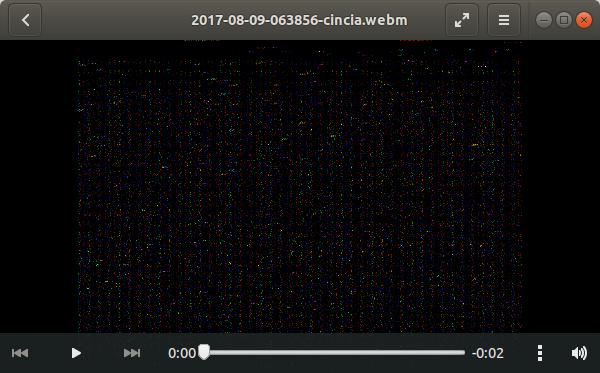
Try play a video in Ubuntu 18.04 x11, i see a black screen with sparks. Same
video is played correctly in wayland session.
corrado@corrado-p9-bb-1221:~$ inxi -SCGx
System:    Host: corrado-p9-bb-1221 Kernel: 4.15.0-9-generic x86_64
           bits: 64 gcc: 7.3.0
           Desktop: Gnome 3.26.2 (Gtk 3.22.26-2ubuntu1)
           Distro: Ubuntu Bionic Beaver (development branch)
CPU:       Dual core Intel Core i3-7100 (-MT-MCP-)
           arch: Skylake rev.9 cache: 3072 KB
           flags: (lm nx sse sse2 sse3 sse4_1 sse4_2 ssse3 vmx) bmips: 15648
           clock speeds: max: 3900 MHz 1: 800 MHz 2: 800 MHz 3: 804 MHz
           4: 811 MHz
Graphics:  Card: Intel HD Graphics 630 bus-ID: 00:02.0
           Display Server: x11 (X.Org 1.19.6 ) driver: i915
           Resolution: [email protected]
           OpenGL: renderer: Mesa DRI Intel HD Graphics 630 (Kaby Lake GT2)
           version: 4.5 Mesa 17.3.3 Direct Render: Yes
corrado@corrado-p9-bb-1221:~$ apt policy totem
totem:
  Installed: 3.26.0-0ubuntu3
  Candidate: 3.26.0-0ubuntu3
  Version table:
 *** 3.26.0-0ubuntu3 500
        500 http://archive.ubuntu.com/ubuntu bionic/main amd64 Packages
        100 /var/lib/dpkg/status
corrado@corrado-p9-bb-1221:~$
ProblemType: Bug
DistroRelease: Ubuntu 18.04
Package: libgstreamer1.0-0 1.12.4-1
ProcVersionSignature: Ubuntu 4.15.0-9.10-generic 4.15.2
Uname: Linux 4.15.0-9-generic x86_64
ApportVersion: 2.20.8-0ubuntu10
Architecture: amd64
CurrentDesktop: ubuntu:GNOME
Date: Wed Feb 14 15:58:07 2018
InstallationDate: Installed on 2017-12-23 (53 days ago)
InstallationMedia: Ubuntu 18.04 LTS "Bionic Beaver" - Alpha amd64 (20171221)
SourcePackage: gstreamer1.0
UpgradeStatus: No upgrade log present (probably fresh install)
XorgLog: Error: [Errno 2] No such file or directory: '/var/log/Xorg.0.log'

** Affects: gstreamer1.0 (Ubuntu)
     Importance: Undecided
         Status: New


** Tags: bionic totem x11

** Attachment added: "Screenshot from 2018-02-14 15-54-29.png"

https://bugs.launchpad.net/bugs/1749480/+attachment/5055178/+files/Screenshot%20from%202018-02-14%2015-54-29.png

--
You received this bug notification because you are a member of Desktop
Packages, which is subscribed to gstreamer1.0 in Ubuntu.
https://bugs.launchpad.net/bugs/1749480

Title:
  Totem black screen with Sparks

Status in gstreamer1.0 package in Ubuntu:
  New

Bug description:
  Try play a video in Ubuntu 18.04 x11, i see a black screen with sparks. Same
video is played correctly in wayland session.
  corrado@corrado-p9-bb-1221:~$ inxi -SCGx
  System:    Host: corrado-p9-bb-1221 Kernel: 4.15.0-9-generic x86_64
             bits: 64 gcc: 7.3.0
             Desktop: Gnome 3.26.2 (Gtk 3.22.26-2ubuntu1)
             Distro: Ubuntu Bionic Beaver (development branch)
  CPU:       Dual core Intel Core i3-7100 (-MT-MCP-)
             arch: Skylake rev.9 cache: 3072 KB
             flags: (lm nx sse sse2 sse3 sse4_1 sse4_2 ssse3 vmx) bmips: 15648
             clock speeds: max: 3900 MHz 1: 800 MHz 2: 800 MHz 3: 804 MHz
             4: 811 MHz
  Graphics:  Card: Intel HD Graphics 630 bus-ID: 00:02.0
             Display Server: x11 (X.Org 1.19.6 ) driver: i915
             Resolution: [email protected]
             OpenGL: renderer: Mesa DRI Intel HD Graphics 630 (Kaby Lake GT2)
             version: 4.5 Mesa 17.3.3 Direct Render: Yes
  corrado@corrado-p9-bb-1221:~$ apt policy totem
  totem:
    Installed: 3.26.0-0ubuntu3
    Candidate: 3.26.0-0ubuntu3
    Version table:
   *** 3.26.0-0ubuntu3 500
          500 http://archive.ubuntu.com/ubuntu bionic/main amd64 Packages
          100 /var/lib/dpkg/status
  corrado@corrado-p9-bb-1221:~$

  ProblemType: Bug
  DistroRelease: Ubuntu 18.04
  Package: libgstreamer1.0-0 1.12.4-1
  ProcVersionSignature: Ubuntu 4.15.0-9.10-generic 4.15.2
  Uname: Linux 4.15.0-9-generic x86_64
  ApportVersion: 2.20.8-0ubuntu10
  Architecture: amd64
  CurrentDesktop: ubuntu:GNOME
  Date: Wed Feb 14 15:58:07 2018
  InstallationDate: Installed on 2017-12-23 (53 days ago)
  InstallationMedia: Ubuntu 18.04 LTS "Bionic Beaver" - Alpha amd64 (20171221)
  SourcePackage: gstreamer1.0
  UpgradeStatus: No upgrade log present (probably fresh install)
  XorgLog: Error: [Errno 2] No such file or directory: '/var/log/Xorg.0.log'

To manage notifications about this bug go to:
https://bugs.launchpad.net/ubuntu/+source/gstreamer1.0/+bug/1749480/+subscriptions

--
Mailing list: https://launchpad.net/~desktop-packages
Post to     : [email protected]
Unsubscribe : https://launchpad.net/~desktop-packages
More help   : https://help.launchpad.net/ListHelp