Christopher Barrington-Leigh, thank you for taking the time to report
this bug and helping to make Ubuntu better. The issue you are reporting
is an upstream one and it would be nice if somebody having it could send
the bug to the developers of the software by following the instructions
at http://wiki.documentfoundation.org/BugReport . If you have done so,
please tell us the number of the upstream bug (or the link), so we can
add a bugwatch that will inform us about its status. Thanks in advance.
** Description changed:

- Hello. Do Microsoft import failures count as bugs?
+ 1)  lsb_release -rd
+ Description:  Ubuntu 11.10
+ Release:      11.10

- Here is a not-recent .doc file which has a table that goes more than one
- page. As shown in the graphic, LibreOffice does not allow me to see the
- second half or so of the table!  It should be that I can scroll down
- further to see the rest of it, or even that it is split between two
- pages.
+ 2) apt-cache policy libreoffice-writer
+ libreoffice-writer:
+   Installed: 1:3.4.4-0ubuntu1
+   Candidate: 1:3.4.4-0ubuntu1
+   Version table:
+  *** 1:3.4.4-0ubuntu1 0
+         500 http://us.archive.ubuntu.com/ubuntu/ oneiric-updates/main i386
Packages
+         100 /var/lib/dpkg/status
+      1:3.4.3-3ubuntu2 0
+         500 http://us.archive.ubuntu.com/ubuntu/ oneiric/main i386 Packages

- (ugh, I'm glad I don't have to program how to deal with long tables.
- Thanks, all!)
+ 3) What is expected to happen in LibreOffice Writer via the Terminal:
+
+ cd ~/Desktop && wget -c
+
https://bugs.launchpad.net/ubuntu/+source/libreoffice/+bug/898791/+attachment/2614990/+files
+ /ACT7DAYS_-_def.doc -O example.doc && lowriter -nologo example.doc
+
+ is the text at the beginning of the document is right above the table in
+ the Word screenshot
+
https://bugs.launchpad.net/ubuntu/+source/libreoffice/+bug/898791/+attachment/2618025/+files
+ /word-screenshot.png and rows 8 through 20 are visible when scrolling
+ down.
+
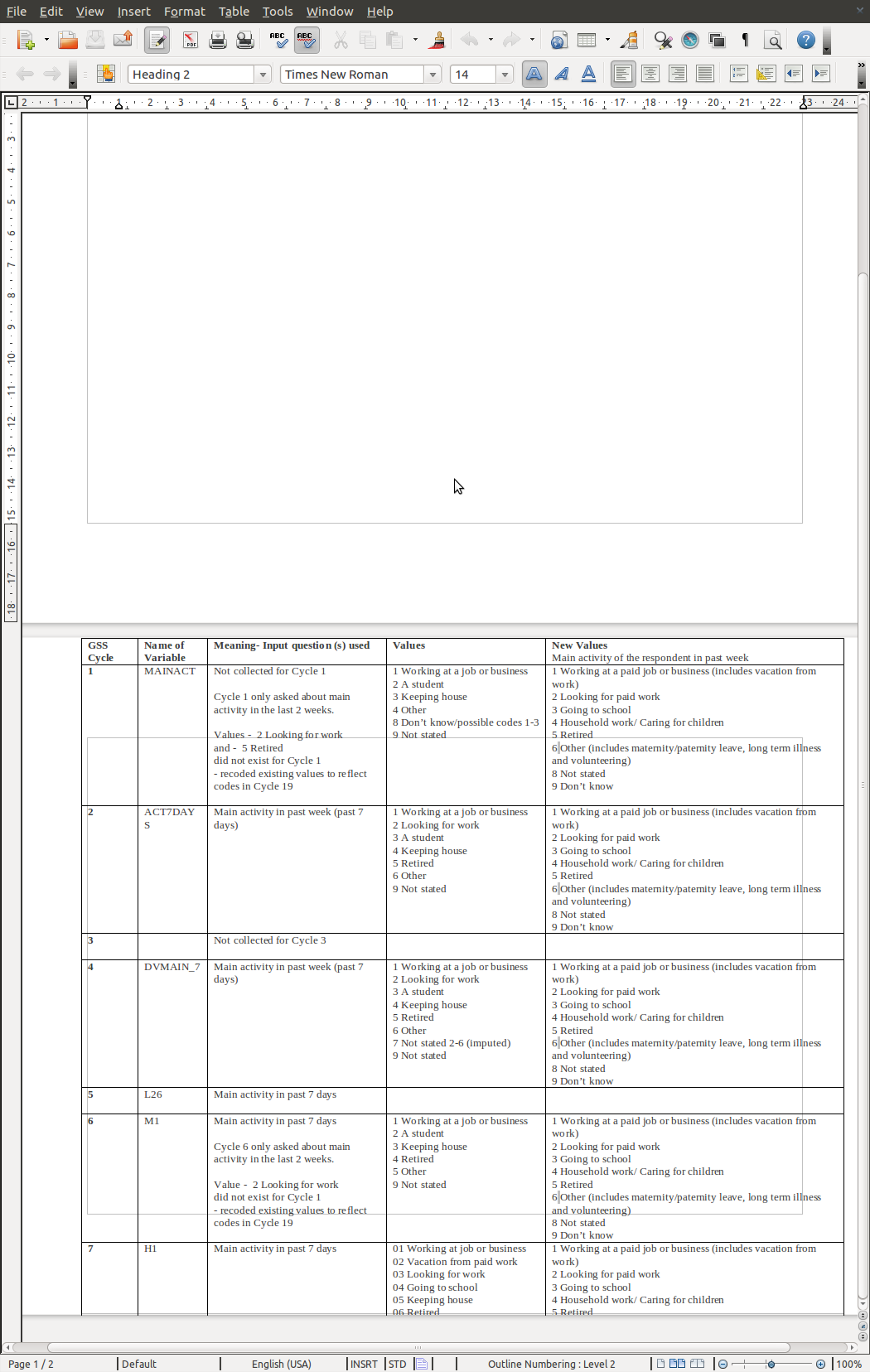
+ 4) What happens instead is the text is separated by almost an entire
+ page as in the Writer screenshot
+
https://bugs.launchpad.net/ubuntu/+source/libreoffice/+bug/898791/+attachment/2614992/+files/stuckTable.png
+ and rows 8 through 20 are not able to be viewed by scrolling down.

  ProblemType: Bug
  DistroRelease: Ubuntu 11.10
  Package: libreoffice-writer 1:3.4.4-0ubuntu1
  ProcVersionSignature: Ubuntu 3.0.0-13.22-generic 3.0.6
  Uname: Linux 3.0.0-13-generic x86_64
  ApportVersion: 1.23-0ubuntu4
  Architecture: amd64
  Date: Thu Dec  1 14:46:13 2011
  InstallationMedia: Ubuntu 11.10 "Oneiric Ocelot" - Beta amd64 (20110921.2)
  ProcEnviron:
   LANGUAGE=en_CA:en
   PATH=(custom, user)
   LANG=en_CA.UTF-8
   SHELL=/bin/bash
  SourcePackage: libreoffice
  UpgradeStatus: No upgrade log present (probably fresh install)

** Changed in: libreoffice (Ubuntu)
   Importance: Undecided => Medium

** Changed in: libreoffice (Ubuntu)
       Status: New => Triaged

** Also affects: df-libreoffice
   Importance: Undecided
       Status: New

** Changed in: df-libreoffice
       Status: New => Incomplete

--
You received this bug notification because you are a member of Desktop
Packages, which is subscribed to libreoffice in Ubuntu.
https://bugs.launchpad.net/bugs/898791

Title:
  long table at end of .doc document cut off

Status in LibreOffice Productivity Suite:
  Incomplete
Status in “libreoffice” package in Ubuntu:
  Triaged

Bug description:
  1)  lsb_release -rd
  Description:  Ubuntu 11.10
  Release:      11.10

  2) apt-cache policy libreoffice-writer
  libreoffice-writer:
    Installed: 1:3.4.4-0ubuntu1
    Candidate: 1:3.4.4-0ubuntu1
    Version table:
   *** 1:3.4.4-0ubuntu1 0
          500 http://us.archive.ubuntu.com/ubuntu/ oneiric-updates/main i386
Packages
          100 /var/lib/dpkg/status
       1:3.4.3-3ubuntu2 0
          500 http://us.archive.ubuntu.com/ubuntu/ oneiric/main i386 Packages

  3) What is expected to happen in LibreOffice Writer via the Terminal:

  cd ~/Desktop && wget -c

https://bugs.launchpad.net/ubuntu/+source/libreoffice/+bug/898791/+attachment/2614990/+files
  /ACT7DAYS_-_def.doc -O example.doc && lowriter -nologo example.doc

  is the text at the beginning of the document is right above the table
  in the Word screenshot

https://bugs.launchpad.net/ubuntu/+source/libreoffice/+bug/898791/+attachment/2618025/+files
  /word-screenshot.png and rows 8 through 20 are visible when scrolling
  down.

  4) What happens instead is the text is separated by almost an entire
  page as in the Writer screenshot

https://bugs.launchpad.net/ubuntu/+source/libreoffice/+bug/898791/+attachment/2614992/+files/stuckTable.png
  and rows 8 through 20 are not able to be viewed by scrolling down.

  ProblemType: Bug
  DistroRelease: Ubuntu 11.10
  Package: libreoffice-writer 1:3.4.4-0ubuntu1
  ProcVersionSignature: Ubuntu 3.0.0-13.22-generic 3.0.6
  Uname: Linux 3.0.0-13-generic x86_64
  ApportVersion: 1.23-0ubuntu4
  Architecture: amd64
  Date: Thu Dec  1 14:46:13 2011
  InstallationMedia: Ubuntu 11.10 "Oneiric Ocelot" - Beta amd64 (20110921.2)
  ProcEnviron:
   LANGUAGE=en_CA:en
   PATH=(custom, user)
   LANG=en_CA.UTF-8
   SHELL=/bin/bash
  SourcePackage: libreoffice
  UpgradeStatus: No upgrade log present (probably fresh install)

To manage notifications about this bug go to:
https://bugs.launchpad.net/df-libreoffice/+bug/898791/+subscriptions

--
Mailing list: https://launchpad.net/~desktop-packages
Post to     : [email protected]
Unsubscribe : https://launchpad.net/~desktop-packages
More help   : https://help.launchpad.net/ListHelp