Public bug reported:

Calc seems to assign the alignment of any particular text cell based on
the contents of the cell: if the first character is a LTR character, the
cell is aligned to the left, and if the first character is RTL, the cell
is aligned to the right. This is desirable behavior but it breaks when
the first character is neutral, i.e. a character that behaves as RTL in
an RTL context and as LTR in a LTR context.
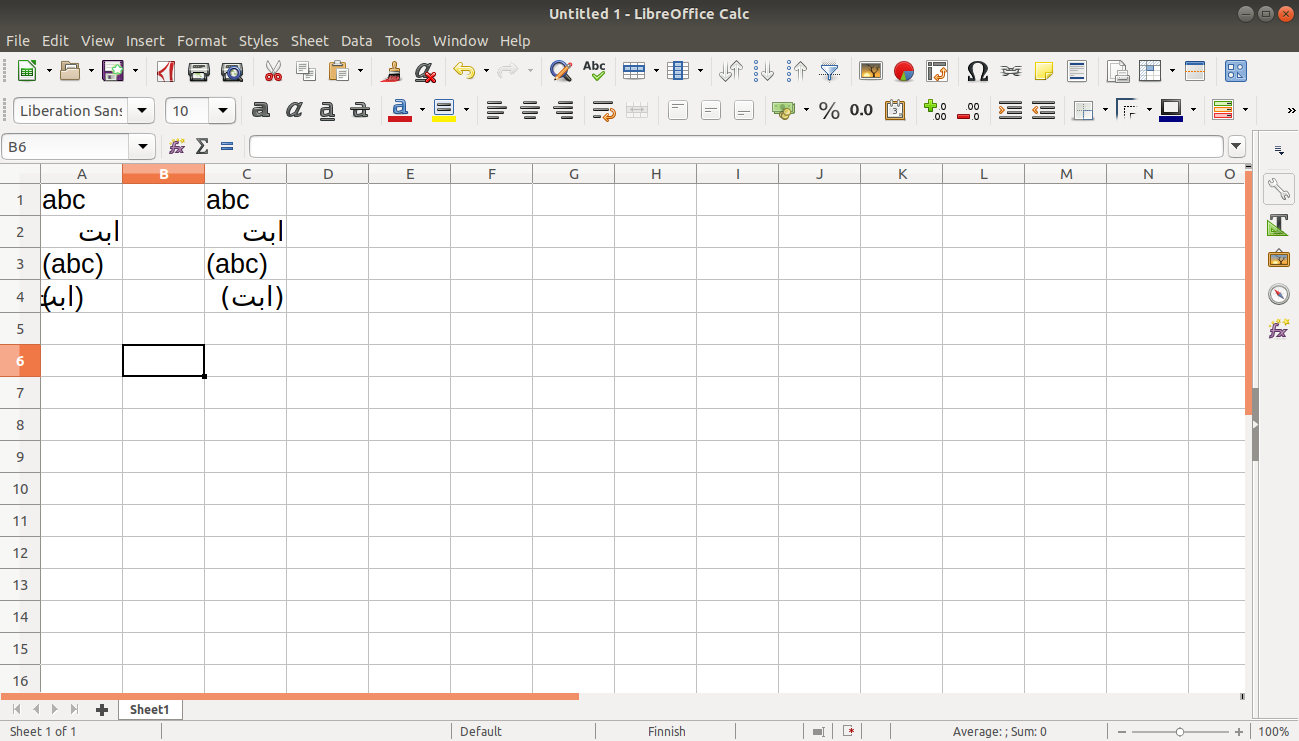
See the attached screenshot where cell A1 "abc" is automatically aligned
to the left and cell A2 "ابت" to the right. When I surround these
strings with parentheses, which are bidi-neutral characters, in A3 and
A4, both are aligned to the left. For some reason, even font metrics
break with this assignment, as the last character of the Arabic string
overlaps visually with the closing parenthesis (I think this is a
separate issue and I’ll file it as such).

In column C, I have copied the contents of column A but changed the
directionality setting of cell C4 manually to RTL through Format Cells >
Text direction. Here the cell is properly aligned to the right and the
closing parenthesis does not overlap with the last character of the
string.

According to the Unicode standard, neutral characters should not affect
directionality, and that’s what I would expect as a user, too. I think
the best solution would be for Calc to skip all neutral characters in
the beginning of the string and just consider the first strong character
for cell alignment. Even better, Calc could use this heuristics to
assign full text directionality for the cell, not just change alignment.
Right now, if you start the cell with an RTL character followed by a LTR
inset and then continue with RTL again, the substrings are ordered as in
a LTR context ("FIRST second THIRD"), not as in true RTL ("THIRD second
FIRST").

Description:    Ubuntu 18.04.1 LTS
Release:        18.04

  Installed: 1:6.0.3-0ubuntu1
  Candidate: 1:6.0.3-0ubuntu1
  Version table:
 *** 1:6.0.3-0ubuntu1 500
        500 http://mr.archive.ubuntu.com/ubuntu bionic/main amd64 Packages
        100 /var/lib/dpkg/status

ProblemType: Bug
DistroRelease: Ubuntu 18.04
Package: libreoffice-calc 1:6.0.3-0ubuntu1
ProcVersionSignature: Ubuntu 4.15.0-33.36-generic 4.15.18
Uname: Linux 4.15.0-33-generic x86_64
ApportVersion: 2.20.9-0ubuntu7.3
Architecture: amd64
CurrentDesktop: ubuntu:GNOME
Date: Tue Sep 18 11:26:18 2018
InstallationDate: Installed on 2017-02-13 (582 days ago)
InstallationMedia: Ubuntu 16.10 "Yakkety Yak" - Release amd64 (20161012.2)
ProcEnviron:
 TERM=xterm-256color
 PATH=(custom, no user)
 XDG_RUNTIME_DIR=<set>
 LANG=C
 SHELL=/bin/bash
SourcePackage: libreoffice
UpgradeStatus: Upgraded to bionic on 2018-05-31 (109 days ago)

** Affects: libreoffice (Ubuntu)
     Importance: Undecided
         Status: New


** Tags: amd64 apport-bug bionic

** Attachment added: "Directionality assignment Calc.png"

https://bugs.launchpad.net/bugs/1793126/+attachment/5190163/+files/Directionality%20assignment%20Calc.png

--
You received this bug notification because you are a member of Desktop
Packages, which is subscribed to libreoffice in Ubuntu.
https://bugs.launchpad.net/bugs/1793126

Title:
  Automatic cell alignment in Calc breaks with bidi-neutral characters

Status in libreoffice package in Ubuntu:
  New

Bug description:
  Calc seems to assign the alignment of any particular text cell based
  on the contents of the cell: if the first character is a LTR
  character, the cell is aligned to the left, and if the first character
  is RTL, the cell is aligned to the right. This is desirable behavior
  but it breaks when the first character is neutral, i.e. a character
  that behaves as RTL in an RTL context and as LTR in a LTR context.

  See the attached screenshot where cell A1 "abc" is automatically
  aligned to the left and cell A2 "ابت" to the right. When I surround
  these strings with parentheses, which are bidi-neutral characters, in
  A3 and A4, both are aligned to the left. For some reason, even font
  metrics break with this assignment, as the last character of the
  Arabic string overlaps visually with the closing parenthesis (I think
  this is a separate issue and I’ll file it as such).

  In column C, I have copied the contents of column A but changed the
  directionality setting of cell C4 manually to RTL through Format Cells
  > Text direction. Here the cell is properly aligned to the right and
  the closing parenthesis does not overlap with the last character of
  the string.

  According to the Unicode standard, neutral characters should not
  affect directionality, and that’s what I would expect as a user, too.
  I think the best solution would be for Calc to skip all neutral
  characters in the beginning of the string and just consider the first
  strong character for cell alignment. Even better, Calc could use this
  heuristics to assign full text directionality for the cell, not just
  change alignment. Right now, if you start the cell with an RTL
  character followed by a LTR inset and then continue with RTL again,
  the substrings are ordered as in a LTR context ("FIRST second THIRD"),
  not as in true RTL ("THIRD second FIRST").

  Description:  Ubuntu 18.04.1 LTS
  Release:      18.04

    Installed: 1:6.0.3-0ubuntu1
    Candidate: 1:6.0.3-0ubuntu1
    Version table:
   *** 1:6.0.3-0ubuntu1 500
          500 http://mr.archive.ubuntu.com/ubuntu bionic/main amd64 Packages
          100 /var/lib/dpkg/status

  ProblemType: Bug
  DistroRelease: Ubuntu 18.04
  Package: libreoffice-calc 1:6.0.3-0ubuntu1
  ProcVersionSignature: Ubuntu 4.15.0-33.36-generic 4.15.18
  Uname: Linux 4.15.0-33-generic x86_64
  ApportVersion: 2.20.9-0ubuntu7.3
  Architecture: amd64
  CurrentDesktop: ubuntu:GNOME
  Date: Tue Sep 18 11:26:18 2018
  InstallationDate: Installed on 2017-02-13 (582 days ago)
  InstallationMedia: Ubuntu 16.10 "Yakkety Yak" - Release amd64 (20161012.2)
  ProcEnviron:
   TERM=xterm-256color
   PATH=(custom, no user)
   XDG_RUNTIME_DIR=<set>
   LANG=C
   SHELL=/bin/bash
  SourcePackage: libreoffice
  UpgradeStatus: Upgraded to bionic on 2018-05-31 (109 days ago)

To manage notifications about this bug go to:
https://bugs.launchpad.net/ubuntu/+source/libreoffice/+bug/1793126/+subscriptions

--
Mailing list: https://launchpad.net/~desktop-packages
Post to     : [email protected]
Unsubscribe : https://launchpad.net/~desktop-packages
More help   : https://help.launchpad.net/ListHelp