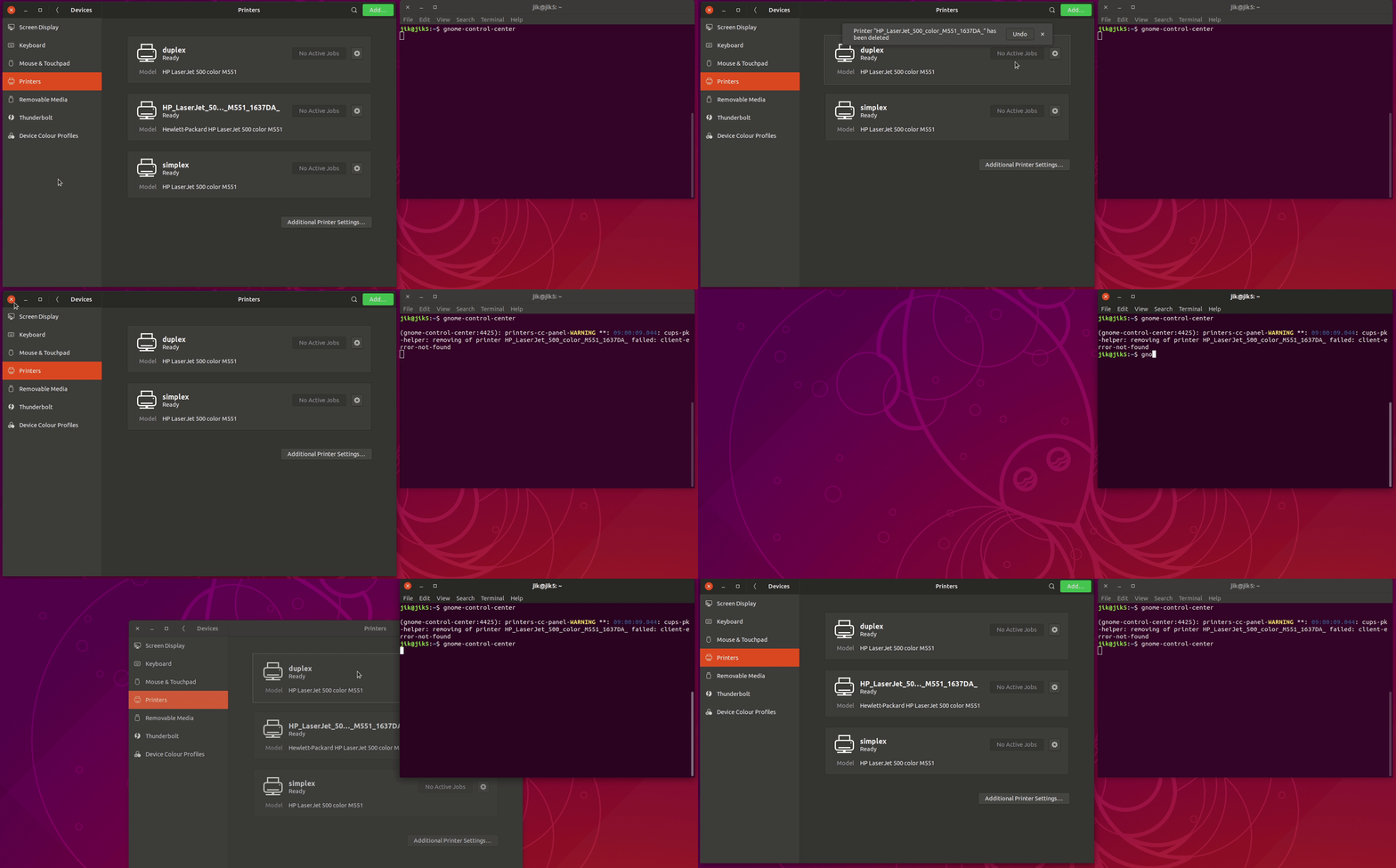
Please see attached animated GIF. Open gnome-control-center, it says
printer is there, try to delete it, it says it was deleted but error in
terminal says it wasn't because it doesn't actually exist, close gnome-
control-center, re-open it, printer is back, close it again.
/var/log/cups/access_log says:

localhost - - [10/Jan/2019:09:02:42 -0500] "POST / HTTP/1.1" 200 343
Create-Printer-Subscriptions successful-ok
localhost - - [10/Jan/2019:09:02:42 -0500] "POST / HTTP/1.1" 200 5821971
CUPS-Get-PPDs -
localhost - - [10/Jan/2019:09:02:51 -0500] "POST /admin/ HTTP/1.1" 200 189
CUPS-Delete-Printer client-error-not-found
localhost - - [10/Jan/2019:09:02:55 -0500] "POST / HTTP/1.1" 200 151
Cancel-Subscription successful-ok
localhost - - [10/Jan/2019:09:02:55 -0500] "POST / HTTP/1.1" 200 151
Cancel-Subscription client-error-not-found
localhost - - [10/Jan/2019:09:02:58 -0500] "POST / HTTP/1.1" 200 343
Create-Printer-Subscriptions successful-ok
localhost - - [10/Jan/2019:09:03:00 -0500] "POST / HTTP/1.1" 200 151
Cancel-Subscription successful-ok
localhost - - [10/Jan/2019:09:03:00 -0500] "POST / HTTP/1.1" 200 151
Cancel-Subscription client-error-not-found

None of the other logs in /var/log/cups are modified.

The printer in question IS NOT LISTED IN /ETC/CUPS/PRINTERS.CONF. I
honestly have no idea where gnome-control-center is getting it from. I
had a theory that maybe a previous invocation of gnome-control-center
removed it from printers.conf but didn't tell CUPS to reload, so it was
in memory in cupsd but not on disk, but I tried restarting cupsd and the
problem persists. I literally have no idea where gnome-control-center is
getting that printer from.

Please don't ask me for any more information, I'm sick and tired of this
and I've already wasted too much time on it. All the issues I've
reported have been extremely easy for me to reproduce. If you are unable
to reproduce them, I have no idea why and have no time to help you
further. If you haven't even tried, then stop wasting my time.


** Attachment added: "animated gif of problem"

https://bugs.launchpad.net/ubuntu/+source/gnome-control-center/+bug/1810404/+attachment/5228311/+files/Peek%202019-01-10%2009-00.gif

--
You received this bug notification because you are a member of Desktop
Packages, which is subscribed to gnome-control-center in Ubuntu.
https://bugs.launchpad.net/bugs/1810404

Title:
  printing options set in control center don't work

Status in gnome-control-center package in Ubuntu:
  Incomplete

Bug description:
  1. Open settings.
  2. Go to Devices / Printers.
  3. Click "Add..." and add a network printer with a duplex unit located
automatically by the network scan.
  4. Click the gear and elect "Printing Options".
  5. Change the "Two-sided" option to enable two-sided printing.
  6. Close the options dialog and settings window.
  7. Print a document with multiple pages to that printer with "lp -d
printer-name filename".
  8. Observe how it prints single-sided.

  To get the setting to stick for real, I had to click on "Additional
  Printer Settings..." and change it there.

  ProblemType: Bug
  DistroRelease: Ubuntu 18.10
  Package: gnome-control-center 1:3.30.2-1ubuntu0.18.10.1
  ProcVersionSignature: Ubuntu 4.18.0-13.14-generic 4.18.17
  Uname: Linux 4.18.0-13-generic x86_64
  NonfreeKernelModules: nvidia_modeset nvidia
  ApportVersion: 2.20.10-0ubuntu13.1
  Architecture: amd64
  CurrentDesktop: ubuntu:GNOME
  Date: Thu Jan  3 07:04:33 2019
  InstallationDate: Installed on 2019-01-02 (0 days ago)
  InstallationMedia: Ubuntu 18.10 "Cosmic Cuttlefish" - Release amd64
(20181017.3)
  SourcePackage: gnome-control-center
  UpgradeStatus: No upgrade log present (probably fresh install)
  modified.conffile..etc.apport.crashdb.conf: [modified]
  mtime.conffile..etc.apport.crashdb.conf: 2019-01-02T11:29:50.338663

To manage notifications about this bug go to:
https://bugs.launchpad.net/ubuntu/+source/gnome-control-center/+bug/1810404/+subscriptions

--
Mailing list: https://launchpad.net/~desktop-packages
Post to     : [email protected]
Unsubscribe : https://launchpad.net/~desktop-packages
More help   : https://help.launchpad.net/ListHelp