Public bug reported:

Gnome 3 desktop
Multi-monitor setup with one screen rotated right into portrait mode
*Experimental* fractional scaling on Wayland with different scaling on each
monitor.  Configured using:
~~~
gsettings set org.gnome.mutter experimental-features
"['scale-monitor-framebuffer']"
~~~

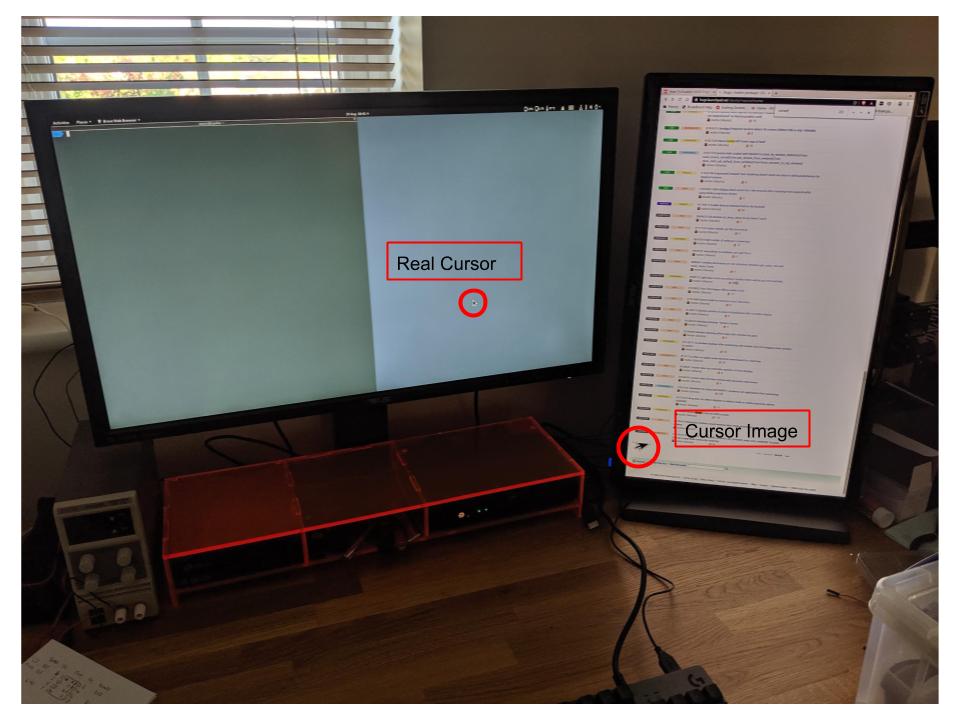
After wake from screen lock I often observe an "image" of an enlarged
rotated mouse pointer on the second (rotated) monitor which doesn't move
and doesn't appear on a screenshot.  It overlays all other screen in
formation and cannot be erased by moving the mouse over the area.
Depending on where the mouse cursor was when sleeping it seems to appear
in one of two places, either towards the bottom left or top right.
After some time a block around the cursor image gets "corrupted".

This behaviour is not observed if logging in to a X11 session

Because this doesn't show up on a screenshot I have included a photo,
which also shows the monitor setup.

Description:    Ubuntu 19.04
Release:        19.04

mutter:
  Installed: 3.32.2+git20190711-2ubuntu1~19.04.1
  Candidate: 3.32.2+git20190711-2ubuntu1~19.04.1
  Version table:
 *** 3.32.2+git20190711-2ubuntu1~19.04.1 500
        500 http://gb.archive.ubuntu.com/ubuntu disco-updates/main amd64
Packages
        100 /var/lib/dpkg/status
     3.32.0+git20190410-1ubuntu1 500
        500 http://gb.archive.ubuntu.com/ubuntu disco/main amd64 Packages

** Affects: mutter (Ubuntu)
     Importance: Undecided
         Status: New

** Attachment added: "Monitor layout showing fake cursor image"

https://bugs.launchpad.net/bugs/1841894/+attachment/5285562/+files/CursorImage.jpg

--
You received this bug notification because you are a member of Desktop
Packages, which is subscribed to mutter in Ubuntu.
https://bugs.launchpad.net/bugs/1841894

Title:
  Wayland: Image of mouse cursor left on screen after unlock

Status in mutter package in Ubuntu:
  New

Bug description:
  Gnome 3 desktop
  Multi-monitor setup with one screen rotated right into portrait mode
  *Experimental* fractional scaling on Wayland with different scaling on each
monitor.  Configured using:

  ~~~
  gsettings set org.gnome.mutter experimental-features
"['scale-monitor-framebuffer']"
  ~~~

  After wake from screen lock I often observe an "image" of an enlarged
  rotated mouse pointer on the second (rotated) monitor which doesn't
  move and doesn't appear on a screenshot.  It overlays all other screen
  in formation and cannot be erased by moving the mouse over the area.
  Depending on where the mouse cursor was when sleeping it seems to
  appear in one of two places, either towards the bottom left or top
  right.  After some time a block around the cursor image gets
  "corrupted".

  This behaviour is not observed if logging in to a X11 session

  Because this doesn't show up on a screenshot I have included a photo,
  which also shows the monitor setup.

  Description:  Ubuntu 19.04
  Release:      19.04

  mutter:
    Installed: 3.32.2+git20190711-2ubuntu1~19.04.1
    Candidate: 3.32.2+git20190711-2ubuntu1~19.04.1
    Version table:
   *** 3.32.2+git20190711-2ubuntu1~19.04.1 500
          500 http://gb.archive.ubuntu.com/ubuntu disco-updates/main amd64
Packages
          100 /var/lib/dpkg/status
       3.32.0+git20190410-1ubuntu1 500
          500 http://gb.archive.ubuntu.com/ubuntu disco/main amd64 Packages

To manage notifications about this bug go to:
https://bugs.launchpad.net/ubuntu/+source/mutter/+bug/1841894/+subscriptions

--
Mailing list: https://launchpad.net/~desktop-packages
Post to     : [email protected]
Unsubscribe : https://launchpad.net/~desktop-packages
More help   : https://help.launchpad.net/ListHelp