Public bug reported:

All GNOME/Gtk apps in Kubuntu 19.10 ignore gnome settings, both from gui and
cli tool.
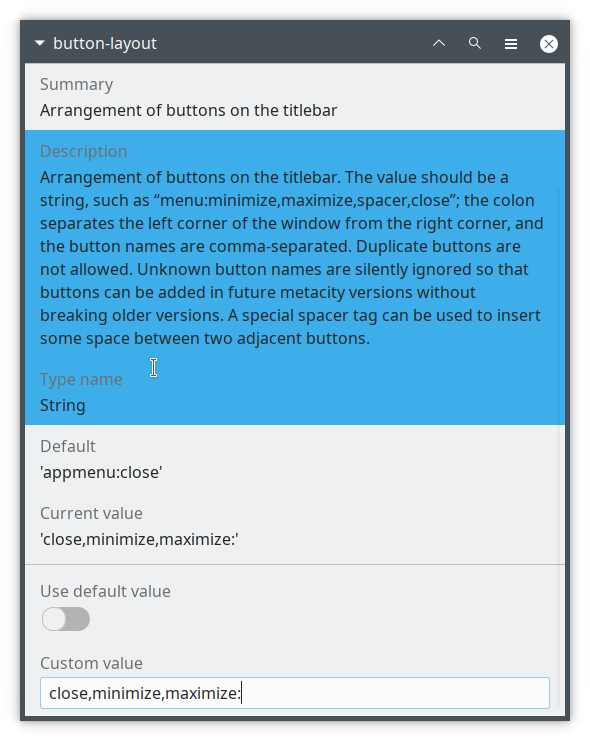
i.e. setting schema button-layout in org.gnome.desktop.wm.preferences from
default 'appmenu:close' to custom 'close,minimize,maximize:' doesn't have any
effect - gtk window widgets are always on the right, while KDE ones are on
left, as set in KDE settings.
ProblemType: Bug
DistroRelease: Ubuntu 19.10
Package: xorg 1:7.7+19ubuntu12
ProcVersionSignature: Ubuntu 5.3.0-23.25-generic 5.3.7
Uname: Linux 5.3.0-23-generic x86_64
ApportVersion: 2.20.11-0ubuntu8.2
Architecture: amd64
BootLog: Error: [Errno 13] Brak dostępu: '/var/log/boot.log'
CompizPlugins: No value set for
`/apps/compiz-1/general/screen0/options/active_plugins'
CompositorRunning: None
CurrentDesktop: KDE
Date: Thu Nov 28 11:13:01 2019
DistUpgraded: Fresh install
DistroCodename: eoan
DistroVariant: ubuntu
ExtraDebuggingInterest: I just need to know a workaround
GraphicsCard:
 Intel Corporation Skylake GT2 [HD Graphics 520] [8086:1916] (rev 07) (prog-if
00 [VGA controller])
   Subsystem: Lenovo Skylake GT2 [HD Graphics 520] [17aa:5059]
InstallationDate: Installed on 2019-10-29 (29 days ago)
InstallationMedia: Kubuntu 19.10 "Eoan Ermine" - Release amd64 (20191017)
MachineType: LENOVO 20GKS0HQ00
ProcEnviron:
 LANGUAGE=
 PATH=(custom, no user)
 XDG_RUNTIME_DIR=<set>
 LANG=pl_PL.UTF-8
 SHELL=/bin/bash
ProcKernelCmdLine: BOOT_IMAGE=/vmlinuz-5.3.0-23-generic
root=/dev/mapper/vgkubuntu-root ro quiet splash vt.handoff=7
SourcePackage: xorg
Symptom: display
UpgradeStatus: No upgrade log present (probably fresh install)
dmi.bios.date: 09/05/2016
dmi.bios.vendor: LENOVO
dmi.bios.version: R0CET27W (1.15 )
dmi.board.asset.tag: 0000
dmi.board.name: 20GKS0HQ00
dmi.board.vendor: LENOVO
dmi.board.version: S
dmi.chassis.asset.tag: 0000
dmi.chassis.type: 10
dmi.chassis.vendor: LENOVO
dmi.chassis.version: None
dmi.modalias:
dmi:bvnLENOVO:bvrR0CET27W(1.15):bd09/05/2016:svnLENOVO:pn20GKS0HQ00:pvrThinkPad13:rvnLENOVO:rn20GKS0HQ00:rvrS:cvnLENOVO:ct10:cvrNone:
dmi.product.family: ThinkPad 13
dmi.product.name: 20GKS0HQ00
dmi.product.sku: LENOVO_MT_20GK_BU_Think_FM_ThinkPad 13
dmi.product.version: ThinkPad 13
dmi.sys.vendor: LENOVO
version.compiz: compiz N/A
version.libdrm2: libdrm2 2.4.99-1ubuntu1
version.libgl1-mesa-dri: libgl1-mesa-dri 19.2.1-1ubuntu1
version.libgl1-mesa-glx: libgl1-mesa-glx N/A
version.xserver-xorg-core: xserver-xorg-core 2:1.20.5+git20191008-0ubuntu1
version.xserver-xorg-input-evdev: xserver-xorg-input-evdev N/A
version.xserver-xorg-video-ati: xserver-xorg-video-ati 1:19.0.1-1ubuntu1
version.xserver-xorg-video-intel: xserver-xorg-video-intel
2:2.99.917+git20190815-1
version.xserver-xorg-video-nouveau: xserver-xorg-video-nouveau 1:1.0.16-1

** Affects: xorg (Ubuntu)
     Importance: Undecided
         Status: New


** Tags: eoan gtk kde kubuntu ubuntu

** Attachment added: "Screenshot_20191128_111939.png"

https://bugs.launchpad.net/bugs/1854336/+attachment/5308424/+files/Screenshot_20191128_111939.png

--
You received this bug notification because you are a member of Desktop
Packages, which is subscribed to xorg in Ubuntu.
https://bugs.launchpad.net/bugs/1854336

Title:
  GNOME apps in Kubuntu 19.10 doesn't respect GNOME window settings

Status in xorg package in Ubuntu:
  New

Bug description:
  All GNOME/Gtk apps in Kubuntu 19.10 ignore gnome settings, both from gui and
cli tool.
  i.e. setting schema button-layout in org.gnome.desktop.wm.preferences from
default 'appmenu:close' to custom 'close,minimize,maximize:' doesn't have any
effect - gtk window widgets are always on the right, while KDE ones are on
left, as set in KDE settings.

  ProblemType: Bug
  DistroRelease: Ubuntu 19.10
  Package: xorg 1:7.7+19ubuntu12
  ProcVersionSignature: Ubuntu 5.3.0-23.25-generic 5.3.7
  Uname: Linux 5.3.0-23-generic x86_64
  ApportVersion: 2.20.11-0ubuntu8.2
  Architecture: amd64
  BootLog: Error: [Errno 13] Brak dostępu: '/var/log/boot.log'
  CompizPlugins: No value set for
`/apps/compiz-1/general/screen0/options/active_plugins'
  CompositorRunning: None
  CurrentDesktop: KDE
  Date: Thu Nov 28 11:13:01 2019
  DistUpgraded: Fresh install
  DistroCodename: eoan
  DistroVariant: ubuntu
  ExtraDebuggingInterest: I just need to know a workaround
  GraphicsCard:
   Intel Corporation Skylake GT2 [HD Graphics 520] [8086:1916] (rev 07)
(prog-if 00 [VGA controller])
     Subsystem: Lenovo Skylake GT2 [HD Graphics 520] [17aa:5059]
  InstallationDate: Installed on 2019-10-29 (29 days ago)
  InstallationMedia: Kubuntu 19.10 "Eoan Ermine" - Release amd64 (20191017)
  MachineType: LENOVO 20GKS0HQ00
  ProcEnviron:
   LANGUAGE=
   PATH=(custom, no user)
   XDG_RUNTIME_DIR=<set>
   LANG=pl_PL.UTF-8
   SHELL=/bin/bash
  ProcKernelCmdLine: BOOT_IMAGE=/vmlinuz-5.3.0-23-generic
root=/dev/mapper/vgkubuntu-root ro quiet splash vt.handoff=7
  SourcePackage: xorg
  Symptom: display
  UpgradeStatus: No upgrade log present (probably fresh install)
  dmi.bios.date: 09/05/2016
  dmi.bios.vendor: LENOVO
  dmi.bios.version: R0CET27W (1.15 )
  dmi.board.asset.tag: 0000
  dmi.board.name: 20GKS0HQ00
  dmi.board.vendor: LENOVO
  dmi.board.version: S
  dmi.chassis.asset.tag: 0000
  dmi.chassis.type: 10
  dmi.chassis.vendor: LENOVO
  dmi.chassis.version: None
  dmi.modalias:
dmi:bvnLENOVO:bvrR0CET27W(1.15):bd09/05/2016:svnLENOVO:pn20GKS0HQ00:pvrThinkPad13:rvnLENOVO:rn20GKS0HQ00:rvrS:cvnLENOVO:ct10:cvrNone:
  dmi.product.family: ThinkPad 13
  dmi.product.name: 20GKS0HQ00
  dmi.product.sku: LENOVO_MT_20GK_BU_Think_FM_ThinkPad 13
  dmi.product.version: ThinkPad 13
  dmi.sys.vendor: LENOVO
  version.compiz: compiz N/A
  version.libdrm2: libdrm2 2.4.99-1ubuntu1
  version.libgl1-mesa-dri: libgl1-mesa-dri 19.2.1-1ubuntu1
  version.libgl1-mesa-glx: libgl1-mesa-glx N/A
  version.xserver-xorg-core: xserver-xorg-core 2:1.20.5+git20191008-0ubuntu1
  version.xserver-xorg-input-evdev: xserver-xorg-input-evdev N/A
  version.xserver-xorg-video-ati: xserver-xorg-video-ati 1:19.0.1-1ubuntu1
  version.xserver-xorg-video-intel: xserver-xorg-video-intel
2:2.99.917+git20190815-1
  version.xserver-xorg-video-nouveau: xserver-xorg-video-nouveau 1:1.0.16-1

To manage notifications about this bug go to:
https://bugs.launchpad.net/ubuntu/+source/xorg/+bug/1854336/+subscriptions

--
Mailing list: https://launchpad.net/~desktop-packages
Post to     : [email protected]
Unsubscribe : https://launchpad.net/~desktop-packages
More help   : https://help.launchpad.net/ListHelp