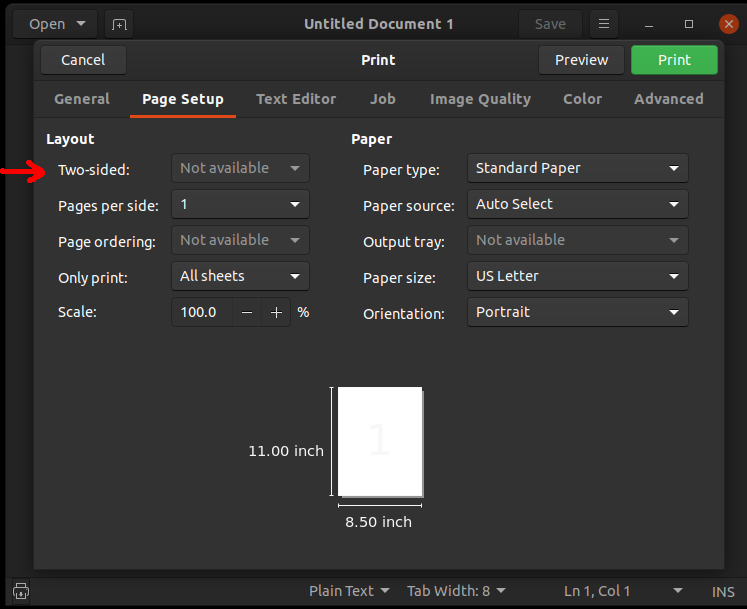
Could you add the following options to "Two-sided": "Off", "Automatic",
and "Manual". The "Automatic" option could be removed, if the printer
does not support automatic two sided printing.
** Attachment added: "Print_Dialog.png"

https://bugs.launchpad.net/ubuntu/+source/system-config-printer/+bug/1854672/+attachment/5324322/+files/Print_Dialog.png

** Summary changed:

- In printer settings, add "Manual Double Sided". Print odd pages first, then
display message to remove and reinsert pages, then horizontally rotate and
print even numbered pages in descending order.
+ On print dialog, add "Manual" option to "Two-sided". Print odd pages first,
then display message to remove and reinsert pages, then horizontally rotate and
print even numbered pages in descending order.

--
You received this bug notification because you are a member of Desktop
Packages, which is subscribed to system-config-printer in Ubuntu.
https://bugs.launchpad.net/bugs/1854672

Title:
  On print dialog, add "Manual" option to "Two-sided". Print odd pages
  first, then display message to remove and reinsert pages, then
  horizontally rotate and print even numbered pages in descending order.

Status in system-config-printer package in Ubuntu:
  New

Bug description:
  1) Ubuntu 19.10
  2) system-config-printer 1.5.11
  3) Inability to manually print on both side of paper.
  4) Ability to manually print on both side of paper.

  If print page count is 1, then do not display a message to remove and
  reinsert page.

To manage notifications about this bug go to:
https://bugs.launchpad.net/ubuntu/+source/system-config-printer/+bug/1854672/+subscriptions

--
Mailing list: https://launchpad.net/~desktop-packages
Post to     : [email protected]
Unsubscribe : https://launchpad.net/~desktop-packages
More help   : https://help.launchpad.net/ListHelp