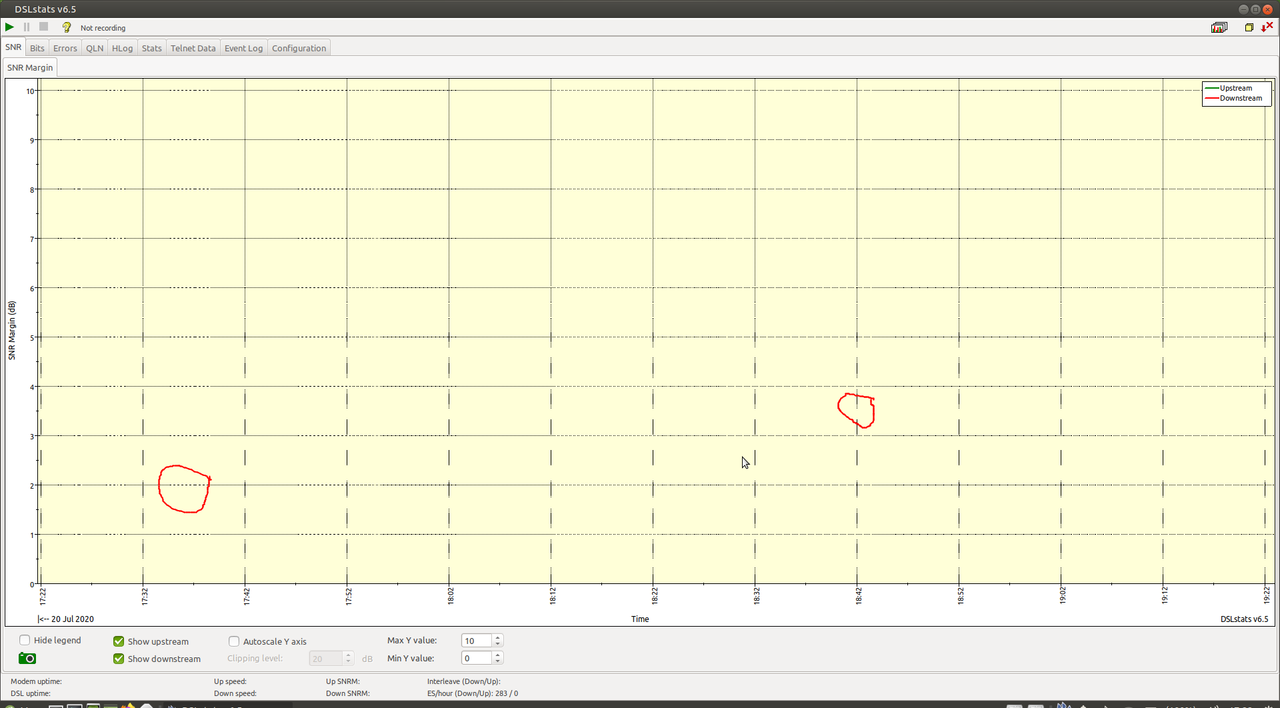
This looks like an aliasing problem. Aliasing may be slightly different
between graphics drivers but mostly it's the job of the application to
avoid it. So please report the bug to Dslstats instead.
** Package changed: xorg (Ubuntu) => xorg-server (Ubuntu)

** Changed in: xorg-server (Ubuntu)
       Status: New => Invalid

--
You received this bug notification because you are a member of Desktop
Packages, which is subscribed to xorg-server in Ubuntu.
https://bugs.launchpad.net/bugs/1888316

Title:
  Corrupted gridlines on Dslstats on Intel HD 5500 (Dell Latitude E7250)

Status in xorg-server package in Ubuntu:
  Invalid

Bug description:
  On Ubuntu MATE 20.04 (and other releases of Ubuntu) I've noticed a problem
with Dslstats (http://dslstats.me.uk/). I see corrupted gridlines as it is
shown here.
  https://i.postimg.cc/Fz6TJ8pc/corrupted-gridlines.png

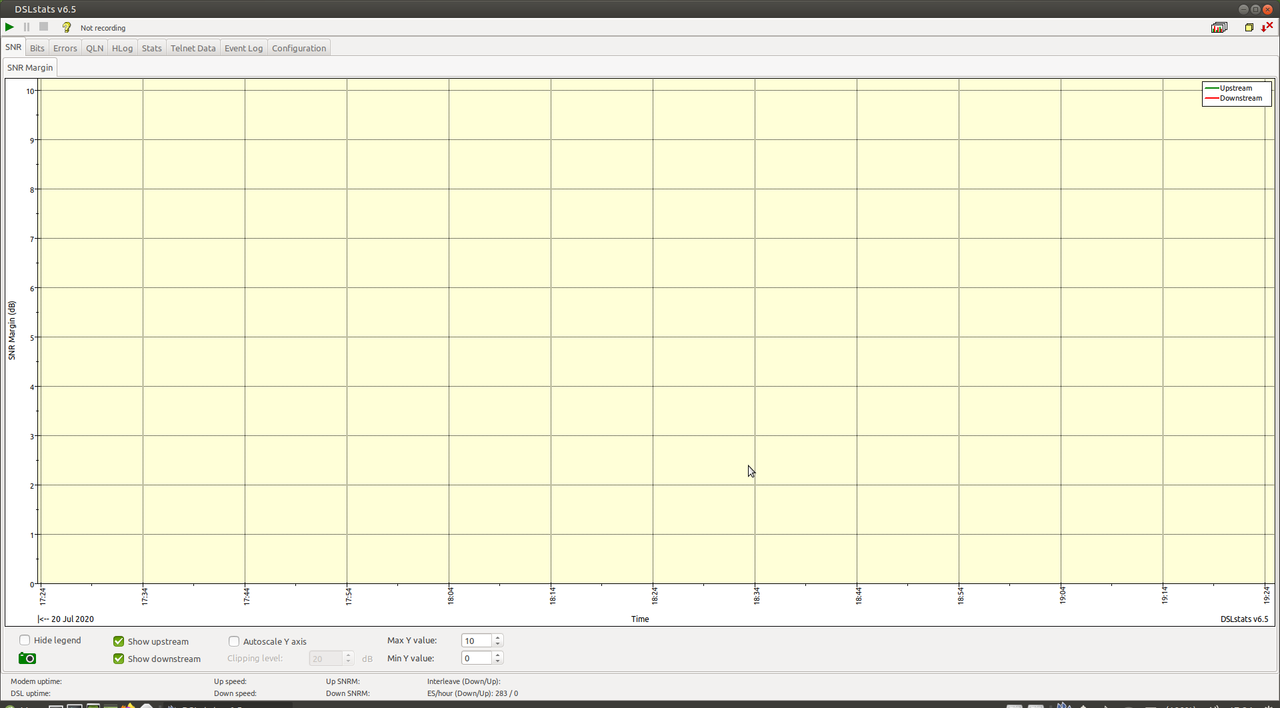
  On Intel Xorg driver I don't see this problem.
  https://i.postimg.cc/zv4kfWDF/normal-gridlines.png

  Configurations when the problem occurs:
  Dell Latitude E7250 (Intel HD 5500 graphics card) on Xorg with modesetting
driver
  Dell Latitude E7250 (Intel HD 5500 graphics card) on Wayland

  Configurations when the problem does not occur:
  Dell Latitude E7250 on Xorg with intel driver
  Dell Optiplex 745 with AMD Radeon HD6450 graphis card
  Dell Optiplex 745 with integrated Intel GMA 3000 on Xorg with modesetting
driver
  Dell Optiplex 745 with integrated Intel GMA 3000 on Xorg with intel driver

  ProblemType: Bug
  DistroRelease: Ubuntu 20.04
  Package: xorg 1:7.7+19ubuntu14
  ProcVersionSignature: Ubuntu 5.4.0-40.44-generic 5.4.44
  Uname: Linux 5.4.0-40-generic x86_64
  ApportVersion: 2.20.11-0ubuntu27.4
  Architecture: amd64
  BootLog: Error: [Errno 13] Brak dostępu: '/var/log/boot.log'
  CasperMD5CheckResult: skip
  CompositorRunning: None
  CurrentDesktop: MATE
  Date: Mon Jul 20 20:13:44 2020
  DistUpgraded: Fresh install
  DistroCodename: focal
  DistroVariant: ubuntu
  ExtraDebuggingInterest: Yes
  GraphicsCard:
   Intel Corporation HD Graphics 5500 [8086:1616] (rev 09) (prog-if 00 [VGA
controller])
     Subsystem: Dell HD Graphics 5500 [1028:062d]
  InstallationDate: Installed on 2020-06-05 (44 days ago)
  InstallationMedia: Ubuntu-MATE 20.04 LTS "Focal Fossa" - Release amd64
(20200423)
  MachineType: Dell Inc. Latitude E7250
  ProcEnviron:
   LANGUAGE=pl
   PATH=(custom, no user)
   XDG_RUNTIME_DIR=<set>
   LANG=pl_PL.UTF-8
   SHELL=/bin/bash
  ProcKernelCmdLine: BOOT_IMAGE=/boot/vmlinuz-5.4.0-40-generic
root=UUID=a072e6bc-e343-4720-9683-3754537c1cc5 ro quiet splash vt.handoff=7
  SourcePackage: xorg
  Symptom: display
  UpgradeStatus: No upgrade log present (probably fresh install)
  dmi.bios.date: 04/10/2020
  dmi.bios.vendor: Dell Inc.
  dmi.bios.version: A24
  dmi.board.name: 0V8RX3
  dmi.board.vendor: Dell Inc.
  dmi.board.version: A00
  dmi.chassis.type: 9
  dmi.chassis.vendor: Dell Inc.
  dmi.modalias:
dmi:bvnDellInc.:bvrA24:bd04/10/2020:svnDellInc.:pnLatitudeE7250:pvr:rvnDellInc.:rn0V8RX3:rvrA00:cvnDellInc.:ct9:cvr:
  dmi.product.name: Latitude E7250
  dmi.product.sku: 062D
  dmi.sys.vendor: Dell Inc.
  version.compiz: compiz N/A
  version.libdrm2: libdrm2 2.4.101-2
  version.libgl1-mesa-dri: libgl1-mesa-dri 20.0.8-0ubuntu1~20.04.1
  version.libgl1-mesa-glx: libgl1-mesa-glx N/A
  version.xserver-xorg-core: xserver-xorg-core 2:1.20.8-2ubuntu2.2
  version.xserver-xorg-input-evdev: xserver-xorg-input-evdev N/A
  version.xserver-xorg-video-ati: xserver-xorg-video-ati 1:19.1.0-1
  version.xserver-xorg-video-intel: xserver-xorg-video-intel
2:2.99.917+git20200226-1
  version.xserver-xorg-video-nouveau: xserver-xorg-video-nouveau 1:1.0.16-1

To manage notifications about this bug go to:
https://bugs.launchpad.net/ubuntu/+source/xorg-server/+bug/1888316/+subscriptions

--
Mailing list: https://launchpad.net/~desktop-packages
Post to     : [email protected]
Unsubscribe : https://launchpad.net/~desktop-packages
More help   : https://help.launchpad.net/ListHelp