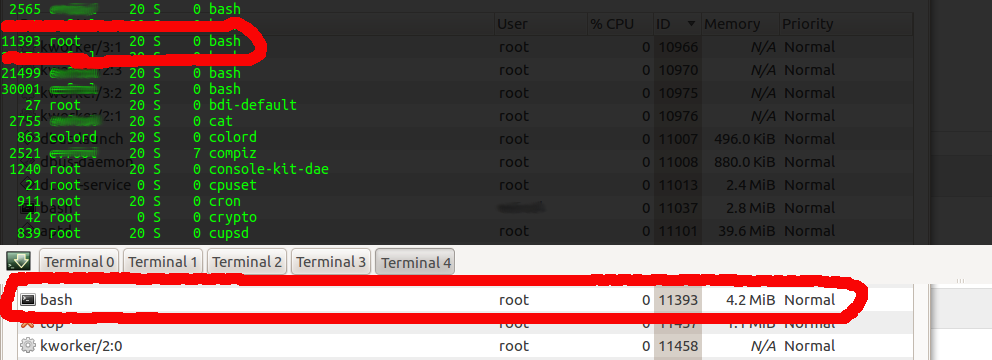
As this is a fairly old bug with no recents reports or comments, and it seems
to be fixed in System Monitor 3.3.4 on Precise, see the attached screenshot
showing the result after following the steps to reproduce from the comments, I
am marking this as Fix released.
Feel free to reopen this if you manage to reproduce this, and comment with the
exact steps to reproduce the issue.
** Attachment added: "Screenshot showing the fixed behavior"

https://bugs.launchpad.net/ubuntu/+source/gnome-system-monitor/+bug/346806/+attachment/2687870/+files/screenshot.png

** Changed in: gnome-system-monitor (Ubuntu)
       Status: Triaged => Fix Released

--
You received this bug notification because you are a member of Desktop
Packages, which is subscribed to gnome-system-monitor in Ubuntu.
https://bugs.launchpad.net/bugs/346806

Title:
  gnome-system-monitor does not show sudo processes' names

Status in The GNOME System Monitor:
  New
Status in “gnome-system-monitor” package in Ubuntu:
  Fix Released

Bug description:
  Binary package hint: gnome-system-monitor

  I have noticed many times that CPU usage will be at 100% on the gnome-
  system-monitor Performance tab but the processes tab does not report a
  process using a high percentage of the CPU, even with the View > All
  Processes option set.

  The top command  does displays the process taking up the CPU.

  I don't have specific steps to reproduce, but the un-shown process is
  usually a background processes such as updatedb.  I run the system
  monitor panel applet and try to investigate when my system slows down
  because something is using the processor, so I am bothered by this bug
  often.  I have noticed this behaviour in Hardy, Intrepid, and Jaunty.

To manage notifications about this bug go to:
https://bugs.launchpad.net/gnome-system-monitor/+bug/346806/+subscriptions

--
Mailing list: https://launchpad.net/~desktop-packages
Post to     : [email protected]
Unsubscribe : https://launchpad.net/~desktop-packages
More help   : https://help.launchpad.net/ListHelp