Public bug reported:

While testing Kubuntu Noble daily I chose a "minimal" install, which
does not include a web browser.
Afterwards I chose to install Firefox "sudo apt install firefox". This
downloads snapd, the snap package and so on.

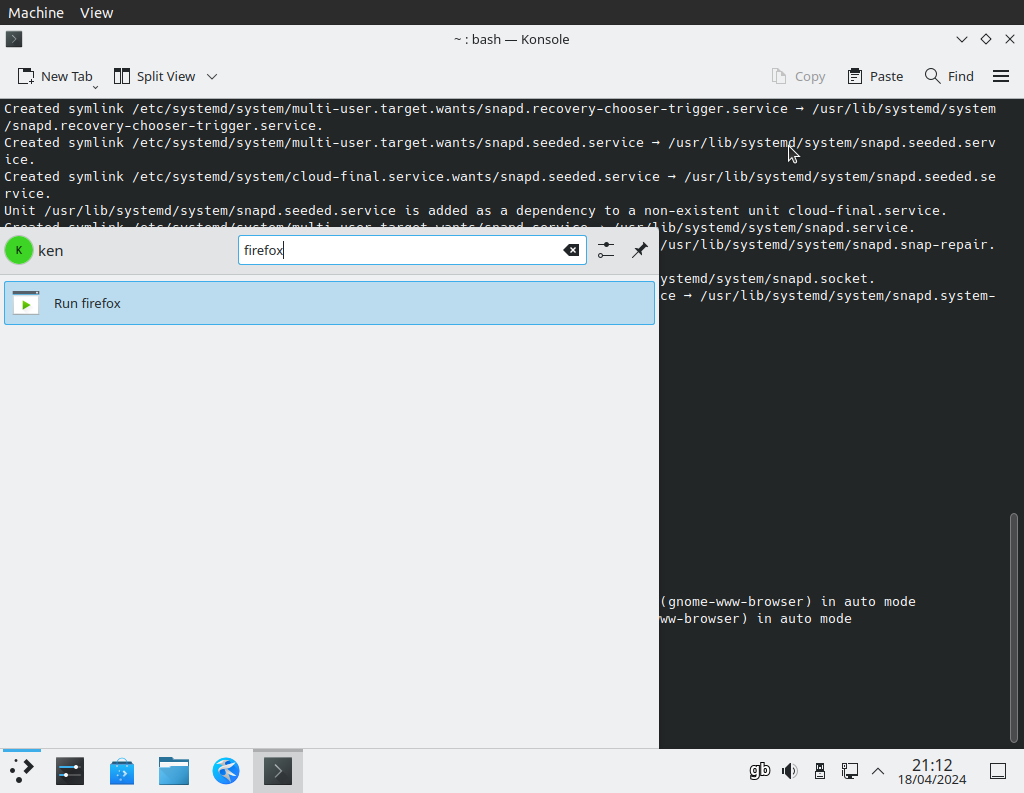
When it is finished there is no icon in the program menu. (Screenshot)

Also:

I was going to log this separately but I suspect the cause is the
same...

When attempting to report this bug with "ubuntu-bug firefox" the
application fails to open Firefox to continue, instead opening Kate with
some HTML code (Screenshot).

** Affects: firefox (Ubuntu)
     Importance: Undecided
         Status: New


** Tags: amd64 iso-testing kubuntu noble

** Attachment added: "Screenshot: no icon"

https://bugs.launchpad.net/bugs/2062415/+attachment/5767656/+files/minimal.png

--
You received this bug notification because you are a member of Desktop
Packages, which is subscribed to firefox in Ubuntu.
https://bugs.launchpad.net/bugs/2062415

Title:
  Following a minimal install, installing Firefox does not create an
  icon

Status in firefox package in Ubuntu:
  New

Bug description:
  While testing Kubuntu Noble daily I chose a "minimal" install, which
  does not include a web browser.

  Afterwards I chose to install Firefox "sudo apt install firefox". This
  downloads snapd, the snap package and so on.

  When it is finished there is no icon in the program menu. (Screenshot)

  Also:

  I was going to log this separately but I suspect the cause is the
  same...

  When attempting to report this bug with "ubuntu-bug firefox" the
  application fails to open Firefox to continue, instead opening Kate
  with some HTML code (Screenshot).

To manage notifications about this bug go to:
https://bugs.launchpad.net/ubuntu/+source/firefox/+bug/2062415/+subscriptions


--
Mailing list: https://launchpad.net/~desktop-packages
Post to     : [email protected]
Unsubscribe : https://launchpad.net/~desktop-packages
More help   : https://help.launchpad.net/ListHelp