eliashdezr opened a new issue #8902: Vertical align canvas into its container URL: https://github.com/apache/incubator-echarts/issues/8902 ### One-line summary [问题简述] I want to fit the actual canvas size the its div container. If I try to fit to the actual canvas size it gets off the container. 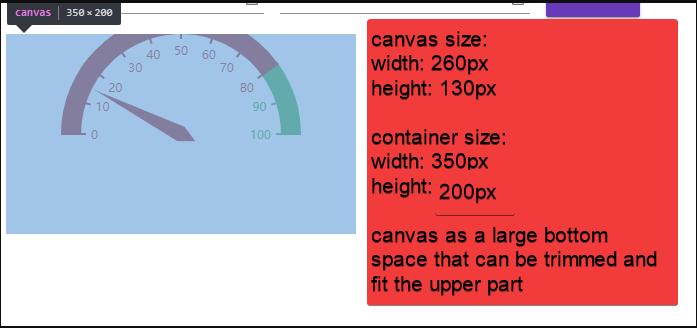 ### Version & Environment [版本及环境] + ECharts version [ECharts 版本]: v4.1.0 + Browser version [浏览器类型和版本]: Chrome v68 + OS Version [操作系统类型和版本]: Windows 10 ### Expected behaviour [期望结果] The bottom part of the canvas should be trimmed or make the canvas content vertical aligned so I can fit it to the limited container height size.  ### ECharts option [ECharts配置项] <!-- Copy and paste your 'echarts option' here. --> <!-- [下方贴你的option,注意不要删掉下方 ```javascript 和 尾部的 ``` 字样。最好是我们能够直接运行的 option。如何得到能运行的 option 参见上方的 guidelines for contributing] --> ```javascript option = { tooltip: { formatter: 'Demo' }, series: [ { startAngle: 180, endAngle: 0, radius: 120, axisTick: undefined, axisLine: { lineStyle: { width: 20, color: [[80 / 100, '#aa2e25'], [1, '#4caf50']] } }, splitLine: { length: 25, lineStyle: { color: 'auto' } }, name: '', type: 'gauge', detail: { show: false }, data: [ { value: 15 } ] } ] } ``` ```html <div id="echarts-gauge" style="width: 350px;height:200px;"></div> ``` http://echarts.baidu.com/examples/editor.html?c=gauge-car
----------------------------------------------------------------
This is an automated message from the Apache Git Service.
To respond to the message, please log on GitHub and use the
URL above to go to the specific comment.

For queries about this service, please contact Infrastructure at:
[email protected]


With regards,
Apache Git Services

---------------------------------------------------------------------
To unsubscribe, e-mail: [email protected]
For additional commands, e-mail: [email protected]


