tmtron opened a new issue #10228: wrong line display after setOption() URL: https://github.com/apache/incubator-echarts/issues/10228 ### Version 4.2.1 ### Reproduction link [https://jsfiddle.net/tmtron/brndo1hf/31/](https://jsfiddle.net/tmtron/brndo1hf/31/) ### Steps to reproduce Open the jsfilddle example 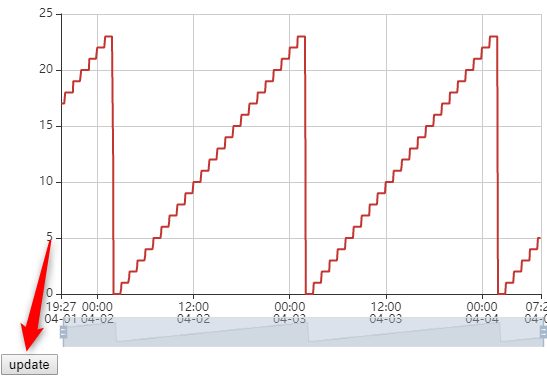 and now press the `Update` button below the chart: This will call `setOption()` with the `notMerge` parameter set to `true`. The new data will show a wrong line, that is not in the data - see the yellow highlighted part (1): 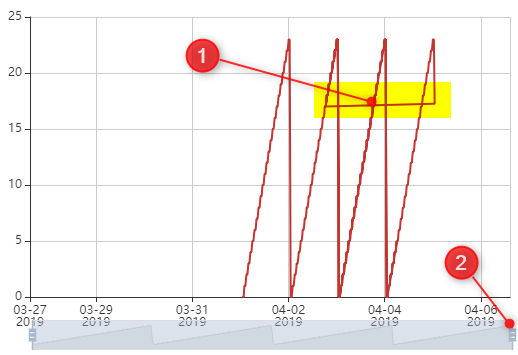 When you now move the zoom slider (2) to the left and back the data is displayed correctly 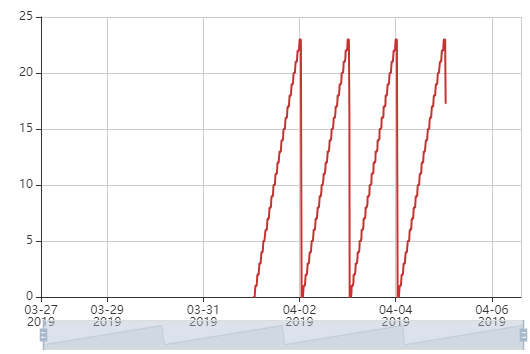 ### What is expected? Show the new data as it is. ### What is actually happening? We see a wrong line in the new data. --- notes: * the `notMerge` parameter of `setOption()` ist `true`, but still the wrong line is shown * to make sure, that the data is correct, we can directly display `option2` in the js-fiddle example * replace `myChart.setOption(option);` * with `myChart.setOption(option2);` * then press the `Run` button at the left top --> the data is shown correctly * maybe this is related to #6202 * as a workaround I can call `myChart.clear()` before setting the option * it seems to be related to the `filterMode`: * `filter` and `weakFilter`: show the wrong line * `empty` and `none` work fine <!-- This issue is generated by echarts-issue-helper. DO NOT REMOVE --> <!-- This issue is in English. DO NOT REMOVE -->
----------------------------------------------------------------
This is an automated message from the Apache Git Service.
To respond to the message, please log on to GitHub and use the
URL above to go to the specific comment.

For queries about this service, please contact Infrastructure at:
[email protected]


With regards,
Apache Git Services

---------------------------------------------------------------------
To unsubscribe, e-mail: [email protected]
For additional commands, e-mail: [email protected]



