Dear Wiki user,

You have subscribed to a wiki page or wiki category on "Lenya Wiki" for change
notification.
The following page has been changed by GregorRothfuss:
http://wiki.apache.org/lenya/GETLenya

The comment on the change is:
obsolete

------------------------------------------------------------------------------
+ deleted
- = No longer accurate =
- This is no longer accurate because Lenya now uses SVN.

- Other than CVS access to SVN is not installed automatically with Eclipse but
you need a plugin.
-
- See: [http://subclipse.tigris.org/], the easiest way of adding the SVN plugin
to Eclipse is to add [http://subclipse.tigris.org/update] as an update site to
Eclipse and install the plugin in from there.
-
-
- == How to get [:Lenya] / Cocoon with Eclipse? ==
- Same as Cocoon, Lenya's build system has a target to create the
[http://www.eclipse.org Eclipse] project files automatically. Because Lenya
depends on Cocoon, first we need to create the cocoon project for eclipse:
-
-  1.  {{{cd $COCOON_HOME}}} and run {{{build eclipse-project}}}: this creates
the {{{.project}}} and {{{.classpath}}} files for Cocoon.
-  *  Run {{{build eclipse-project}}}: this creates the {{{.project}}} and
{{{.classpath}}} files,
-  *  {{{cd $LENYA_HOME}}} and run {{{build eclipse-project}}} too.
-  *  Launch Eclipse,
-  *  On the menu select File/Import.
-  *  In the dialog select: "Existing Project into Workspace" and click on
"next" button
-  *  Click on "browse" and select $COCOON_HOME directory.
-  *  Click on "Finish" button.
-  *  On the menu select File/Import.
-  *  In the dialog select: "Existing Project into Workspace" and click on
"next" button
-  *  Click on "browse" and select the $LENYA_HOME directory.
-  *  Click on "Finish" button.
-  *  Now see
[http://www.cis.upenn.edu/~matuszek/cit594-2004/Pages/eclipse-faq.html#assert
How do I get the assert statement to work in eclipse?]
-
- === explained on WinXP ===
- '''1. - download Eclipse'''
- [http://eclipse.org download] the newest version of Eclipse! I unziped the
file to D:\opensource\bin\eclipse! So for me the following is correct, but your
setting can be different.{{{ECLIPSE_HOME=D:\opensource\bin\eclipse
- I will refer to that path as $ECLIPSE_HOME}}} If you want to tune your
eclipse with plugins have a look at GetStarted.
-
- '''2. create a new project (you have to do it 2 times)'''
- Open your new Eclipse installation and follow the following steps.
-
- '''Note:'''
- {{{You should create two directories within the directory where tomcat resides
- e.g. with D:\opensource\bin\tomcat 4.1, makes D:\opensource\bin\lenya and
D:\opensource\bin\cocoon}}}
- {{{The root is the menu bar of eclipse}}}
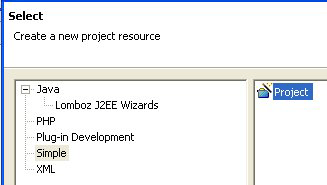
-  *  file - new - project
- [http://www.target-x.de/lenya/img/lenya-project_001.png]
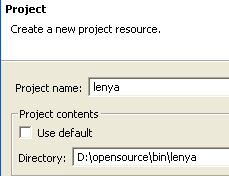
-  *  Project name: lenya
-  *  Project contents - use default '''(false)'''
-  *  Directory: D:\opensource\bin\lenya
- [http://www.target-x.de/lenya/img/lenya-project_002.png]
-
- '''3. CVS root for lenya'''
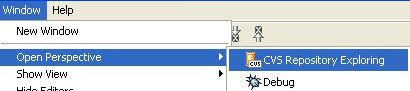
-  *  window - Open Perspective - CVS Repository Exploring
- [http://www.target-x.de/lenya/img/lenya-project_003.png]
-
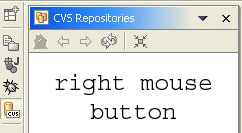
- within CVS Repositories View
-
- [http://www.target-x.de/lenya/img/lenya-project_004.png]
-
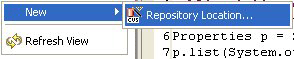
- -> right mouse button (rmb): new - Repository Location
- [http://www.target-x.de/lenya/img/lenya-project_005.png]
-
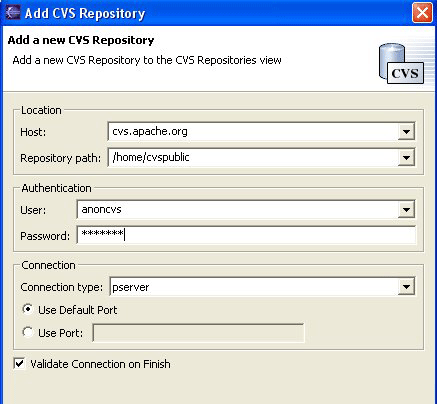
- '''Public'''
-  *  Host: cvs.apache.org
-  *  repository path : /home/cvspublic
-  *  user: anoncvs
-  *  password: anoncvs
-  *  connection type: pserver
-
- [http://www.target-x.de/lenya/img/lenya-project_006.png]
-
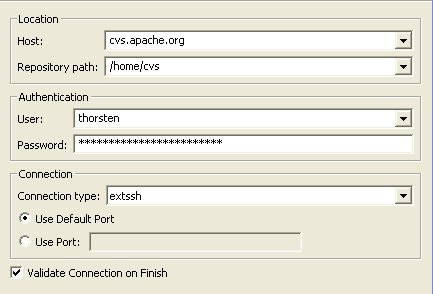
- '''Committer'''
-  *  Host: cvs.apache.org
-  *  repository path : /home/cvs
-  *  user: USER
-  *  password: USERPASSWORD
-  *  connection type: extssh
- [http://www.target-x.de/lenya/img/lenya-project_010.png]
-
-

---------------------------------------------------------------------
To unsubscribe, e-mail: [EMAIL PROTECTED]
For additional commands, e-mail: [EMAIL PROTECTED]