adminnz opened a new issue #254:
URL: https://github.com/apache/pulsar-helm-chart/issues/254
**Describe the bug** When installing the Helm chart with examples/values-minikube.yaml with a modification make it install pulsar_manager. The puslar manager pod is started along with the service and I can access the login page, but the username "pulsar" and password "pulsar" that are set as environment variables on the pod do not work to login. Also checking the pulsar-mini-pulsar-manager-secret shows PULSAR_MANAGER_ADMIN_PASSWORD & PULSAR_MANAGER_ADMIN_USER set with "pulsar" (without quotes). Note: I can login to the Grafana dashboard. **To Reproduce** Steps to reproduce the behavior: 1. Follow the Install Pulsar Helm Chart guide [here](https://pulsar.apache.org/docs/en/kubernetes-helm/#step-1-install-pulsar-helm-chart) 2. modify the examples/values-minikube.yaml file to have pulsar_manager: true set under components. 3. minikube service -n pulsar pulsar-mini-pulsar-manager 4. Go to login page, enter username = "pulsar" and password = "pulsar" without quotes, and it returns "the username or password is incorrect" **Expected behavior** The username & password should work **Screenshots** 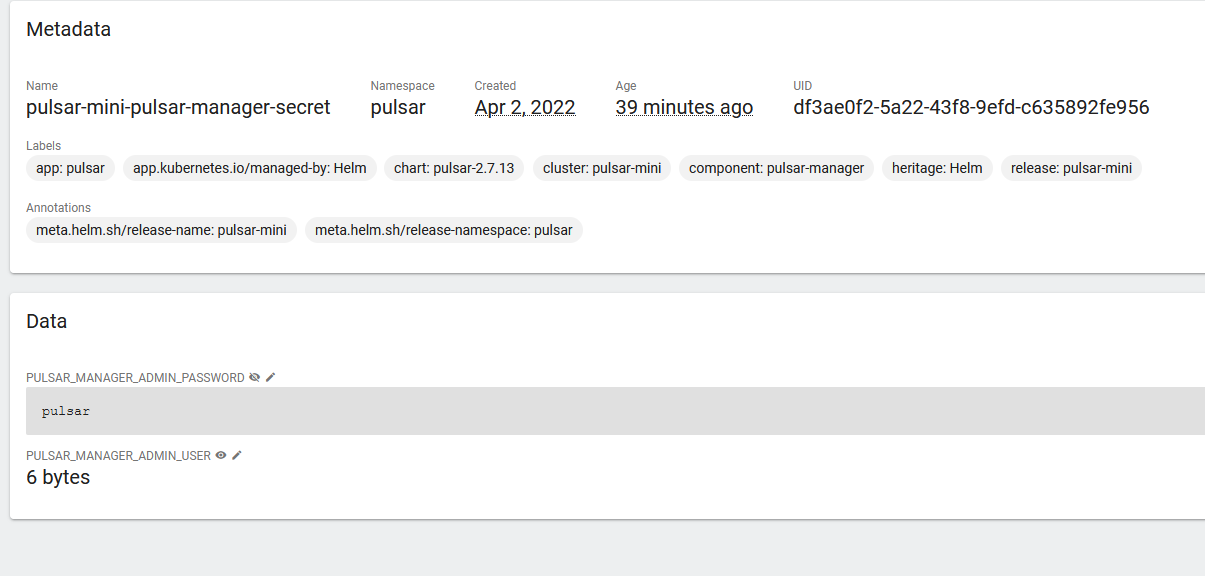  **Desktop (please complete the following information):** - OS: Windows, with Docker & Minikube (Note: I could not run the scripts/pulsar/prepare_helm_release.sh because it doesnt work on windows), so i manually created the namespace. **Additional context** -- This is an automated message from the Apache Git Service. To respond to the message, please log on to GitHub and use the URL above to go to the specific comment. To unsubscribe, e-mail: [email protected] For queries about this service, please contact Infrastructure at: [email protected]


