Hello Siddhesh

Thanks for all your answers to my questions.
Le 28/06/2017 à 20:25, Siddhesh Rane a écrit :

> The tab structure right now is temporary, for development convenience.
> All the contents inside the tabs are independent panes with their own
> fxml files and controllers. These can be shifted anywhere or embedded
> anywhere (like in an about window) very easily by just modifyng top
> level fxml and its controller code. I'm following a bottom-up
> development model. So I'm focusing on the core low-level views such as
> MetadataView and CRS. Then I'll move up and begin integrating them in
> the larger app. Thats when features such as shifting to already open
> tab and cosmetic changes will be done.
>
I understand, it looks a good approach.


> Right now I will write switch-case kind of code which will check the
> "name" field and accordingly expand or collapse the tab. But a more
> generic approach is to have preferences file that lists what nodes
> must be expanded. This can be reused for both About information as
> well as metadata. Another advantage being that the user can manually
> edit the file to indicate his preferences.
>
Indeed, it seems an interesting approach.


>> Did you have some though about designing an overview with only the
>> main metadata on a flat page? It could be a button in the metadata
>> tab for allowing users to switch between overview and detailed view.
>>
> The generic approach mentioned above can be used for this purpose too.
> BTW can you elaborate on what constitutes the main metadata? Looking
> over sample files it seems the "Spatial Representation info" and
> "Identification info" contain the most useful data so is it the main
> metadata?
>
I was thinking about no tree at all for the "summary" view. It could be
a flat page giving a view in one glance of about 10 metadata elements
that are otherwise spread over the tree. One example is the following
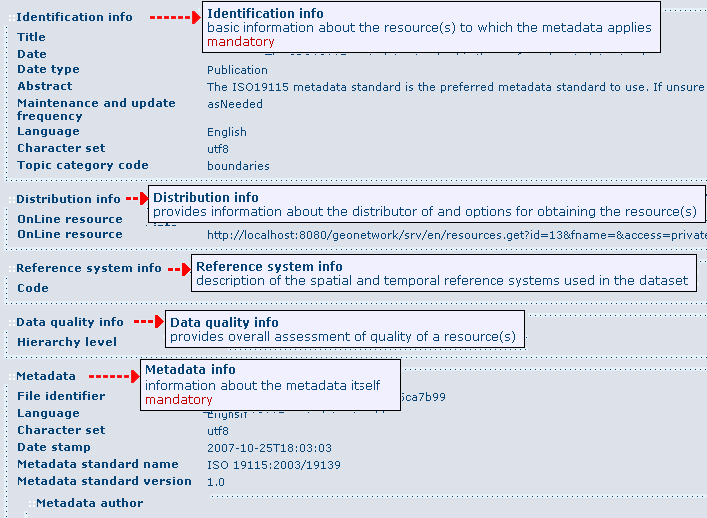
images from Geonetwork (but maybe we could simplify more):

http://geonetwork-opensource.org/manuals/2.10.4/eng/users/_images/mainSections.png

For example in above image, under the "Identification info" section, the
"Title" appears directly (it does not show the intermediate "Citation"
node, and does not show other "Citation" elements like "alternate
titles", "series", etc.). Following this example, I would suggest to
begin with "Title", "Abstract", and "Topic categories" only for
starting. After future development cycles, we would add progressively
more elements like the geographic extent (skipped for now because not so
simple - see below).


>> What is the current state of development for other types?
>>
> The CRS related types are still remaining. Support is read only.
> Current UI relies on TreeTable's decomposition of types into more
> primitive types which can be suboptimal. For example
> GeographicBoundingBox defines 2 latitudes and 2 longitudes which
> appear as children under "Extent" node. Problems with current
> approach: * occupy 4 rows of the table vertically * Exposed as a
> double, without information about its range, so out of range values
> can be put in and lead to exceptions. * All 4 doubles are independent.
> But in reality the south bound latitude cannot be greater than the
> north bound. Exception thrown again.
>
Yes I agree. This is why I think we need specialized cell renderers not
only for primitive types like Double, Boolean, Date, etc., but also for
some bigger metadata objects like GeographicBoundingBox. I think it
would be nice that when the TreeTable see a GeographicBoundingBox, it
does not expand the 4 values but instead uses a specialized renderer. It
could be a rectangle on a world map, or it could be a panel with 4
fields disposed like that:

         North
    West       East
         South

or other ideas.


> A more optimal and intuitive UI control would be one horizontal range
> slider for longitude (-180 to +180) and a vertical range slider for
> latitude (-90 to +90).
>
I'm not sure about range sliders for geographic bounding boxes. I think
that sliders are nice for controlling things with immediate effect on
what the user can see or feel (e.g. sound volume, image contrast, etc.).
But in the case of geographic area, those numerical values are usually
computed from the actual data. If the user really wants to modify them,
it may be because (s)he wants rounded values, or (s)he wants to match
the values expected by some system (e.g. because the data is part of a
larger dataset), in which case I think (s)he may prefer to edit the
numerical values directly.

    Martin