This is an automated email from the ASF dual-hosted git repository.

liuxun pushed a commit to branch master
in repository https://gitbox.apache.org/repos/asf/submarine.git
The following commit(s) were added to refs/heads/master by this push:
new 31f9322 SUBMARINE-370. Add & update some documentation for MXNet
31f9322 is described below
commit 31f9322216307f958a1c3ec79e8a09cb0a5f5b5e
Author: Ryan Lo <[email protected]>
AuthorDate: Sat Apr 18 19:02:29 2020 +0800
SUBMARINE-370. Add & update some documentation for MXNet
### What is this PR for?
Update and add documents related to MXNet.
If any other documents are required to update, please let me know.
Thanks!
### What type of PR is it?
[Documentation]
### Todos
* [ ] - Task
### What is the Jira issue?
[SUBMARINE-370](https://issues.apache.org/jira/projects/SUBMARINE/issues/SUBMARINE-370)
### How should this be tested?
[passed
CI](https://travis-ci.org/github/lowc1012/submarine/builds/676124546)
### Screenshots (if appropriate)
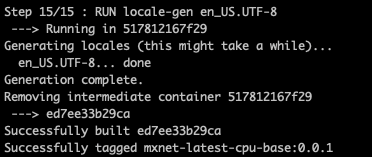
<img width="356" alt="螢幕快照 2020-04-18 下午6 58 28"
src="https://user-images.githubusercontent.com/52355146/79636054-9c4c7780-81a7-11ea-86bf-7a1ce6976cf9.png";>
### Questions:
* Does the licenses files need update? No
* Is there breaking changes for older versions? No
* Does this needs documentation? No
Author: Ryan Lo <[email protected]>
Closes #265 from lowc1012/SUBMARINE-370 and squashes the following commits:
211afab [Ryan Lo] SUBMARINE-370. Update Dockerfile, TonYRuntimeGuide.md,
WriteDockerfileMX.md
e85ba87 [Ryan Lo] SUBMARINE-370. Add & update some documentation for MXNet
---
README.md | 4 +-
docs/README.md | 2 +
docs/helper/QuickStart.md | 195 ++++++++++++++-------
docs/helper/TonYRuntimeGuide.md | 173 +++++++++++++-----
docs/helper/WriteDockerfileMX.md | 88 ++++++++++
.../base/ubuntu-18.04/Dockerfile.cpu.mx_latest | 49 ++++++
.../base/ubuntu-18.04/Dockerfile.gpu.mx_latest | 49 ++++++
docs/helper/docker/mxnet/build-all.sh | 25 +++
.../mxnet/cifar10/Dockerfile.cifar10.mx_1.5.1 | 62 +++++++
9 files changed, 541 insertions(+), 106 deletions(-)
diff --git a/README.md b/README.md
index 5a85c6b..5c78c7f 100644
--- a/README.md
+++ b/README.md
@@ -24,7 +24,7 @@ Apache Submarine is a unified AI platform which allows
engineers and data scient
Goals of Submarine:
- It allows jobs easy access data/models in HDFS and other storages.
-- Can launch services to serve TensorFlow/PyTorch models.
+- Can launch services to serve TensorFlow/PyTorch/MXNet models.
- Support run distributed TensorFlow jobs with simple configs.
- Support run user-specified Docker images.
- Support specify GPU and other resources.
@@ -71,7 +71,7 @@ The submarine core is the execution engine of the system and
has the following f
- **ML Engine**
- Support for multiple machine learning framework access, such as tensorflow,
pytorch.
+ Support for multiple machine learning framework access, such as tensorflow,
pytorch, mxnet.
- **Data Engine**
diff --git a/docs/README.md b/docs/README.md
index 854606d..299bd7b 100644
--- a/docs/README.md
+++ b/docs/README.md
@@ -57,6 +57,8 @@ Here're some examples about Submarine usage.
[How to write Dockerfile for Submarine PyTorch
jobs](./helper/WriteDockerfilePT.md)
+[How to write Dockerfile for Submarine MXNet
jobs](./helper/WriteDockerfileMX.md)
+
[How to write Dockerfile for Submarine Kaldi
jobs](./ecosystem/kaldi/WriteDockerfileKaldi.md)
## Install Dependencies
diff --git a/docs/helper/QuickStart.md b/docs/helper/QuickStart.md
index 2e881db..2987082 100644
--- a/docs/helper/QuickStart.md
+++ b/docs/helper/QuickStart.md
@@ -33,7 +33,7 @@ Optional:
## Submarine Configuration
-After submarine 0.2.0, it supports two runtimes which are YARN service runtime
and Linkedin's TonY runtime for YARN. Each runtime can support both Tensorflow
and PyTorch framework. But we don't need to worry about the usage because the
two runtime implements the same interface.
+After submarine 0.2.0, it supports two runtimes which are YARN service runtime
and Linkedin's TonY runtime for YARN. Each runtime can support TensorFlow,
PyTorch and MXNet framework. But we don't need to worry about the usage because
the two runtime implements the same interface.
So before we start running a job, the runtime type should be picked. The
runtime choice may vary depending on different requirements. Check below table
to choose your runtime.
@@ -123,68 +123,137 @@ Or from YARN UI:
## Submarine Commandline options
```$xslt
-usage: ... job run
-
- -framework <arg> Framework to use.
- Valid values are: tensorflow, pytorch.
- The default framework is Tensorflow.
- -checkpoint_path <arg> Training output directory of the job, could
- be local or other FS directory. This
- typically includes checkpoint files and
- exported model
- -docker_image <arg> Docker image name/tag
- -env <arg> Common environment variable of worker/ps
- -input_path <arg> Input of the job, could be local or other FS
- directory
- -name <arg> Name of the job
- -num_ps <arg> Number of PS tasks of the job, by default
- it's 0
- -num_workers <arg> Numnber of worker tasks of the job, by
- default it's 1
- -ps_docker_image <arg> Specify docker image for PS, when this is
- not specified, PS uses --docker_image as
- default.
- -ps_launch_cmd <arg> Commandline of worker, arguments will be
- directly used to launch the PS
- -ps_resources <arg> Resource of each PS, for example
- memory-mb=2048,vcores=2,yarn.io/gpu=2
- -queue <arg> Name of queue to run the job, by default it
- uses default queue
- -saved_model_path <arg> Model exported path (savedmodel) of the job,
- which is needed when exported model is not
- placed under ${checkpoint_path}could be
- local or other FS directory. This will be
- used to serve.
- -tensorboard <arg> Should we run TensorBoard for this job? By
- default it's true
- -verbose Print verbose log for troubleshooting
- -wait_job_finish Specified when user want to wait the job
- finish
- -worker_docker_image <arg> Specify docker image for WORKER, when this
- is not specified, WORKER uses --docker_image
- as default.
- -worker_launch_cmd <arg> Commandline of worker, arguments will be
- directly used to launch the worker
- -worker_resources <arg> Resource of each worker, for example
- memory-mb=2048,vcores=2,yarn.io/gpu=2
- -localization <arg> Specify localization to remote/local
- file/directory available to all
container(Docker).
- Argument format is "RemoteUri:LocalFilePath[:rw]"
- (ro permission is not supported yet).
- The RemoteUri can be a file or directory in local
- or HDFS or s3 or abfs or http .etc.
- The LocalFilePath can be absolute or relative.
- If relative, it'll be under container's implied
- working directory.
- This option can be set mutiple times.
- Examples are
- -localization
"hdfs:///user/yarn/mydir2:/opt/data"
- -localization "s3a:///a/b/myfile1:./"
- -localization "https:///a/b/myfile2:./myfile";
- -localization "/user/yarn/mydir3:/opt/mydir3"
- -localization "./mydir1:."
- -conf <arg> User specified configuration, as
- key=val pairs.
+usage: job run
+ -checkpoint_path <arg> Training output directory of the job,
+ could be local or other FS directory.
+ This typically includes checkpoint
+ files and exported model
+ -conf <arg> User specified configuration, as
+ key=val pairs.
+ -distribute_keytab Distribute local keytab to cluster
+ machines for service authentication. If
+ not specified, pre-distributed keytab
+ of which path specified by
+ parameterkeytab on cluster machines
+ will be used
+ -docker_image <arg> Docker image name/tag
+ -env <arg> Common environment variable of
+ worker/ps
+ -f <arg> Config file (in YAML format)
+ -framework <arg> Framework to use. Valid values are:
+ tensorlow,pytorch,mxnet! The default
+ framework is tensorflow.
+ -h,--help Print help
+ -input_path <arg> Input of the job, could be local or
+ other FS directory
+ -insecure Cluster is not Kerberos enabled.
+ -keytab <arg> Specify keytab used by the job under
+ security environment
+ -localization <arg> Specify localization to make
+ remote/local file/directory available
+ to all container(Docker). Argument
+ format is "RemoteUri:LocalFilePath[:rw]
+ " (ro permission is not supported yet)
+ The RemoteUri can be a file or
+ directory in local or HDFS or s3 or
+ abfs or http .etc. The LocalFilePath
+ can be absolute or relative. If it's a
+ relative path, it'll be under
+ container's implied working directory
+ but sub directory is not supported yet.
+ This option can be set mutiple times.
+ Examples are
+ -localization
+ "hdfs:///user/yarn/mydir2:/opt/data"
+ -localization "s3a:///a/b/myfile1:./"
+ -localization
+ "https:///a/b/myfile2:./myfile";
+ -localization
+ "/user/yarn/mydir3:/opt/mydir3"
+ -localization "./mydir1:."
+ -name <arg> Name of the job
+ -num_ps <arg> Number of PS tasks of the job, by
+ default it's 0. Can be used with
+ TensorFlow or MXNet frameworks.
+ -num_schedulers <arg> Number of scheduler tasks of the job.
+ It should be 1 or 0, by default it's
+ 0.Can only be used with MXNet
+ framework.
+ -num_workers <arg> Number of worker tasks of the job, by
+ default it's 1.Can be used with
+ TensorFlow or PyTorch or MXNet
+ frameworks.
+ -principal <arg> Specify principal used by the job under
+ security environment
+ -ps_docker_image <arg> Specify docker image for PS, when this
+ is not specified, PS uses
+ --docker_image as default.Can be used
+ with TensorFlow or MXNet frameworks.
+ -ps_launch_cmd <arg> Commandline of PS, arguments will be
+ directly used to launch the PSCan be
+ used with TensorFlow or MXNet
+ frameworks.
+ -ps_resources <arg> Resource of each PS, for example
+ memory-mb=2048,vcores=2,yarn.io/gpu=2Ca
+ n be used with TensorFlow or MXNet
+ frameworks.
+ -queue <arg> Name of queue to run the job, by
+ default it uses default queue
+ -quicklink <arg> Specify quicklink so YARNweb UI shows
+ link to given role instance and port.
+ When --tensorboard is specified,
+ quicklink to tensorboard instance will
+ be added automatically. The format of
+ quick link is: Quick_link_label=http(or
+ https)://role-name:port. For example,
+ if want to link to first worker's 7070
+ port, and text of quicklink is
+ Notebook_UI, user need to specify
+ --quicklink
+ Notebook_UI=https://master-0:7070
+ -saved_model_path <arg> Model exported path (savedmodel) of the
+ job, which is needed when exported
+ model is not placed under
+ ${checkpoint_path}could be local or
+ other FS directory. This will be used
+ to serve.
+ -scheduler_docker_image <arg> Specify docker image for scheduler,
+ when this is not specified, scheduler
+ uses --docker_image as default. Can
+ only be used with MXNet framework.
+ -scheduler_launch_cmd <arg> Commandline of scheduler, arguments
+ will be directly used to launch the
+ scheduler. Can only be used with MXNet
+ framework.
+ -scheduler_resources <arg> Resource of each scheduler, for example
+ memory-mb=2048,vcores=2. Can only be
+ used with MXNet framework.
+ -tensorboard Should we run TensorBoard for this job?
+ By default it's disabled.Can only be
+ used with TensorFlow framework.
+ -tensorboard_docker_image <arg> Specify Tensorboard docker image. when
+ this is not specified, Tensorboard uses
+ --docker_image as default.Can only be
+ used with TensorFlow framework.
+ -tensorboard_resources <arg> Specify resources of Tensorboard, by
+ default it is memory=4G,vcores=1.Can
+ only be used with TensorFlow framework.
+ -verbose Print verbose log for troubleshooting
+ -wait_job_finish Specified when user want to wait the
+ job finish
+ -worker_docker_image <arg> Specify docker image for WORKER, when
+ this is not specified, WORKER uses
+ --docker_image as default.Can be used
+ with TensorFlow or PyTorch or MXNet
+ frameworks.
+ -worker_launch_cmd <arg> Commandline of worker, arguments will
+ be directly used to launch the
+ workerCan be used with TensorFlow or
+ PyTorch or MXNet frameworks.
+ -worker_resources <arg> Resource of each worker, for example
+ memory-mb=2048,vcores=2,yarn.io/gpu=2Ca
+ n be used with TensorFlow or PyTorch or
+ MXNet frameworks.
```
#### Notes:
diff --git a/docs/helper/TonYRuntimeGuide.md b/docs/helper/TonYRuntimeGuide.md
index 8f602f5..dd367c5 100644
--- a/docs/helper/TonYRuntimeGuide.md
+++ b/docs/helper/TonYRuntimeGuide.md
@@ -26,9 +26,7 @@ Check out the [QuickStart](QuickStart.md)
You need:
* Build a Python virtual environment with TensorFlow 1.13.1 installed
-* A cluster with Hadoop 2.7 or above.
-* TonY library 0.3.2 or above. Download from
[here](https://github.com/linkedin/TonY/releases)
-
+* A cluster with Hadoop 2.9 or above.
### Building a Python virtual environment with TensorFlow
@@ -58,9 +56,9 @@ Get mnist_distributed.py from
https://github.com/linkedin/TonY/tree/master/tony-
```
-SUBMARINE_VERSION=0.2.0
-SUBMARINE_HOME=path-to/hadoop-submarine-dist-0.2.0-hadoop-3.1
-CLASSPATH=$(hadoop classpath
--glob):${SUBMARINE_HOME}/hadoop-submarine-core-${SUBMARINE_VERSION}.jar:${SUBMARINE_HOME}/hadoop-submarine-tony-runtime-${SUBMARINE_VERSION}.jar:path-to/tony-cli-0.3.13-all.jar
\
+SUBMARINE_VERSION=0.4.0-SNAPSHOT
+SUBMARINE_HADOOP_VERSION=3.1
+CLASSPATH=$(hadoop classpath
--glob):path-to/submarine-all-${SUBMARINE_VERSION}-hadoop-${SUBMARINE_HADOOP_VERSION}.jar
\
java org.apache.submarine.client.cli.Cli job run --name tf-job-001 \
--framework tensorflow \
--verbose \
@@ -72,8 +70,7 @@ java org.apache.submarine.client.cli.Cli job run --name
tf-job-001 \
--worker_launch_cmd "myvenv.zip/venv/bin/python mnist_distributed.py --steps
2 --data_dir /tmp/data --working_dir /tmp/mode" \
--ps_launch_cmd "myvenv.zip/venv/bin/python mnist_distributed.py --steps 2
--data_dir /tmp/data --working_dir /tmp/mode" \
--insecure \
- --conf
tony.containers.resources=path-to/myvenv.zip#archive,path-to/mnist_distributed.py,path-to/tony-cli-0.3.13-all.jar
-
+ --conf
tony.containers.resources=path-to/myvenv.zip#archive,path-to/mnist_distributed.py,path-to/submarine-all-${SUBMARINE_VERSION}-hadoop-${SUBMARINE_HADOOP_VERSION}.jar
```
You should then be able to see links and status of the jobs from command line:
@@ -93,12 +90,12 @@ You should then be able to see links and status of the jobs
from command line:
### With Docker
```
-SUBMARINE_VERSION=0.2.0
-SUBMARINE_HOME=path-to/hadoop-submarine-dist-0.2.0-hadoop-3.1
-CLASSPATH=$(hadoop classpath
--glob):${SUBMARINE_HOME}/hadoop-submarine-core-${SUBMARINE_VERSION}.jar:${SUBMARINE_HOME}/hadoop-submarine-tony-runtime-${SUBMARINE_VERSION}.jar:path-to/tony-cli-0.3.13-all.jar
\
+SUBMARINE_VERSION=0.4.0-SNAPSHOT
+SUBMARINE_HADOOP_VERSION=3.1
+CLASSPATH=$(hadoop classpath
--glob):path-to/submarine-all-${SUBMARINE_VERSION}-hadoop-${SUBMARINE_HADOOP_VERSION}.jar
\
java org.apache.submarine.client.cli.Cli job run --name tf-job-001 \
--framework tensorflow \
- --docker_image hadoopsubmarine/tf-1.8.0-cpu:0.0.3 \
+ --docker_image hadoopsubmarine/tf-1.8.0-cpu:0.0.1 \
--input_path hdfs://pi-aw:9000/dataset/cifar-10-data \
--worker_resources memory=3G,vcores=2 \
--worker_launch_cmd "export CLASSPATH=\$(/hadoop-3.1.0/bin/hadoop classpath
--glob) && cd /test/models/tutorials/image/cifar10_estimator && python
cifar10_main.py --data-dir=%input_path% --job-dir=%checkpoint_path%
--train-steps=10000 --eval-batch-size=16 --train-batch-size=16
--variable-strategy=CPU --num-gpus=0 --sync" \
@@ -110,26 +107,27 @@ java org.apache.submarine.client.cli.Cli job run --name
tf-job-001 \
--env HADOOP_COMMON_HOME=/hadoop-3.1.0 \
--env HADOOP_HDFS_HOME=/hadoop-3.1.0 \
--env HADOOP_CONF_DIR=/hadoop-3.1.0/etc/hadoop \
- --conf
tony.containers.resources=/home/pi/hadoop/TonY/tony-cli/build/libs/tony-cli-0.3.2-all.jar
+ --conf
tony.containers.resources=path-to/submarine-all-${SUBMARINE_VERSION}-hadoop-${SUBMARINE_HADOOP_VERSION}.jar
```
#### Notes:
1) `DOCKER_JAVA_HOME` points to JAVA_HOME inside Docker image.
2) `DOCKER_HADOOP_HDFS_HOME` points to HADOOP_HDFS_HOME inside Docker image.
-After Submarine v0.2.0, there is a uber jar
`hadoop-submarine-all-${SUBMARINE_VERSION}-hadoop-${HADOOP_VERSION}.jar`
released together with
-the `hadoop-submarine-core-${SUBMARINE_VERSION}.jar`,
`hadoop-submarine-yarnservice-runtime-${SUBMARINE_VERSION}.jar` and
`hadoop-submarine-tony-runtime-${SUBMARINE_VERSION}.jar`.
+We removed TonY submodule after applying
[SUBMARINE-371](https://issues.apache.org/jira/browse/SUBMARINE-371) and
changed to use TonY dependency directly.
+
+After Submarine v0.2.0, there is a uber jar
`submarine-all-${SUBMARINE_VERSION}-hadoop-${HADOOP_VERSION}.jar` released
together with
+the `submarine-core-${SUBMARINE_VERSION}.jar`,
`submarine-yarnservice-runtime-${SUBMARINE_VERSION}.jar` and
`submarine-tony-runtime-${SUBMARINE_VERSION}.jar`.
<br />
-To use the uber jar, we need to replace the three jars in previous command
with one uber jar and put hadoop config directory in CLASSPATH.
-## Launch PyToch Application:
+## Launch PyTorch Application:
### Without Docker
You need:
* Build a Python virtual environment with PyTorch 0.4.0+ installed
-
+* A cluster with Hadoop 2.9 or above.
### Building a Python virtual environment with PyTorch
@@ -153,10 +151,11 @@ Get mnist_distributed.py from
https://github.com/linkedin/TonY/tree/master/tony-
```
-SUBMARINE_VERSION=0.2.0
-SUBMARINE_HOME=path-to/hadoop-submarine-dist-0.2.0-hadoop-3.1
-CLASSPATH=$(hadoop classpath
--glob):${SUBMARINE_HOME}/hadoop-submarine-core-${SUBMARINE_VERSION}.jar:${SUBMARINE_HOME}/hadoop-submarine-tony-runtime-${SUBMARINE_VERSION}.jar:path-to/tony-cli-0.3.13-all.jar
\
-java org.apache.submarine.client.cli.Cli job run --name tf-job-001 \
+SUBMARINE_VERSION=0.4.0-SNAPSHOT
+SUBMARINE_HADOOP_VERSION=3.1
+CLASSPATH=$(hadoop classpath
--glob):path-to/submarine-all-${SUBMARINE_VERSION}-hadoop-${SUBMARINE_HADOOP_VERSION}.jar
\
+java org.apache.submarine.client.cli.Cli job run --name PyTorch-job-001 \
+ --framework pytorch
--num_workers 2 \
--worker_resources memory=3G,vcores=2 \
--num_ps 2 \
@@ -164,10 +163,8 @@ java org.apache.submarine.client.cli.Cli job run --name
tf-job-001 \
--worker_launch_cmd "myvenv.zip/venv/bin/python mnist_distributed.py" \
--ps_launch_cmd "myvenv.zip/venv/bin/python mnist_distributed.py" \
--insecure \
- --conf
tony.containers.resources=PATH_TO_VENV_YOU_CREATED/myvenv.zip#archive,PATH_TO_MNIST_EXAMPLE/mnist_distributed.py,
\
-PATH_TO_TONY_CLI_JAR/tony-cli-0.3.2-all.jar \
---conf tony.application.framework=pytorch
-
+ --conf
tony.containers.resources=path-to/myvenv.zip#archive,path-to/mnist_distributed.py,
\
+path-to/submarine-all-${SUBMARINE_VERSION}-hadoop-${SUBMARINE_HADOOP_VERSION}.jar
```
You should then be able to see links and status of the jobs from command line:
@@ -187,23 +184,117 @@ You should then be able to see links and status of the
jobs from command line:
### With Docker
```
-SUBMARINE_VERSION=0.2.0
-SUBMARINE_HOME=path-to/hadoop-submarine-dist-0.2.0-hadoop-3.1
-CLASSPATH=$(hadoop classpath
--glob):${SUBMARINE_HOME}/hadoop-submarine-core-${SUBMARINE_VERSION}.jar:${SUBMARINE_HOME}/hadoop-submarine-tony-runtime-${SUBMARINE_VERSION}.jar:path-to/tony-cli-0.3.13-all.jar
\
-java org.apache.submarine.client.cli.Cli job run --name tf-job-001 \
- --docker_image hadoopsubmarine/tf-1.8.0-cpu:0.0.3 \
- --input_path hdfs://pi-aw:9000/dataset/cifar-10-data \
+SUBMARINE_VERSION=0.4.0-SNAPSHOT
+SUBMARINE_HADOOP_VERSION=3.1
+CLASSPATH=$(hadoop classpath
--glob):path-to/submarine-all-${SUBMARINE_VERSION}-hadoop-${SUBMARINE_HADOOP_VERSION}.jar
\
+java org.apache.submarine.client.cli.Cli job run --name PyTorch-job-001 \
+ --framework pytorch
+ --docker_image pytorch-latest-gpu:0.0.1 \
+ --input_path "" \
+ --num_workers 1 \
--worker_resources memory=3G,vcores=2 \
- --worker_launch_cmd "export CLASSPATH=\$(/hadoop-3.1.0/bin/hadoop classpath
--glob) && cd /test/models/tutorials/image/cifar10_estimator && python
cifar10_main.py --data-dir=%input_path% --job-dir=%checkpoint_path%
--train-steps=10000 --eval-batch-size=16 --train-batch-size=16
--variable-strategy=CPU --num-gpus=0 --sync" \
+ --worker_launch_cmd "cd /test/ && python cifar10_tutorial.py" \
--env JAVA_HOME=/usr/lib/jvm/java-8-openjdk-amd64 \
- --env DOCKER_HADOOP_HDFS_HOME=/hadoop-3.1.0 \
+ --env DOCKER_HADOOP_HDFS_HOME=/hadoop-3.1.2 \
--env DOCKER_JAVA_HOME=/usr/lib/jvm/java-8-openjdk-amd64 \
- --env HADOOP_HOME=/hadoop-3.1.0 \
- --env HADOOP_YARN_HOME=/hadoop-3.1.0 \
- --env HADOOP_COMMON_HOME=/hadoop-3.1.0 \
- --env HADOOP_HDFS_HOME=/hadoop-3.1.0 \
- --env HADOOP_CONF_DIR=/hadoop-3.1.0/etc/hadoop \
- --conf tony.containers.resources=PATH_TO_TONY_CLI_JAR/tony-cli-0.3.2-all.jar \
- --conf tony.application.framework=pytorch
+ --env HADOOP_HOME=/hadoop-3.1.2 \
+ --env HADOOP_YARN_HOME=/hadoop-3.1.2 \
+ --env HADOOP_COMMON_HOME=/hadoop-3.1.2 \
+ --env HADOOP_HDFS_HOME=/hadoop-3.1.2 \
+ --env HADOOP_CONF_DIR=/hadoop-3.1.2/etc/hadoop \
+ --conf
tony.containers.resources=path-to/submarine-all-${SUBMARINE_VERSION}-hadoop-${SUBMARINE_HADOOP_VERSION}.jar
+```
+
+## Launch MXNet Application:
+
+### Without Docker
+
+You need:
+
+* Build a Python virtual environment with MXNet installed
+* A cluster with Hadoop 2.9 or above.
+
+### Building a Python virtual environment with MXNet
+
+TonY requires a Python virtual environment zip with MXNet and any needed
Python libraries already installed.
+
+```
+wget
https://files.pythonhosted.org/packages/33/bc/fa0b5347139cd9564f0d44ebd2b147ac97c36b2403943dbee8a25fd74012/virtualenv-16.0.0.tar.gz
+tar xf virtualenv-16.0.0.tar.gz
+
+python virtualenv-16.0.0/virtualenv.py venv
+. venv/bin/activate
+pip install mxnet==1.5.1
+zip -r myvenv.zip venv
+deactivate
+```
+
+
+### Get the training examples
+
+Get image_classification.py from this
[link](https://github.com/apache/submarine/blob/master/dev-support/mini-submarine/submarine/image_classification.py)
+
+
+```
+SUBMARINE_VERSION=0.4.0-SNAPSHOT
+SUBMARINE_HADOOP_VERSION=3.1
+CLASSPATH=$(hadoop classpath
--glob):path-to/submarine-all-${SUBMARINE_VERSION}-hadoop-${SUBMARINE_HADOOP_VERSION}.jar
\
+java org.apache.submarine.client.cli.Cli job run --name MXNet-job-001 \
+ --framework mxnet
+ --input_path "" \
+ --num_workers 2 \
+ --worker_resources memory=3G,vcores=2 \
+ --worker_launch_cmd "myvenv.zip/venv/bin/python image_classification.py
--dataset cifar10 --model vgg11 --epochs 1 --kvstore dist_sync" \
+ --num_ps 2 \
+ --ps_resources memory=3G,vcores=2 \
+ --ps_launch_cmd "myvenv.zip/venv/bin/python image_classification.py --dataset
cifar10 --model vgg11 --epochs 1 --kvstore dist_sync" \
+ --num_schedulers=1 \
+ --scheduler_resources memory=1G,vcores=1 \
+ --scheduler_launch_cmd="myvenv.zip/venv/bin/python image_classification.py
--dataset cifar10 --model vgg11 --epochs 1 --kvstore dist_sync" \
+ --insecure \
+ --conf
tony.containers.resources=path-to/myvenv.zip#archive,path-to/image_classification.py,
\
+path-to/submarine-all-${SUBMARINE_VERSION}-hadoop-${SUBMARINE_HADOOP_VERSION}.jar
+```
+You should then be able to see links and status of the jobs from command line:
+
+```
+2020-04-16 20:23:43,834 INFO tony.TonyClient: Task status updated: [TaskInfo]
name: server, index: 1, url:
http://pi-aw:8042/node/containerlogs/container_1587037749540_0005_01_000004/pi
status: RUNNING
+2020-04-16 20:23:43,834 INFO tony.TonyClient: Task status updated: [TaskInfo]
name: server, index: 0, url:
http://pi-aw:8042/node/containerlogs/container_1587037749540_0005_01_000003/pi
status: RUNNING
+2020-04-16 20:23:43,834 INFO tony.TonyClient: Task status updated: [TaskInfo]
name: worker, index: 1, url:
http://pi-aw:8042/node/containerlogs/container_1587037749540_0005_01_000006/pi
status: RUNNING
+2020-04-16 20:23:43,834 INFO tony.TonyClient: Task status updated: [TaskInfo]
name: worker, index: 0, url:
http://pi-aw:8042/node/containerlogs/container_1587037749540_0005_01_000005/pi
status: RUNNING
+2020-04-16 20:23:43,834 INFO tony.TonyClient: Task status updated: [TaskInfo]
name: scheduler, index: 0, url:
http://pi-aw:8042/node/containerlogs/container_1587037749540_0005_01_000002/pi
status: RUNNING
+2020-04-16 20:23:43,839 INFO tony.TonyClient: Logs for scheduler 0 at:
http://pi-aw:8042/node/containerlogs/container_1587037749540_0005_01_000002/pi
+2020-04-16 20:23:43,839 INFO tony.TonyClient: Logs for server 0 at:
http://pi-aw:8042/node/containerlogs/container_1587037749540_0005_01_000003/pi
+2020-04-16 20:23:43,840 INFO tony.TonyClient: Logs for server 1 at:
http://pi-aw:8042/node/containerlogs/container_1587037749540_0005_01_000004/pi
+2020-04-16 20:23:43,840 INFO tony.TonyClient: Logs for worker 0 at:
http://pi-aw:8042/node/containerlogs/container_1587037749540_0005_01_000005/pi
+2020-04-16 20:23:43,840 INFO tony.TonyClient: Logs for worker 1 at:
http://pi-aw:8042/node/containerlogs/container_1587037749540_0005_01_000006/pi
+2020-04-16 21:02:09,723 INFO tony.TonyClient: Task status updated: [TaskInfo]
name: scheduler, index: 0, url:
http://pi-aw:8042/node/containerlogs/container_1587037749540_0005_01_000002/pi
status: SUCCEEDED
+2020-04-16 21:02:09,736 INFO tony.TonyClient: Task status updated: [TaskInfo]
name: worker, index: 0, url:
http://pi-aw:8042/node/containerlogs/container_1587037749540_0005_01_000005/pi
status: SUCCEEDED
+2020-04-16 21:02:09,737 INFO tony.TonyClient: Task status updated: [TaskInfo]
name: server, index: 1, url:
http://pi-aw:8042/node/containerlogs/container_1587037749540_0005_01_000004/pi
status: SUCCEEDED
+2020-04-16 21:02:09,737 INFO tony.TonyClient: Task status updated: [TaskInfo]
name: worker, index: 1, url:
http://pi-aw:8042/node/containerlogs/container_1587037749540_0005_01_000006/pi
status: SUCCEEDED
+2020-04-16 21:02:09,737 INFO tony.TonyClient: Task status updated: [TaskInfo]
name: server, index: 0, url:
http://pi-aw:8042/node/containerlogs/container_1587037749540_0005_01_000003/pi
status: SUCCEEDED
```
+### With Docker
+You could refer to this [sample
Dockerfile](docker/mxnet/cifar10/Dockerfile.cifar10.mx_1.5.1) for building your
own Docker image.
+```
+SUBMARINE_VERSION=0.4.0-SNAPSHOT
+SUBMARINE_HADOOP_VERSION=3.1
+CLASSPATH=$(hadoop classpath
--glob):path-to/submarine-all-${SUBMARINE_VERSION}-hadoop-${SUBMARINE_HADOOP_VERSION}.jar
\
+java org.apache.submarine.client.cli.Cli job run --name MXNet-job-001 \
+ --framework mxnet
+ --docker_image <your_docker_image> \
+ --input_path "" \
+ --num_schedulers 1 \
+ --scheduler_resources memory=1G,vcores=1 \
+ --scheduler_launch_cmd "/usr/bin/python image_classification.py --dataset
cifar10 --model vgg11 --epochs 1 --kvstore dist_sync" \
+ --num_workers 2 \
+ --worker_resources memory=2G,vcores=1 \
+ --worker_launch_cmd "/usr/bin/python image_classification.py --dataset
cifar10 --model vgg11 --epochs 1 --kvstore dist_sync" \
+ --num_ps 2 \
+ --ps_resources memory=2G,vcores=1 \
+ --ps_launch_cmd "/usr/bin/python image_classification.py --dataset cifar10
--model vgg11 --epochs 1 --kvstore dist_sync" \
+ --verbose \
+ --insecure \
+ --conf
tony.containers.resources=path-to/image_classification.py,path-to/submarine-all-${SUBMARINE_VERSION}-hadoop-${SUBMARINE_HADOOP_VERSION}.jar
+```
diff --git a/docs/helper/WriteDockerfileMX.md b/docs/helper/WriteDockerfileMX.md
new file mode 100644
index 0000000..dccf76a
--- /dev/null
+++ b/docs/helper/WriteDockerfileMX.md
@@ -0,0 +1,88 @@
+<!--
+ Licensed to the Apache Software Foundation (ASF) under one or more
+ contributor license agreements. See the NOTICE file distributed with
+ this work for additional information regarding copyright ownership.
+ The ASF licenses this file to You under the Apache License, Version 2.0
+ (the "License"); you may not use this file except in compliance with
+ the License. You may obtain a copy of the License at
+ http://www.apache.org/licenses/LICENSE-2.0
+ Unless required by applicable law or agreed to in writing, software
+ distributed under the License is distributed on an "AS IS" BASIS,
+ WITHOUT WARRANTIES OR CONDITIONS OF ANY KIND, either express or implied.
+ See the License for the specific language governing permissions and
+ limitations under the License.
+-->
+
+# Creating Docker Images for Running MXNet on YARN
+
+## How to create docker images to run MXNet on YARN
+
+Dockerfile to run MXNet on YARN needs two parts:
+
+**Base libraries which MXNet depends on**
+
+1) OS base image, for example ```ubuntu:18.04```
+
+2) MXNet dependent libraries and packages. \
+ For example ```python```, ```scipy```. For GPU support, you also need
```cuda```, ```cudnn```, etc.
+
+3) MXNet package.
+
+**Libraries to access HDFS**
+
+1) JDK
+
+2) Hadoop
+
+Here's an example of a base image (without GPU support) to install MXNet:
+```shell
+FROM ubuntu:18.04
+
+# Install some development tools and packages
+# MXNet 1.6 is going to be the last MXNet release to support Python2
+RUN apt-get update && DEBIAN_FRONTEND=noninteractive apt-get install -y tzdata
git \
+ wget zip python3 python3-pip python3-distutils libgomp1 libopenblas-dev
libopencv-dev
+
+# Install latest MXNet using pip (without GPU support)
+RUN pip3 install mxnet
+
+RUN echo "Install python related packages" && \
+ pip3 install --user graphviz==0.8.4 ipykernel jupyter matplotlib numpy
pandas scipy sklearn && \
+ python3 -m ipykernel.kernelspec
+```
+
+On top of above image, add files, install packages to access HDFS
+```shell
+ENV JAVA_HOME=/usr/lib/jvm/java-8-openjdk-amd64
+RUN apt-get update && apt-get install -y openjdk-8-jdk wget
+
+# Install hadoop
+ENV HADOOP_VERSION="3.1.2"
+RUN wget
https://archive.apache.org/dist/hadoop/common/hadoop-${HADOOP_VERSION}/hadoop-${HADOOP_VERSION}.tar.gz
+# If you are in mainland China, you can use the following command.
+# RUN wget
http://mirrors.hust.edu.cn/apache/hadoop/common/hadoop-${HADOOP_VERSION}/hadoop-${HADOOP_VERSION}.tar.gz
+
+RUN tar zxf hadoop-${HADOOP_VERSION}.tar.gz
+RUN ln -s hadoop-${HADOOP_VERSION} hadoop-current
+RUN rm hadoop-${HADOOP_VERSION}.tar.gz
+```
+
+Build and push to your own docker registry: Use ```docker build ... ``` and
```docker push ...``` to finish this step.
+
+## Use examples to build your own MXNet docker images
+
+We provided some example Dockerfiles for you to build your own MXNet docker
images.
+
+For latest MXNet
+
+- *docker/mxnet/base/ubuntu-18.04/Dockerfile.cpu.mxnet_latest*: Latest MXNet
that supports CPU
+- *docker/mxnet/base/ubuntu-18.04/Dockerfile.gpu.mxnet_latest*: Latest MXNet
that supports GPU, which is prebuilt to CUDA10.
+
+# Build Docker images
+
+### Manually build Docker image:
+
+Under `docker/mxnet` directory, run `build-all.sh` to build all Docker images.
This command will build the following Docker images:
+
+- `mxnet-latest-cpu-base:0.0.1` for base Docker image which includes Hadoop,
MXNet
+- `mxnet-latest-gpu-base:0.0.1` for base Docker image which includes Hadoop,
MXNet, GPU base libraries.
diff --git
a/docs/helper/docker/mxnet/base/ubuntu-18.04/Dockerfile.cpu.mx_latest
b/docs/helper/docker/mxnet/base/ubuntu-18.04/Dockerfile.cpu.mx_latest
new file mode 100644
index 0000000..d1f062d
--- /dev/null
+++ b/docs/helper/docker/mxnet/base/ubuntu-18.04/Dockerfile.cpu.mx_latest
@@ -0,0 +1,49 @@
+# Licensed to the Apache Software Foundation (ASF) under one or more
+# contributor license agreements. See the NOTICE file distributed with
+# this work for additional information regarding copyright ownership.
+# The ASF licenses this file to You under the Apache License, Version 2.0
+# (the "License"); you may not use this file except in compliance with
+# the License. You may obtain a copy of the License at
+#
+# http://www.apache.org/licenses/LICENSE-2.0
+#
+# Unless required by applicable law or agreed to in writing, software
+# distributed under the License is distributed on an "AS IS" BASIS,
+# WITHOUT WARRANTIES OR CONDITIONS OF ANY KIND, either express or implied.
+# See the License for the specific language governing permissions and
+# limitations under the License.
+
+FROM ubuntu:18.04
+
+# Install some development tools and packages
+# MXNet 1.6 is going to be the last MXNet release to support Python2
+RUN apt-get update && DEBIAN_FRONTEND=noninteractive apt-get install -y tzdata
git \
+ wget zip python3 python3-pip python3-distutils libgomp1 libopenblas-dev
libopencv-dev
+
+# Install latest MXNet using pip
+RUN pip3 install mxnet
+
+# Install JDK
+ENV JAVA_HOME=/usr/lib/jvm/java-8-openjdk-amd64
+RUN echo "$LOG_TAG Install java8" && \
+ apt-get update && \
+ apt-get install -y --no-install-recommends openjdk-8-jdk && \
+ apt-get clean && rm -rf /var/lib/apt/lists/*
+
+# Install Hadoop
+WORKDIR /
+RUN echo "Install Hadoop 3.1.2"
+ENV HADOOP_VERSION="3.1.2"
+RUN wget
https://archive.apache.org/dist/hadoop/common/hadoop-${HADOOP_VERSION}/hadoop-${HADOOP_VERSION}.tar.gz
+RUN tar zxf hadoop-${HADOOP_VERSION}.tar.gz
+RUN ln -s hadoop-${HADOOP_VERSION} hadoop-current
+RUN rm hadoop-${HADOOP_VERSION}.tar.gz
+
+RUN echo "Install python related packages" && \
+ pip3 install --user graphviz==0.8.4 ipykernel jupyter matplotlib numpy
pandas scipy sklearn && \
+ python3 -m ipykernel.kernelspec
+
+# Set the locale to fix bash warning: setlocale: LC_ALL: cannot change locale
(en_US.UTF-8)
+RUN apt-get update && apt-get install -y --no-install-recommends locales && \
+ apt-get clean && rm -rf /var/lib/apt/lists/*
+RUN locale-gen en_US.UTF-8
diff --git
a/docs/helper/docker/mxnet/base/ubuntu-18.04/Dockerfile.gpu.mx_latest
b/docs/helper/docker/mxnet/base/ubuntu-18.04/Dockerfile.gpu.mx_latest
new file mode 100644
index 0000000..ecfc752
--- /dev/null
+++ b/docs/helper/docker/mxnet/base/ubuntu-18.04/Dockerfile.gpu.mx_latest
@@ -0,0 +1,49 @@
+# Licensed to the Apache Software Foundation (ASF) under one or more
+# contributor license agreements. See the NOTICE file distributed with
+# this work for additional information regarding copyright ownership.
+# The ASF licenses this file to You under the Apache License, Version 2.0
+# (the "License"); you may not use this file except in compliance with
+# the License. You may obtain a copy of the License at
+#
+# http://www.apache.org/licenses/LICENSE-2.0
+#
+# Unless required by applicable law or agreed to in writing, software
+# distributed under the License is distributed on an "AS IS" BASIS,
+# WITHOUT WARRANTIES OR CONDITIONS OF ANY KIND, either express or implied.
+# See the License for the specific language governing permissions and
+# limitations under the License.
+
+FROM nvidia/cuda:10.0-cudnn7-devel-ubuntu18.04
+
+# Install some development tools and packages
+# MXNet 1.6 is going to be the last MXNet release to support Python2
+RUN apt-get update && DEBIAN_FRONTEND=noninteractive apt-get install -y tzdata
git \
+ wget zip python3 python3-pip python3-distutils libgomp1 libopenblas-dev
libopencv-dev
+
+# Install latest MXNet with CUDA-10.0 using pip
+RUN pip3 install mxnet-cu100
+
+# Install JDK
+ENV JAVA_HOME=/usr/lib/jvm/java-8-openjdk-amd64
+RUN echo "$LOG_TAG Install java8" && \
+ apt-get update && \
+ apt-get install -y --no-install-recommends openjdk-8-jdk && \
+ apt-get clean && rm -rf /var/lib/apt/lists/*
+
+# Install Hadoop
+WORKDIR /
+RUN echo "Install Hadoop 3.1.2"
+ENV HADOOP_VERSION="3.1.2"
+RUN wget
https://archive.apache.org/dist/hadoop/common/hadoop-${HADOOP_VERSION}/hadoop-${HADOOP_VERSION}.tar.gz
+RUN tar zxf hadoop-${HADOOP_VERSION}.tar.gz
+RUN ln -s hadoop-${HADOOP_VERSION} hadoop-current
+RUN rm hadoop-${HADOOP_VERSION}.tar.gz
+
+RUN echo "Install python related packages" && \
+ pip3 install --user graphviz==0.8.4 ipykernel jupyter matplotlib numpy
pandas scipy sklearn && \
+ python3 -m ipykernel.kernelspec
+
+# Set the locale to fix bash warning: setlocale: LC_ALL: cannot change locale
(en_US.UTF-8)
+RUN apt-get update && apt-get install -y --no-install-recommends locales && \
+ apt-get clean && rm -rf /var/lib/apt/lists/*
+RUN locale-gen en_US.UTF-8
diff --git a/docs/helper/docker/mxnet/build-all.sh
b/docs/helper/docker/mxnet/build-all.sh
new file mode 100755
index 0000000..45f5767
--- /dev/null
+++ b/docs/helper/docker/mxnet/build-all.sh
@@ -0,0 +1,25 @@
+#!/usr/bin/env bash
+# Licensed to the Apache Software Foundation (ASF) under one or more
+# contributor license agreements. See the NOTICE file distributed with
+# this work for additional information regarding copyright ownership.
+# The ASF licenses this file to You under the Apache License, Version 2.0
+# (the "License"); you may not use this file except in compliance with
+# the License. You may obtain a copy of the License at
+#
+# http://www.apache.org/licenses/LICENSE-2.0
+#
+# Unless required by applicable law or agreed to in writing, software
+# distributed under the License is distributed on an "AS IS" BASIS,
+# WITHOUT WARRANTIES OR CONDITIONS OF ANY KIND, either express or implied.
+# See the License for the specific language governing permissions and
+# limitations under the License.
+
+echo "Building base images"
+
+set -e
+
+cd base/ubuntu-18.04
+
+docker build . -f Dockerfile.cpu.mx_latest -t mxnet-latest-cpu-base:0.0.1
+docker build . -f Dockerfile.gpu.mx_latest -t mxnet-latest-gpu-base:0.0.1
+echo "Finished building base images"
diff --git a/docs/helper/docker/mxnet/cifar10/Dockerfile.cifar10.mx_1.5.1
b/docs/helper/docker/mxnet/cifar10/Dockerfile.cifar10.mx_1.5.1
new file mode 100644
index 0000000..313b0f8
--- /dev/null
+++ b/docs/helper/docker/mxnet/cifar10/Dockerfile.cifar10.mx_1.5.1
@@ -0,0 +1,62 @@
+# Licensed to the Apache Software Foundation (ASF) under one or more
+# contributor license agreements. See the NOTICE file distributed with
+# this work for additional information regarding copyright ownership.
+# The ASF licenses this file to You under the Apache License, Version 2.0
+# (the "License"); you may not use this file except in compliance with
+# the License. You may obtain a copy of the License at
+#
+# http://www.apache.org/licenses/LICENSE-2.0
+#
+# Unless required by applicable law or agreed to in writing, software
+# distributed under the License is distributed on an "AS IS" BASIS,
+# WITHOUT WARRANTIES OR CONDITIONS OF ANY KIND, either express or implied.
+# See the License for the specific language governing permissions and
+# limitations under the License.
+
+FROM ubuntu:18.04
+
+RUN apt-get update && apt-get install -y git wget zip python3 python3-pip \
+ python3-distutils openjdk-8-jdk libgomp1 apt-transport-https
ca-certificates curl \
+ gnupg-agent software-properties-common
+
+RUN curl -fsSL https://download.docker.com/linux/ubuntu/gpg | apt-key add -
+RUN add-apt-repository \
+ "deb [arch=amd64] https://download.docker.com/linux/ubuntu \
+ $(lsb_release -cs) \
+ stable"
+
+ENV JAVA_HOME=/usr/lib/jvm/java-8-openjdk-amd64
+RUN ln -s /usr/bin/python3 /usr/bin/python
+
+# Install MXNet
+RUN pip3 install "mxnet==1.5.1"
+
+# Install hadoop 3.1.0+ supported YARN service
+ENV HADOOP_VERSION="3.1.2"
+RUN wget
https://archive.apache.org/dist/hadoop/common/hadoop-${HADOOP_VERSION}/hadoop-${HADOOP_VERSION}.tar.gz
+# If you are in mainland China, you can use the following command.
+# RUN wget
http://mirrors.shu.edu.cn/apache/hadoop/common/hadoop-${HADOOP_VERSION}/hadoop-${HADOOP_VERSION}.tar.gz
+
+RUN tar -xvf hadoop-${HADOOP_VERSION}.tar.gz -C /opt/
+RUN rm hadoop-${HADOOP_VERSION}.tar.gz
+
+# Copy the $HADOOP_CONF_DIR folder as "hadoop" folder in the same dir as
dockerfile .
+# ├── Dockerfile.cifar10_mx_1.5.1
+# └── hadoop
+# ├── capacity-scheduler.xml
+# ├── configuration.xsl
+# ...
+COPY hadoop /opt/hadoop-$HADOOP_VERSION/etc/hadoop
+
+# Config Hadoop env
+ENV HADOOP_HOME=/opt/hadoop-$HADOOP_VERSION/
+ENV HADOOP_YARN_HOME=/opt/hadoop-$HADOOP_VERSION/
+ENV HADOOP_HDFS_HOME=/opt/hadoop-$HADOOP_VERSION/
+ENV HADOOP_CONF_DIR=/opt/hadoop-$HADOOP_VERSION/etc/hadoop
+ENV HADOOP_COMMON_HOME=/opt/hadoop-$HADOOP_VERSION
+ENV HADOOP_MAPRED_HOME=/opt/hadoop-$HADOOP_VERSION
+
+# Create a user, make sure the user groups are the same as your host
+# and the container user's UID is same as your host's.
+RUN groupadd -g 5000 hadoop
+RUN useradd -u 1000 -g hadoop pi
---------------------------------------------------------------------
To unsubscribe, e-mail: [email protected]
For additional commands, e-mail: [email protected]


