Dear Wiki user,

You have subscribed to a wiki page or wiki category on "Tapestry Wiki" for
change notification.
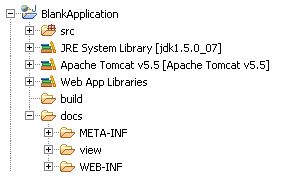
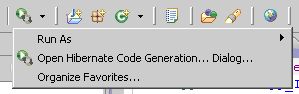
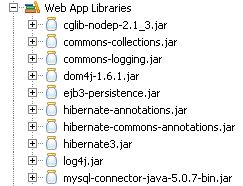
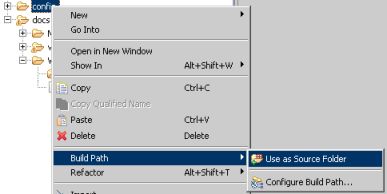
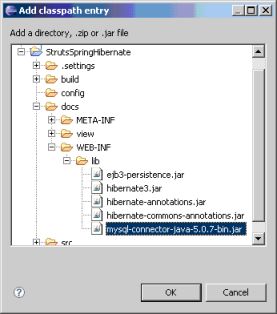
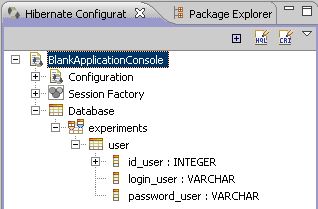
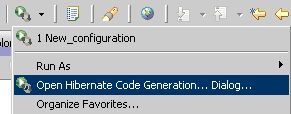
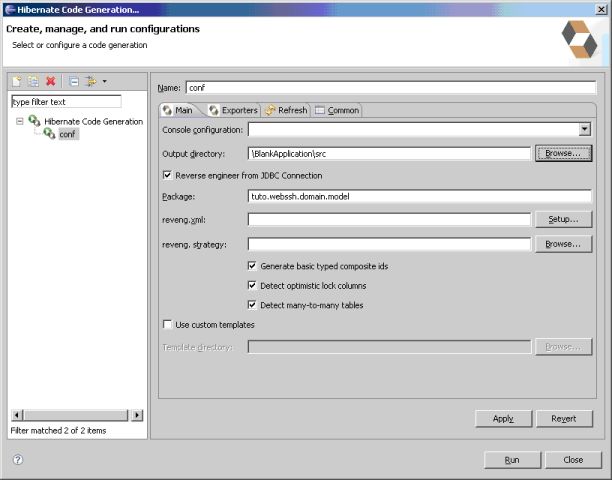
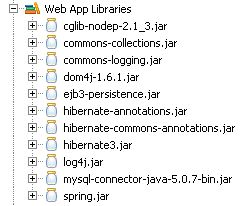
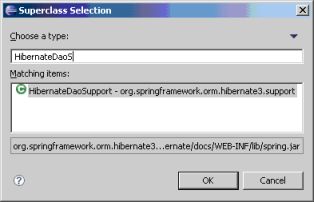
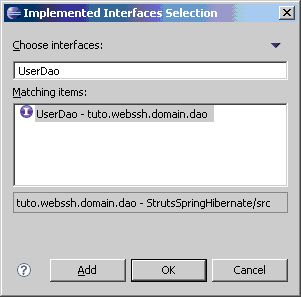
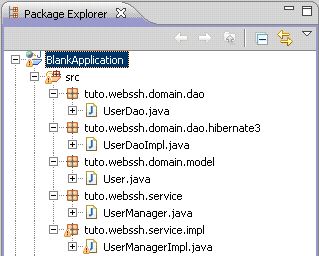
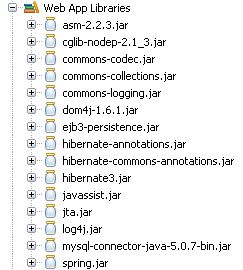
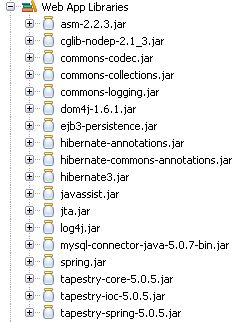
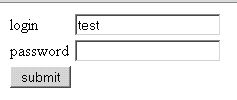
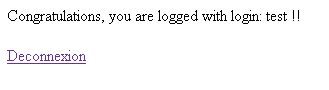
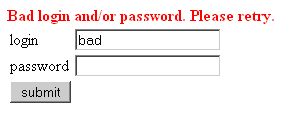
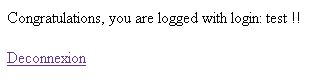
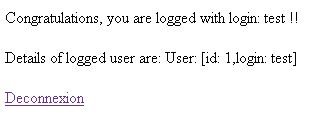
The following page has been changed by michaelcourcy: http://wiki.apache.org/tapestry/Tapstry5First_project_with_Tapestry5,_Spring_and_Hibernate New page: === Introduction === This tutorial is a translation of a french tutorial written by Baptiste Meurant : http://baptiste-meurant.developpez.com/tutoriaux/tapestry5-spring-hibernate/ This tutorial proposes a blanck application for a Tapestry5-Spring-Hibernate project. It consist on a main page of login that seach for the existence of a user inside a DB. This tutorial is in two parts : a blank application with Spring-Hibernate and in the second part we integrate Tapestry 5. With this separation you'll be able to reuse the first part with another front framework. The source of this tutorial could be found [ftp://ftp-developpez.com/baptiste-meurant/tutoriaux/tapestry5-spring-hibernate/tuto-Tapestry5-Spring-Hibernate-src.zip here] or [http://baptiste-meurant.ftp-developpez.com/tutoriaux/tapestry5-spring-hibernate/tuto-Tapestry5-Spring-Hibernate-src.zip Http Mirror ] The pdf version of this tutorial is available [http://baptiste-meurant.ftp-developpez.com/tutoriaux/tapestry5-spring-hibernate/tutoriel-tapestry5-spring-hibernate.pdf here] === Before you start === ==== Installation ==== * Install Eclipse and WTP [http://www.eclipse.org/downloads/download.php?file=/technology/epp/downloads/release/20070702/eclipse-jee-europa-win32.zip&r=1&protocol=http here] or try the [http://eclipse.org/ official eclipse site] * Install Tomcat 5.5, download [http://tomcat.apache.org/download-55.cgi#5.5.23 here] * Install mySQL, download [http://dev.mysql.com/downloads/ here] ==== Prepare the DB ==== Create a table user {{{ CREATE TABLE `user` ( `id_user` int(10) unsigned NOT NULL auto_increment, `login_user` varchar(25) NOT NULL default '', `password_user` varchar(25) NOT NULL default '', PRIMARY KEY (`id_user`) ) ENGINE=InnoDB; }}} Note : The tables must be in InnoDB format in order to have the automatic generation of the model class working properly in Eclipse. Create a user now {{{ INSERT INTO user VALUES ('test', 'test'); }}} === Creation of the project === Note : If you already have an existing project you can skip this part. Create a new project Dynamic Web : go to File -> new Project and choose Web -> Dynamic Web Project. Click on next [http://baptiste-meurant.developpez.com/tutoriaux/tapestry5-spring-hibernate/images/fig1.jpg] Fill the project name and choose a Target Runtime. If nothing is defined click on new [http://baptiste-meurant.developpez.com/tutoriaux/tapestry5-spring-hibernate/images/fig2.jpg] Choose the runtime (here tomcat 5.5). Caution : you must have installed the server of course. [http://baptiste-meurant.developpez.com/tutoriaux/tapestry5-spring-hibernate/images/fig3.jpg] Fill the required informations and click on finish [http://baptiste-meurant.developpez.com/tutoriaux/tapestry5-spring-hibernate/images/fig4.jpg] Back on the previous screen, click on Next and Next again At the end of the process, the package explorer should look like this image : a Dynamic Web project has been created and a server configration integrated. [http://baptiste-meurant.developpez.com/tutoriaux/tapestry5-spring-hibernate/images/fig6.jpg] === Software architecture === The main insterest of setting your software architecture this way is having a rigourous management of your ptoject, it garantees the maintainability, the evolutivity and the exploitation. The image below shows the architecture that we're going to set up in this tutorial. This type of architecture is widely regarded as efficient and could be applyed to any web project. [http://baptiste-meurant.developpez.com/tutoriaux/tapestry5-spring-hibernate/images/fig7.jpg] The main goal of this kind of architecture is to separate the concerns (buisness vs web) using a strict separation of layers. Indeed one can see on the previous image the 3 layers of this application : * DAO Layer : this layer manages the access to the database through the Hibernate framework. * Service Layer : The layer represents all the buisness code, it organises the access to the DAO layer and manages all the transactionnal aspects. All of them are organized and manages by the Spring framework. * MVC Layer : This layer is the IHM, it's the client part of the application. It interacts with the Service layer depending of the client action and retreive the data to show them in well formed way. This layer is undertaken by the Tapestry5 framework. Those layers must be decoupled, which means that there should be no dependencies between each other. Pratically this is enabled by having each layer collborating to the other layer through interface. For instance the Service layer only know the interfaces of the DAO layer and the MVC layer only know the interfaces of the Service Layer. This way, each layer publish, through its interfaces, all the treatement that it can offer to the upper layer. And the link between the interface and the implementation, which introduces a technologic dependency (for instance the implementation of the DAO layer uses hibernate) is managed by Spring. Indeed it's Spring when the application starts who establish the link between the interface and the implementation with its Inversion Of Control and dependencies Injection engine. The developper works only on method call from interface and not directly from the implememntation, which enhances the evolutivity and the loose coupling of the application. We notice also a special layer : the model layer. This layer traverses the other three layers because it reflects the buisness entity stored in the DB model. Each layer naturally could manipulate those entities. The link between the buisness entities and the DB model is called Object Relational Mapping (ORM), and the role of hibernate is to build this mapping. Every DB relations is represented by an object. Then persisting an object is actually persiting data in the DB but it's transparent for the developper. When the state of an object is modified in a transactional context the change will be propagated to the DB without any action from the developper. It's what we call object persistance. Let's focus for a little while on the manipulation of the DB. The previous explainations show two aspects : * The DAO layer publish its access methods to the DB, theses methods can search, create or delete records. Actually they can retreive objects from DB record, create new objects by creating new records in the DB, or delete object by deleting record in the DB. * The object relational mapping and the persistance of datas in a transactionnal context allow any change in the state of an object to be propagated in the DB through UPDATE actions. Thus the DAO layer won't features any methods to update the objects. Thoses aspects will be covered in greater details later on. Nevertless, the creation of object corresponding to INSERT are still needed, because even if you are in a transactionnal contexte the service layer can't decide on your behalf if a new object of the model layer must be persited. After all it could be a temporary variable. === Setting Hibernate === Note : the version of Hibernate is 3.2 or greater. In this part we're going to generate the object model from the relationnal model and then set the persitence through Hibernate. Download Hibernate Core, Hibernate Annotations and Hibernate Tools http://www.hibernate.org/30.html or get them in the archive of the tutorial. ==== Install Hibernate tool ==== Hibernate Tools is an eclipse plugin that make possible to generate classes from the DB model : * Unzip the archive. * You'll find 2 directories : plugins and features, put what they contains respectively in the directory plugins and features of your eclipse installation. * Restart eclipse. * New elements show up in the interface, provinng that the plugins is well setup : [http://baptiste-meurant.developpez.com/tutoriaux/tapestry5-spring-hibernate/images/fig8.jpg] ==== Add the libraries ==== * Get the driver of your DB (for MySQL, see [http://dev.mysql.com/downloads/connector/j/3.1.html here]) and put it in the WEB-INF/lib directory * Refresh the project, the jar should show up. * Add also in the WEB-INF/lib directory all the jar that come with hibernate [http://baptiste-meurant.developpez.com/tutoriaux/tapestry5-spring-hibernate/images/fig9.jpg] ==== Configure the connexion ==== Create the directory config and add it as a source folder [http://baptiste-meurant.developpez.com/tutoriaux/tapestry5-spring-hibernate/images/fig10.jpg] Select the directory config and click on File/New/Other. Then choose Hibernate/Hibernate configuration file. [http://baptiste-meurant.developpez.com/tutoriaux/tapestry5-spring-hibernate/images/fig11.jpg] Configure the connexion to the DB depending of your own settings. Don't forget to thick the checkbox 'Create Console configuration' [http://baptiste-meurant.developpez.com/tutoriaux/tapestry5-spring-hibernate/images/fig12.jpg] We'll take the opportunity to configure the Hibernate Tools console in order to have a simple tool of mapping generation. Configure the console like shown below : [http://baptiste-meurant.developpez.com/tutoriaux/tapestry5-spring-hibernate/images/fig13.jpg] Click on Classpath/Add JAR and add the DB Driver then click on finish. [http://baptiste-meurant.developpez.com/tutoriaux/tapestry5-spring-hibernate/images/fig14.jpg] The Hibernate configuration look like this : {{{ <?xml version="1.0" encoding="UTF-8"?> <!DOCTYPE hibernate-configuration PUBLIC "-//Hibernate/Hibernate Configuration DTD 3.0//EN" "http://hibernate.sourceforge.net/hibernate-configuration-3.0.dtd";> <hibernate-configuration> <session-factory> <property name="hibernate.connection.driver_class">com.mysql.jdbc.Driver</property> <property name="hibernate.connection.password">root</property> <property name="hibernate.connection.url">jdbc:mysql://localhost:3306/experiments</property> <property name="hibernate.connection.username">root</property> <property name="hibernate.dialect">org.hibernate.dialect.MySQLDialect</property> </session-factory> </hibernate-configuration> }}} Open the console view and browse the DB. The result should be about the same than the image bellow. If no, check your connection settings. [http://baptiste-meurant.developpez.com/tutoriaux/tapestry5-spring-hibernate/images/fig15.jpg] ==== Generating the model layer code and the mapping ==== Launch the automatic generation of code : [http://baptiste-meurant.developpez.com/tutoriaux/tapestry5-spring-hibernate/images/fig16.jpg] Configure the code generation this way [http://baptiste-meurant.developpez.com/tutoriaux/tapestry5-spring-hibernate/images/fig17.jpg] Click on export and only check the generation of Domain code. Then Click on run. [http://baptiste-meurant.developpez.com/tutoriaux/tapestry5-spring-hibernate/images/fig18.jpg] The user code class has been generated with all the necessary annotations {{{ package tuto.webssh.domain.model; import javax.persistence.Column; import javax.persistence.Entity; import javax.persistence.Id; import javax.persistence.Table; @Entity @Table(name = "user", catalog = "experiments") public class User implements java.io.Serializable { private int idUser; private String loginUser; private String passwordUser; public User() { } public User(int idUser, String loginUser, String passwordUser) { this.idUser = idUser; this.loginUser = loginUser; this.passwordUser = passwordUser; } @Id @Column(name = "id_user", unique = true, nullable = false) public int getIdUser() { return this.idUser; } public void setIdUser(int idUser) { this.idUser = idUser; } @Column(name = "login_user", nullable = false, length = 25) public String getLoginUser() { return this.loginUser; } public void setLoginUser(String loginUser) { this.loginUser = loginUser; } @Column(name = "password_user", nullable = false, length = 25) public String getPasswordUser() { return this.passwordUser; } public void setPasswordUser(String passwordUser) { this.passwordUser = passwordUser; } } }}} we notice the annotations : * @Entity : declares to hibernate that this class is persistant. * @Table : to which table in the DB this entity must be mapped * @Id : declare the property of the entity that is used as a primary key * @Column : map a a property in the entity to a column of the table. This annotation brings extra constraint informations like for instance non nullity or non mutabillity. These hints on the column let hibernate validate the constraints before acting in the DB. ==== Adding the mapped class to the Hibernate configuration ==== Modify hibernate.cfg.xml to add the mapped class. {{{ <hibernate-configuration> <session-factory> <property name="hibernate.connection.driver_class">com.mysql.jdbc.Driver</property> <property name="hibernate.connection.password">root</property> <property name="hibernate.connection.url">jdbc:mysql://localhost:3306/experiments</property> <property name="hibernate.connection.username">root</property> <property name="hibernate.dialect">org.hibernate.dialect.MySQLDialect</property> <mapping class="tuto.webssh.domain.model.User"/> </session-factory> </hibernate-configuration> }}} User object is now persistent, every instance of will correspond to a record in the DB. === Installing Spring === Note : the version of Spring here should be 2.0 or greater. * Download Spring [http://sourceforge.net/project/showfiles.php?group_id=73357&package_id=173644&release_id=512513 here] * Unzip and paste spring.jar in WEB-INF/lib [http://baptiste-meurant.developpez.com/tutoriaux/tapestry5-spring-hibernate/images/fig20.jpg] The Spring framework is on top of a invervion of control and injections dependencies engine. To have layers of the application properly decoupled, each class of a layer collabore with the interface of the other layer. Then the Spring framework inject at runtime the implementation code of the interface in the different classes. The developper make this possible by creating the getters and the setters of this interfaces, then Spring through xml configurations files use this setters to inject implementations of the interfaces. Using this mechanism we're going to create two distincts layers: The DAO layer (Data Access Object) and the service layer (buisness layer), the two layers are going to collabore with each other through interfaces. ==== The DAO Layer ==== Create DAO layer in the dao package [http://baptiste-meurant.developpez.com/tutoriaux/tapestry5-spring-hibernate/images/fig21.jpg] Create the implementation of this interface : UserDaoImpl in the package dao.hibernate3. In order to benefit from the good integration of Spring with Hibernate, extends this class from HibernateDaoSupport. [http://baptiste-meurant.developpez.com/tutoriaux/tapestry5-spring-hibernate/images/fig22.jpg] [http://baptiste-meurant.developpez.com/tutoriaux/tapestry5-spring-hibernate/images/fig23.jpg] [http://baptiste-meurant.developpez.com/tutoriaux/tapestry5-spring-hibernate/images/fig24.jpg] Here is all the classes and interfaces we've created: Interface UserDAO {{{ package tuto.webssh.domain.dao; import org.springframework.dao.DataAccessException; import tuto.webssh.domain.model.User; /** * Allows performing complex actions on persistent data * @author bmeurant */ public interface UserDao { /** * Check if the login exists and if the password is correct in datasource. * @param login : user login * @param password : user password * @return true if the login exists and if the password is correct. * Otherwise, return false. * @throws DataAccessException in case of Data access errors * (database unreachable, etc.) */ public boolean checkLogin (String login, String password); /** * Return a User object from a given login. * @param login : user login * @return the corresponding user object. * @throws DataAccessException in case of Data access errors * (database unreachable, etc.) */ public User getUser(String login); } }}} UserDAOImpl {{{ package tuto.webssh.domain.dao.hibernate3; import org.hibernate.Criteria; import org.hibernate.Session; import org.hibernate.criterion.Expression; import org.springframework.dao.DataAccessException; import org.springframework.orm.hibernate3.support.HibernateDaoSupport; import tuto.webssh.domain.dao.UserDao; import tuto.webssh.domain.model.User; /** * Implements a strategy to perform complex actions on persistent data. * @author bmeurant */ public class UserDaoImpl extends HibernateDaoSupport implements UserDao { /** * [EMAIL PROTECTED] */ public boolean checkLogin(String login, String password) { if (null == login || null == password) { throw new IllegalArgumentException("Login and password are mandatory. Null values are forbidden."); } try { logger.info("Check user with login: "+login+" and password : [PROTECTED]"); Session session = getHibernateTemplate().getSessionFactory().getCurrentSession(); // create a new criteria Criteria crit = session.createCriteria(User.class); crit.add(Expression.ilike("loginUser", login)); crit.add(Expression.eq("passwordUser", password)); User user = (User)crit.uniqueResult(); return (user != null); } catch(DataAccessException e) { // Critical errors : database unreachable, etc. logger.error("Exception - DataAccessException occurs : "+e.getMessage() +" on complete checkLogin()."); return false; } } /** * [EMAIL PROTECTED] */ public User getUser(String login) { if (null == login) { throw new IllegalArgumentException("Login is mandatory. Null value is forbidden."); } try { logger.info("get User with login: "+login); Session session = getHibernateTemplate().getSessionFactory().getCurrentSession(); // create a new criteria Criteria crit = session.createCriteria(User.class); crit.add(Expression.eq("loginUser", login)); User user = (User)crit.uniqueResult(); return user; } catch(DataAccessException e) { // Critical errors : database unreachable, etc. logger.error("Exception - DataAccessException occurs : "+e.getMessage() +" on complete getUser()."); return null; } } } }}} We notice : * The use of the logger (API commons-logging) already integrated with HibernateDaoSupport - commons-logging let you choose your log tool, in this example we choose the powerful Log4J. * The use of the Hibernate Criteria API that let you make request based on Object. We could do the same thing with HQL but it's not as elegant as the Criteria API is. * The use of differents Spring interfaces for accessing the Hibernate (for instance getHibernateTemplate(), etc.). Create the xml file ApplicationContextDao.xml in WEB-INF and declare the couple interface/implementation using Spring's bean. By Default a Spring's bean is a singleton and thus are ThreadSafe. Thi means that this code could be concurently called by two different processes safly. This mechanism in internally managed by Spring. This file define a bean userDao corresponding to the previous interface and we choose the implementation we want to use. This bean contains a property (in the JavaBeans sens) sessionFactory. The sessionFactory bean represents actually the Hibernate SessionFactory and has to be configured as well. The two mains configuration aspects of this beans is where to find the hibernate.cfg.xml and which strategy must be used for mapping entity to the DB tables, here it's the annotation strategy. {{{ <?xml version="1.0" encoding="UTF-8"?> <!DOCTYPE beans PUBLIC "-//SPRING//DTD BEAN//EN" "http://www.springframework.org/dtd/spring-beans.dtd";> <!-- Application context DAO layer --> <beans> <!-- General --> <bean id="userDao" class="tuto.webssh.domain.dao.hibernate3.UserDaoImpl"> <property name="sessionFactory"> <ref bean="sessionFactory" /> </property> </bean> <!-- sessionFactory --> <bean id="sessionFactory" class="org.springframework.orm.hibernate3.LocalSessionFactoryBean"> <property name="configLocation"> <value>classpath:hibernate.cfg.xml</value> </property> <property name="configurationClass"> <value>org.hibernate.cfg.AnnotationConfiguration</value> </property> </bean> </beans> }}} ==== The services layer ==== The DAO layer will be used by the upper layer : the services layer Create two packages service and service.impl, create the interface UserManager and its implementation UserManagerImpl. [http://baptiste-meurant.developpez.com/tutoriaux/tapestry5-spring-hibernate/images/fig25.jpg] Interface UserManager {{{ package tuto.webssh.service; import tuto.webssh.domain.model.User; /** * This interface publishes business features to handler users * @author bmeurant */ public interface UserManager { /** * Check if the login exists and if the password is correct. * @param login : user login * @param password : user password * @return true if the login exists and if the password is correct. * Otherwise, return false. */ public boolean checkLogin (String login, String password); /** * Return a User object from a given login. * @param login : user login * @return the corresponding user object. */ public User getUser(String login); /** * Change the password to 'password' for the given login * @param login : user login * @param password : user new password * @return the new User object */ public User changePassword (String login, String password); } }}} Implementation UserManagerImpl {{{ package tuto.webssh.service.impl; import org.apache.commons.logging.Log; import org.apache.commons.logging.LogFactory; import tuto.webssh.domain.dao.UserDao; import tuto.webssh.domain.model.User; import tuto.webssh.service.UserManager; /** * Implements business features to handler users * @author bmeurant */ public class UserManagerImpl implements UserManager { private final Log logger = LogFactory.getLog(UserManagerImpl.class); /** * [EMAIL PROTECTED] */ public boolean checkLogin (String login, String password) { return userDao.checkLogin(login, password); } /** * [EMAIL PROTECTED] */ public User changePassword(String login, String password) { User user = userDao.getUser(login); if (user != null) { user.setPasswordUser(password); } return user; } /** * [EMAIL PROTECTED] */ @SuppressWarnings("finally") public User getUser(String login) { return userDao.getUser(login); } } }}} The services layer need to collaborate with the dao layer. But following the principle of loose coupling, the service layer is going to collaborate with the interface of the dao not with its implementation. Spring has the duty to inject the implememtation in place of the interface at runtime. Two things need to be done to make this possible : provide in the service class a setter method for the dao and write the needed configuration in xml files. * Edit UserManagerImpl to create the dao injector (actually its a setter). We also add two extras methods that we be needed for the next steps. UserManagerImpl modified {{{ package tuto.webssh.service.impl; import org.apache.commons.logging.Log; import org.apache.commons.logging.LogFactory; import tuto.webssh.domain.dao.UserDao; import tuto.webssh.domain.model.User; import tuto.webssh.service.UserManager; /** * Implements business features to handler users * @author bmeurant */ public class UserManagerImpl implements UserManager { private final Log logger = LogFactory.getLog(UserManagerImpl.class); private UserDao userDao = null; /** * setter to allows spring to inject userDao implementation * @param userDao : object (implementation of UserDao interface) to inject. */ public void setUserDao(UserDao userDao) { this.userDao = userDao; } /** * [EMAIL PROTECTED] */ public boolean checkLogin (String login, String password) { return userDao.checkLogin(login, password); } /** * [EMAIL PROTECTED] */ public User changePassword(String login, String password) { User user = userDao.getUser(login); if (user != null) { user.setPasswordUser(password); } return user; } /** * [EMAIL PROTECTED] */ @SuppressWarnings("finally") public User getUser(String login) { return userDao.getUser(login); } } }}} Notice that there's no reference to the implementation : only the interface is known and used via the locale variable userDao. At startup, Spring use the setter to inject the implementation you defined in ApplicationContextDao.xml. Thanks to the configuration of ApplicationContextDao.xml, all the method of UserDao become available (Caution : actually only the method defined in the interface are available, anyway trying to invoke a non interface method would end up in compilation error). To make this injection effective, userManager need to be declared to Spring and must add the internal property userDao. Create the file ApplicationContext.xml in WEB-INF: ApplicationContext.xml {{{ <?xml version="1.0" encoding="UTF-8"?> <!DOCTYPE beans PUBLIC "-//SPRING//DTD BEAN//EN" "http://www.springframework.org/dtd/spring-beans.dtd";> <beans> <bean id="userManager" class=" tuto.webssh.service.impl.UserManagerImpl"> <property name="userDao"> <ref bean="userDao" /> </property> </bean> </beans> }}} Once again we deal with the paradigm interface/implémentation with this time the use of injection through the definition of userDao which reference the bean defined before. : the name of the bean must exactly the name of the property defined in userManager. Spring will use camelise mechanism to invoke the setter : ie set + "U"serDao(userDAO); ==== Transaction management ==== Beside inversion of control, dependencies injection and layering structuration of your code, Spring features powerful mechanism to manage the transactions. Transaction rely on proxy and PAO (Programmation Aspect Oriented), which is the core of the Spring Framework. You configure transaction in three steps : First define a general abstract proxy that will be used by all the manager that need to be transactional : Add this code to applicationConextDao.xml applicationContextDao.xml {{{ <bean id="transactionManager" class="org.springframework.orm.hibernate3.HibernateTransactionManager"> <property name="sessionFactory" ref="sessionFactory"/> </bean> <bean id="transactionProxy" abstract="true" class="org.springframework.transaction.interceptor.TransactionProxyFactoryBean"> <property name="transactionManager"> <ref bean="transactionManager"/> </property> <property name="transactionAttributes"> <props> <prop key="insert*">PROPAGATION_REQUIRED</prop> <prop key="update*">PROPAGATION_REQUIRED</prop> <prop key="save*">PROPAGATION_REQUIRED</prop> <prop key="*">PROPAGATION_REQUIRED, readOnly</prop> </props> </property> </bean> }}} Then for every bean that need to be transactionnal you feature a proxy that inherit from the general TransactionProxy applicationContext.xml {{{ <beans> <bean id="userManagerTarget" class="tuto.webssh.service.impl.UserManagerImpl"> <property name="userDao"> <ref bean="userDao" /> </property> </bean> <bean id="userManager" parent="transactionProxy"> <property name="transactionManager"> <ref bean="transactionManager"/> </property> <property name="target"> <ref bean="userManagerTarget"/> </property> <property name="transactionAttributeSource"> <bean class="org.springframework.transaction.annotation.AnnotationTransactionAttributeSource"/> </property> </bean> </beans> }}} Todo : check if the property transactionManager is not redundant. We put a transactionnal proxy in front of the buisness bean. The transactionManager is passed to the transactionnal proxy and we declare to Spring that the transaction configuration is done with annotation thanks to the property transactionAttributeSource. Now we need to add the necessary annotation to the interface UserManager to cofigure its transactionnal behavior. Change UserManager : UserManager {{{ package tuto.webssh.service; import org.springframework.transaction.annotation.Propagation; import org.springframework.transaction.annotation.Transactional; import tuto.webssh.domain.model.User; /** * This interface publishes business features to handler users * @author bmeurant */ @Transactional (readOnly=true, propagation=Propagation.REQUIRED) public interface UserManager { /** * Check if the login exists and if the password is correct. * @param login : user login * @param password : user password * @return true if the login exists and if the password is correct. * Otherwise, return false. */ public boolean checkLogin (String login, String password); /** * Return a User object from a given login. * @param login : user login * @return the corresponding user object. */ public User getUser(String login); /** * Change the password to 'password' for the given login * @param login : user login * @param password : user new password * @return the new User object */ @Transactional (readOnly=false) public User changePassword (String login, String password); } }}} After this Spring will be able to manage on its own all the transaction aspects: commit, rollback and persitence of the attached object as long as they flow of execution is occuring in a transactionnal context. Let's watch the implementation of the changePassword method and notice the persitent nature of the User object : in this method the user is retreived with the login. Then the password is changed and no access to the DAO layer is needed anymore. Only because this method is in a transactionnal context (and also not read-only), any changed to the object will be propagated to the DB. ==== Integrate Spring when the project start ==== The last step consists in integrating this 2 xml beans definition files to the Spring listener in web.xml to make sure Spring build those object at startup : add this in web.xml {{{ <context-param> <param-name>contextConfigLocation</param-name> <param-value>/WEB-INF/applicationContext.xml /WEB-INF/applicationContextDao.xml</param-value> </context-param> <listener> <listener-class>org.springframework.web.context.ContextLoaderListener</listener-class> </listener> }}} Then add the Spring dependencies [http://baptiste-meurant.developpez.com/tutoriaux/tapestry5-spring-hibernate/images/fig26.jpg] Spring will load the whole configuration at startup and eventually throw errors. To get more information, add the jar log4j to your classpath and the file log4j.properties in the config directories. Lo4j.properties {{{ # Set root logger level to DEBUG and its only appender to CONSOLE. log4j.rootLogger=DEBUG,CONSOLE_APP # le appender CONSOL_APP est associé à la console log4j.appender.CONSOLE_APP=org.apache.log4j.ConsoleAppender # CONSOLE_APP utilise un PatternLayout qui affiche : le nom du thread, la priorité, # le nom du logger et le message log4j.appender.CONSOLE_APP.layout=org.apache.log4j.PatternLayout log4j.appender.CONSOLE_APP.layout.ConversionPattern= %d{dd-MM-yyyy HH:mm:ss:SSS} %-4r %-5p %c %x - %m%n # Change the level of messages for various packages. log4j.logger.org.apache=DEBUG log4j.logger.org.springframework=DEBUG log4j.logger.org.hibernate.cache=DEBUG log4j.logger.org.hibernate.cfg=DEBUG log4j.logger.org.hibernate=DEBUG }}} At startup Spring will log its actions {{{ INFO: Pre-instantiating singletons in [EMAIL PROTECTED]: defining beans [userManagerTarget,userManager,userDao,sessionFactory,transactionManager,transactionProxy]; root of factory hierarchy }}} === Setting up tapestry === Note : in this tutorial we use tapestry 5. ==== Simple login ==== The first step is to add the jars to the project [http://baptiste-meurant.developpez.com/tutoriaux/tapestry5-spring-hibernate/images/fig27.jpg] Then create Login.html in the WEB-INF directory Login.html {{{ <html xmlns:t="http://tapestry.apache.org/schema/tapestry_5_0_0.xsd";> <head> <title>Login</title> </head> <body> <div id="login_box"> <t:form> <t:errors /> <table> <tr> <td><label t:type="Label" for="login" class="login_label"/></td> <td><input t:type="TextField" t:id="login" t:value="login" t:label="login " class="login_input" /></td> </tr> <tr> <td><label t:type="Label" for="password" class="login_label"/></td> <td><input t:type="PasswordField" t:id="password" t:value="password" t:label="password " class="login_input" /></td> </tr> <tr> <td><input t:id="submitform" t:type="Submit" t:value="submit" class="login_submit"/></td> </tr> </table> </t:form> </div> </body> </html> }}} Notice the attributes t:value that binds a the textefield value to a java variable. The atrribute for binds the html input to the label. Create a package pages and a class Login.java which mirrors the html form : Login.java {{{ package tuto.webssh.pages; import org.apache.tapestry.annotations.ApplicationState; import org.apache.tapestry.beaneditor.Validate; public class Login { @ApplicationState private String login; private String password; public String getLogin() { return login; } @Validate("required") public void setLogin(String login) { this.login = login; } public String getPassword() { return password; } @Validate("required") public void setPassword(String password) { this.password = password; } String onSuccess() { //mon code métier String ret = "Home"; return ret; } } }}} We note : * The annotation @ApplicationState which persist a variable in the session. Every time the login page reload (or any page with this variable name coming along with the @ApplicationState annotation), the value of the variable will be obtained from the session. * The annotation @Validate("required") let tapestry knows this input is mandatory. When the form submit, if the value is not defined an error message shows up. * The method onSuccess is invoked when the form is succesfully submitted, it returns the next page (here Home). * Create a page Home.html within WEB-INF, the user will be directed to this page after it submits Login {{{ <html xmlns:t="http://tapestry.apache.org/schema/tapestry_5_0_0.xsd";> <head> <title>Congratulation</title> </head> <body> Congratulations, you are logged with login: ${login} !!<br/><br/> <span id="LogoutLink"><span class="moduleTitle"><t:actionlink t:id="logout">Deconnexion</t:actionlink></span></span> </body> </html> }}} ${login} uses the login variable in the session if defined. Tapestry can retreive this value if the context ApplicationState has been defined for both classes : Login.java and Home.java must bear the login property with the ApplicationState context. The element t:actionLink define another link to a tapestry page. In the package pages create Home.java {{{ package tuto.webssh.web.pages; import javax.servlet.http.HttpSession; import org.apache.tapestry.ComponentResources; import org.apache.tapestry.Link; import org.apache.tapestry.annotations.ApplicationState; import org.apache.tapestry.annotations.Inject; import org.apache.tapestry.annotations.OnEvent; import org.apache.tapestry.services.RequestGlobals; public class Home { @Inject private ComponentResources resources; @Inject private RequestGlobals requestGlobals; @ApplicationState private String login; public String getLogin() { return login; } public void setLogin(String login) { this.login = login; } @OnEvent(component = "logout") public Link onLogout() { HttpSession session = requestGlobals.getHTTPServletRequest().getSession(); session.invalidate(); return resources.createPageLink("login", false); } } }}} * Once again, the annotation @ApplicationState will retreive the variable login from the session. * The annotation @Inject let tapestry inject dependencies from third parties source (here J2EE core). * The method onLogout which thanks to the annotation @onEvent(component="logout") will be invoked every time the component bubble an event. Here, the component is a simple link, so every time one click on it the session is invalidated and the user redircted to the login page. Edit web.xml to configure the Tapestry filter and the base package from which tapestry knows where to find the pages package that contains page beans. {{{ <?xml version="1.0" encoding="UTF-8"?> <web-app id="WebApp_ID" version="2.4" xmlns="http://java.sun.com/xml/ns/j2ee"; xmlns:xsi="http://www.w3.org/2001/XMLSchema-instance"; xsi:schemaLocation="http://java.sun.com/xml/ns/j2ee http://java.sun.com/xml/ns/j2ee/web-app_2_4.xsd";> <display-name>BlankApplication</display-name> <context-param> <param-name>contextConfigLocation</param-name> <param-value>/WEB-INF/applicationContext.xml /WEB-INF/applicationContextDao.xml</param-value> </context-param> <context-param> <param-name>tapestry.app-package</param-name> <param-value>tuto.webssh.web</param-value> </context-param> <filter> <filter-name>app</filter-name> <filter-class>org.apache.tapestry.TapestryFilter</filter-class> </filter> <filter-mapping> <filter-name>app</filter-name> <url-pattern>/*</url-pattern> </filter-mapping> <listener> <listener-class>org.springframework.web.context.ContextLoaderListener</listener-class> </listener> <welcome-file-list> <welcome-file>Login</welcome-file> </welcome-file-list> </web-app> }}} Start the server and type the url : http://localhost:8080/BlankApplicationTapestry/login. you should get the following page [http://baptiste-meurant.developpez.com/tutoriaux/tapestry5-spring-hibernate/images/fig28.jpg] Notice that if you click Submit before filling up the fields login and password, errors are displayed. this is the expected tapestry behaviour when you annotate a property with @Validate. [http://baptiste-meurant.developpez.com/tutoriaux/tapestry5-spring-hibernate/images/fig29.jpg] Otherwise the Home page shows up. Notice that the login is now in the session and is displayed on the Home page though this value was provided in the Login page. [http://baptiste-meurant.developpez.com/tutoriaux/tapestry5-spring-hibernate/images/fig30.jpg] Clicking on deconnexion lead you to the Login page again. ==== Integration with Spring ==== If the result is already interesting, it's still not enough. We must now search the user in the DB, check its existence, if it's password is valid, etc. To achieve this we're going to traverse the different application layers, from tapestry to dao passing by the service. As explained before, the communicationship between the different layers - as some advanced functions (transactions, etc.) - are managed by Spring. We must integrate Spring and Tapestry. Tapestry5 propose natively a support to Spring. The first thing to do is to change the tapestry filter in web.xml : replace the class org.apache.tapestry.TapestryFilter by org.apache.tapestry.spring.TapestrySpringFilter. {{{ <filter> <filter-name>app</filter-name> <!-- Special filter that adds in a T5 IoC module derived from the Spring WebApplicationContext. --> <filter-class>org.apache.tapestry.spring.TapestrySpringFilter</filter-class> </filter> }}} Once Tapestry is configured to work with Spring, we must inject the Springbeans in the Tapestry pages. change Login.java : {{{ package tuto.webssh.pages; import org.apache.tapestry.annotations.ApplicationState; import org.apache.tapestry.annotations.Inject; import org.apache.tapestry.annotations.Persist; import org.apache.tapestry.annotations.Service; import org.apache.tapestry.beaneditor.Validate; import tuto.webssh.service.UserManager; public class Login { private static final String BAD_CREDENTIALS = "Bad login and/or password. Please retry."; @Persist private boolean error = false; @ApplicationState private String login; @Inject @Service("userManager") private UserManager userManager; private String password; public String getLogin() { return login; } @Validate("required") public void setLogin(String login) { this.login = login; } public String getPassword() { return password; } public String getErrorMessage() { String ret = null; if (error) { ret = BAD_CREDENTIALS; } return ret; } @Validate("required") public void setPassword(String password) { this.password = password; } String onSuccess() { String ret = "Login"; error=true; if (userManager.checkLogin(login, password)) { error= false; ret = "Home"; } return ret; } } }}} We notice : * the annotations @Inject and @Service a bean (Manager) from Spring into Tapestry. We can now use all of the methods defined in the interface here we modify the methode onSucces, when the for is submitted the application called the Spring userManager service to execute the checkLogin method and check that login and password really exist in DB. If yes the user is redirected to the Home page. In the opposite, we initialise an error message variable to be diplayed to the user. * The annotation @Persist on error persist the value of error only for this page : instead of the annotation @ApplicationState, @Persist define persistence only for the page not for the whole application. * The getErrorMessage make the property errorMessage available in the Login page. change Login.html : {{{ <html xmlns:t="http://tapestry.apache.org/schema/tapestry_5_0_0.xsd";> <head> <title>Login</title> </head> <body> <div id="login_box"> <t:form> <t:errors /> <label style="color:red; font-weight:bold;">${errorMessage}</label> <table> <tr> <td><label t:type="Label" for="login" class="login_label"/></td> <td><input t:type="TextField" t:id="login" t:value="login" t:label="login " class="login_input" /></td> </tr> <tr> <td><label t:type="Label" for="password" class="login_label"/></td> <td><input t:type="PasswordField" t:id="password" t:value="password" t:label="password " class="login_input" /></td> </tr> <tr> <td><input t:id="submitform" t:type="Submit" t:value="submit" class="login_submit"/></td> </tr> </table> </t:form> </div> </body> </html> }}} Start the server and navigate to http://localhost:8080/BlankApplicationTapestry/login. Choose an incorrect login and/or password, you are redirected to the page login and the expected message is displayed : [http://baptiste-meurant.developpez.com/tutoriaux/tapestry5-spring-hibernate/images/fig31.jpg] Now type the good login/password ('test', 'test') and validate. You are redirected to the page Home : [http://baptiste-meurant.developpez.com/tutoriaux/tapestry5-spring-hibernate/images/fig32.jpg] === Setting the lazy loading for hibernate === As we explained it at the beginning of this tutorial dealing with hibernate, every model object is related to a table in the DB. We therefore get a complete object graph : an entity having a 1,n relation with entity E2 in object realm is going to be object O1 of type T1 hold an object O2 of type collection of T2 ⦠And so on. We quickly realised that the object graph could be extremely heavy if all collections and children of children collections must be loaded. It's why by default, Hibernate uses "Lazy loading". Lazy loading means that when the object is loaded in memory, only the object is loaded not all it's collections; collections will be loaded when they will first be used. The opposite of lazy loading is eager loading : when the object is loaded all the graph is loaded. You must eplicily annotate your classes to have eager loading (1,n ; n,1 ou n,n) : @OneToMany, @ManyToMany ou @ManyToOne(cascade = {}, fetch = FetchType.EAGER). One very important thing to understand about lazy loading is that you can access to the lazy collections only if the transaction in wich you got this object is not commited yet. Indeed, the lazy loading is possible because the session Hibernate is stil active and opened to be able to complete the graph from the DB when needed. And with the transaction manager we used in this tutorial, the session is closed at the end of the execution of the service method. Thus if we try to access a collection in the view we're going to have a LazyInitializationException. But there's a workaround to keep the session Hibernate "alive" until the page renders, with this workaround you only load what's really needed. It doesn't mean that you can do now whatever you want with the session. Indeed the session is alive until the request completes ; it means that we are going to be able to access a lazy collection in the view, but if you decide to put the object you got from a transactionnal context in the http session you won't be able to retreive a lazy collection in the next request. The Hibernate session would have died. Extending the life of the httpSession is easy with Spring thanks to a dedicated filter : OpenSessionInViewFilter. Just change your web.xml : {{{ <filter> <filter-name>Hibernate Session In View Filter</filter-name> <filter-class>org.springframework.orm.hibernate3.support.OpenSessionInViewFilter</filter-class> </filter> <filter-mapping> <filter-name>Hibernate Session In View Filter</filter-name> <url-pattern>/*</url-pattern> </filter-mapping> }}} Make sure this filter is called before the the tapestry filter. To test this new filter we're going to create a new table 'rights' that will defines the rights of a given user : {{{ CREATE TABLE `experiments`.`rights` ( `id` INTEGER UNSIGNED NOT NULL AUTO_INCREMENT, `label` VARCHAR(45) NOT NULL, `id_user` INTEGER UNSIGNED NOT NULL, PRIMARY KEY(`id`), CONSTRAINT `FK_user` FOREIGN KEY `FK_user` (`id_user`) REFERENCES `user` (`id_user`) ON DELETE CASCADE ) }}} Create some data test {{{ INSERT INTO rights (label, id_user) VALUES ('USER', 1); INSERT INTO rights (label, id_user) VALUES ('ADMIN', 1); }}} We must redo the mapping now with the entity Right and User User.java {{{ package tuto.webssh.domain.model; import java.util.HashSet; import java.util.Set; import javax.persistence.CascadeType; import javax.persistence.Column; import javax.persistence.Entity; import javax.persistence.FetchType; import javax.persistence.Id; import javax.persistence.OneToMany; import javax.persistence.Table; @Entity @Table(name = "user", catalog = "experiments") public class User implements java.io.Serializable { private static final long serialVersionUID = 1073256708139002061L; private int idUser; private String loginUser; private String passwordUser; private Set<Rights> rights = new HashSet<Rights>(0); public User() { } public User(int idUser, String loginUser, String passwordUser) { this.idUser = idUser; this.loginUser = loginUser; this.passwordUser = passwordUser; } public User(int idUser, String loginUser, String passwordUser, Set<Rights> rights) { this.idUser = idUser; this.loginUser = loginUser; this.passwordUser = passwordUser; this.rights = rights; } @Id @Column(name = "id_user", unique = true, nullable = false) public int getIdUser() { return this.idUser; } public void setIdUser(int idUser) { this.idUser = idUser; } @Column(name = "login_user", nullable = false, length = 25) public String getLoginUser() { return this.loginUser; } public void setLoginUser(String loginUser) { this.loginUser = loginUser; } @Column(name = "password_user", nullable = false, length = 25) public String getPasswordUser() { return this.passwordUser; } public void setPasswordUser(String passwordUser) { this.passwordUser = passwordUser; } @OneToMany(cascade = CascadeType.ALL, fetch = FetchType.LAZY, mappedBy = "user") public Set<Rights> getRights() { return this.rights; } public void setRights(Set<Rights> rights) { this.rights = rights; } } }}} Right.java {{{ package tuto.webssh.domain.model; import javax.persistence.Column; import javax.persistence.Entity; import javax.persistence.FetchType; import javax.persistence.Id; import javax.persistence.JoinColumn; import javax.persistence.ManyToOne; import javax.persistence.Table; @Entity @Table(name = "rights", catalog = "experiments") public class Rights implements java.io.Serializable { private static final long serialVersionUID = -8905167784828935704L; private int id; private User user; private String label; public Rights() { } public Rights(int id, User user, String label) { this.id = id; this.user = user; this.label = label; } @Id @Column(name = "id", unique = true, nullable = false) public int getId() { return this.id; } public void setId(int id) { this.id = id; } @ManyToOne(fetch = FetchType.LAZY) @JoinColumn(name = "id_user", nullable = false) public User getUser() { return this.user; } public void setUser(User user) { this.user = user; } @Column(name = "label", nullable = false, length = 45) public String getLabel() { return this.label; } public void setLabel(String label) { this.label = label; } } }}} Notice that two assiciations have been created : one to access to the rights of the users, the other to access to the user from the right. This association was achieved with the annotation @JoinColumn instead of the simple annotation @Column. The others annotations (respectively @OneToMany and @ManyToOne) define the cardinality of the associations. Notice also the presence of other attributes : fetch of type LAZY or EAGER that defines the loading strategy. And to finish you can see on the association type OneToMany the use of attribute mappedBy that indicates that the join column is specified at the other end of the relationship Add the new mapped file to hibernate : {{{ <mapping class="tuto.webssh.domain.model.Rights"/> }}} Change Home.java : we add a property user that we'll be provided by UserManager when the page load, thanks to the annotation @PageLoaded {{{ package tuto.webssh.web.pages; import javax.servlet.http.HttpSession; import org.apache.tapestry.ComponentResources; import org.apache.tapestry.Link; import org.apache.tapestry.annotations.ApplicationState; import org.apache.tapestry.annotations.Inject; import org.apache.tapestry.annotations.OnEvent; import org.apache.tapestry.annotations.PageLoaded; import org.apache.tapestry.annotations.Persist; import org.apache.tapestry.annotations.Service; import org.apache.tapestry.services.RequestGlobals; import tuto.webssh.domain.model.User; import tuto.webssh.service.UserManager; public class Home { @Inject private ComponentResources resources; @Inject private RequestGlobals requestGlobals; @Inject @Service("userManager") private UserManager userManager; @ApplicationState private String login; @Persist private User user; public String getLogin() { return login; } public void setLogin(String login) { this.login = login; } @PageLoaded public void onLoad() { user = userManager.getUser(login); } @OnEvent(component = "logout") public Link onLogout() { HttpSession session = requestGlobals.getHTTPServletRequest().getSession(); session.invalidate(); return resources.createPageLink("login", false); } public User getUser() { return user; } public void setUser(User user) { this.user = user; } } }}} Change Home.html : {{{ <html xmlns:t="http://tapestry.apache.org/schema/tapestry_5_0_0.xsd";> <head> <title>Congratulation</title> </head> <body> Congratulations, you are logged with login: ${login} !!<br/><br/> Details of logged user are: ${user} <br/><br/> <span id="LogoutLink"><span class="moduleTitle"><t:actionlink t:id="logout">Deconnexion</t:actionlink></span></span> </body> </html> }}} Change User.java : we're going first to override toString tha will be automatically called by $(user). In the first step we're not going to display the object Rights : {{{ @Override public String toString() { return "User: [id: "+idUser+",login: "+loginUser+"]"; } }}} Then we get this screen with no errors [http://baptiste-meurant.developpez.com/tutoriaux/tapestry5-spring-hibernate/images/fig33.jpg] We're going now to display the rights for a user User.java {{{ @Override public String toString() { return "User: [id: "+idUser+",login: "+loginUser+", rights: "+rights+"]"; } }}} and Rights.java {{{ @Override public String toString() { return "Rights: [ id: "+id+", label: "+label+"]"; } }}} But at the execution .... {{{ org.apache.tapestry.ioc.internal.util.TapestryException: failed to lazily initialize a collection of role: tuto.webssh.domain.model.User.rights, no session or session was closed }}} To better understand let's change for the last time Home.java {{{ @PageLoaded public void onLoad() { User tempUser = userManager.getUser(login); System.out.println(tempUser); user = tempUser; } }}} Here we force the use of the lazy loading thus beacause the object is already loaded, there's no problem anymore : [http://baptiste-meurant.developpez.com/tutoriaux/tapestry5-spring-hibernate/images/fig34.jpg] This example show the limitations of lazy loading. Keep now in your mind that lazy loadig is only available inside the scope of the trasactionnal context. So what we did was useless ⦠in this particular case, yes, beside this object is extremly light so we'd better use the EAGER loading. Nevertless very often it's useful - especially when you have to manipulate very high data volumes. In the Other hand here chossing the EAGER would have forced ud to define a new method in the Service layer and in the DAO layer to get a given user. To finish about the lazy loading, lazy loadig must be used with extra cautions but once the principles are well understood the advantages are very significant. === Conclusion === We have now a blank application implementing a simplistic login with Tapestry Spring and Hibernate. --------------------------------------------------------------------- To unsubscribe, e-mail: [EMAIL PROTECTED] For additional commands, e-mail: [EMAIL PROTECTED]