    [
https://issues.apache.org/jira/browse/WEEX-434?page=com.atlassian.jira.plugin.system.issuetabpanels:comment-tabpanel&focusedCommentId=16522503#comment-16522503
 ]
ASF GitHub Bot commented on WEEX-434:
-------------------------------------
Github user weifengsmile commented on the issue:
https://github.com/apache/incubator-weex/pull/1239
```
<template>
<div class="wrapper">
<text class="greeting">The environment is ready!</text>
<input type="text" placeholder="Input Text" class="input" value=""/>
</div>
</template>
<script>
export default {
name: 'App',
data () {
return {
}
}
}
</script>
<style scoped>
.input {
background-color: #ffffff;
margin-top: 300px;
width: 300px;
height: 80px ;
padding: 20px;
color: #000000;
}
.wrapper {
justify-content: center;
align-items: center;
background-color: #888888;
}
.greeting {
text-align: center;
margin-top: 70px;
font-size: 50px;
color: #41B883;
}
</style>
```

It is very simple. You can check the image:
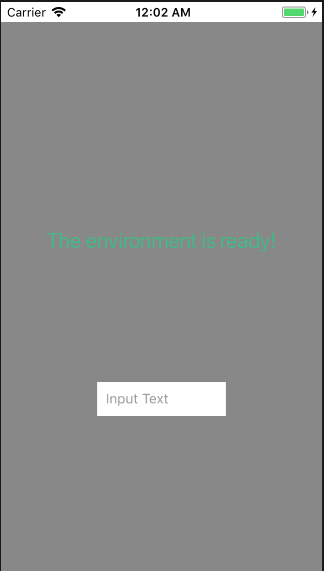
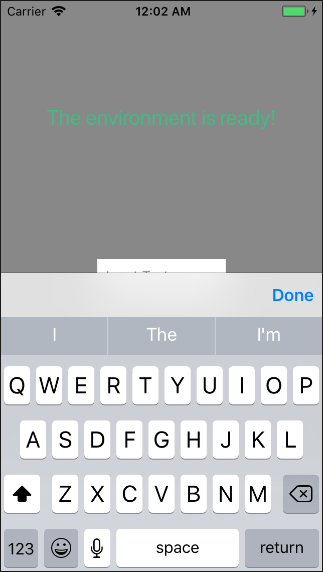

**Issue 1: The WXRootView cannot reset to original position.**
**Issue 2: The keyboards cover a apart of the input component.**
@wqyfavor
> WXRootView cannot reset to original position
> --------------------------------------------
>
> Key: WEEX-434
> URL: https://issues.apache.org/jira/browse/WEEX-434
> Project: Weex
> Issue Type: Bug
> Components: iOS
> Reporter: weifengsmile
> Assignee: xingZhang
> Priority: Major
> Attachments: 屏幕快照 2018-06-04 下午5.28.47.png, 屏幕快照 2018-06-04
> 下午5.29.09.png, 屏幕快照 2018-06-04 下午5.30.43.png
>
>
> Reproduce condition: the input component is on the bottom of page.
> When the input component moved up as keyboard shown, the keyboard
> Preselection view or toolbar view will cover a part of the input component.
> And WXRootView cannot move to original position after keyboard hiden.
>
--
This message was sent by Atlassian JIRA
(v7.6.3#76005)




