zshshr closed pull request #298: Add documents for using vuex and vue router
URL: https://github.com/apache/incubator-weex-site/pull/298
This is a PR merged from a forked repository. As GitHub hides the original diff on merge, it is displayed below for the sake of provenance: As this is a foreign pull request (from a fork), the diff is supplied below (as it won't show otherwise due to GitHub magic): diff --git a/docs/guide/advanced/use-vuex-and-vue-router.md b/docs/guide/advanced/use-vuex-and-vue-router.md index e69de29bb..a60aa6fa4 100644 --- a/docs/guide/advanced/use-vuex-and-vue-router.md +++ b/docs/guide/advanced/use-vuex-and-vue-router.md @@ -0,0 +1,82 @@ +# Use Vuex and vue-router + +[[toc]] + +Vue.js has many peripheral technology products such as [Vuex](https://github.com/vuejs/vuex) and [vue-router](https://github.com/vuejs/vue-router), those libraries can also work well on Weex. + +> **NOTE**: Weex is using native navigator to manage instance pages, the context of them are isolated. That means, Both Vuex and vue-router can only effect the single page, they can't share state between different pages. + +## Using Vuex + +> [Official Vuex documents](https://vuex.vuejs.org/en/) + +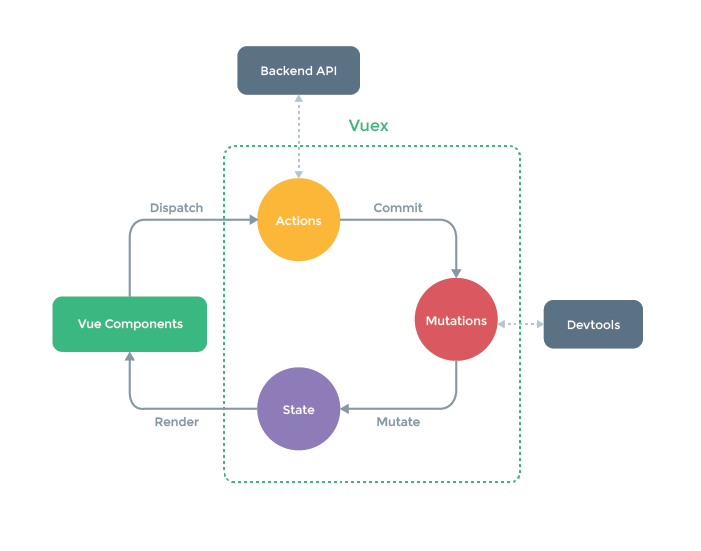 + +Vuex is a state management pattern + library for Vue.js applications. It's also a library implementation tailored specifically for Vue.js to take advantage of its granular reactivity system for efficient updates. It serves as a centralized store for all the components in an application, with rules ensuring that the state can only be mutated in a predictable fashion. + +As a kind of state management library, Vuex is platform-independent, It also can be used in Weex. It also integrates with Vue's official [devtools extension](https://github.com/vuejs/vue-devtools) to provide advanced features on web platform, such as zero-config time-travel debugging and state snapshot export / import. (web platform only) + +## Using vue-router + +> [Official vue-router documents](https://router.vuejs.org/en/) + +Creating a Single-page Application with Vue.js + vue-router is dead simple. With Vue.js, you are already composing our application with components. When adding vue-router to the mix, all you need to do is map your components to the routes and let vue-router know where to render them. + +However, there are many differences between web and Android or iOS, some features of vue-router are limited in Weex. + +### Router mode + +vue-router provides three routing modes: + ++ `hash`: uses the URL hash for routing. Works in all Vue-supported browsers, including those that do not support HTML5 History API. (**default**) ++ `history`: requires HTML5 History API and server config. See [HTML5 History Mode](https://router.vuejs.org/en/essentials/history-mode.html). ++ `abstract`: works in all JavaScript environments, e.g. server-side with Node.js. + +You can pass the `mode` parameter when creating a router: + +```js +new Router({ + mode: 'abstract', + // ... +}) +``` + +Obviously, `hash` mode and `history` mode are only available on the web, and have no effect in Weex. In other words, you can only use `abstract` mode in Android and iOS. However, vue-router will automatically be forced into `abstract` mode if no browser API is present. So, just **don't set the `mode` option, or set it to `abstract`**. + +### Programmatic navigation + +vue-router use `<router-link>` to create a navigation link, but in which, some features are based on the DOM events and it doesn't work well in the native environment. In Weex, you must use the [Programmatic Navigation](https://router.vuejs.org/en/essentials/navigation.html) to manage the router. + +Here is a basic example using `<router-link>`: + +```html +<!-- Can only be used on the web, it takes no effects on Android or iOS! --> +<template> + <div> + <router-link to="profile"> + <text>Profile</text> + </router-link> + </div> +</template> +``` + +For native platforms, you have to use the `router.push`: + +```html +<template> + <div> + <text @click="jump">Profile</text> + </div> +</template> + +<script> + import router from './path/to/router' + export default { + methods: { + jump () { + router.push('profile') + } + } + } +</script> +``` diff --git a/docs/zh/guide/advanced/use-vuex-and-vue-router.md b/docs/zh/guide/advanced/use-vuex-and-vue-router.md index e69de29bb..48112cbb3 100644 --- a/docs/zh/guide/advanced/use-vuex-and-vue-router.md +++ b/docs/zh/guide/advanced/use-vuex-and-vue-router.md @@ -0,0 +1,80 @@ +## 使用 Vuex 和 vue-router + +[[toc]] + +Vue.js 也有较多周边技术产品,如 [Vuex](https://github.com/vuejs/vuex) 和 [vue-router](https://github.com/vuejs/vue-router) 等,这些库也可以在 Weex 中很好的工作。 + +> **注意**: Weex 使用原生的 navigator 来管理页面实例,多个实例之间的状态是隔离的。也就是说,Vuex 和 vue-router 只能作用于当前一个页面,无法在多个页面间共享状态。 + +## 使用 Vuex + + + +Vuex 是一个专为 Vue.js 应用程序开发的状态管理工具库,可以利用 Vue.js 的细粒度数据响应机制来进行高效的状态更新。它采用集中式存储管理应用的所有组件的状态,并以相应的规则保证状态以一种可预测的方式发生变化。 + +由于在 Vuex 本身就是平台无关的,有较强的移植能力,完全可以在 Weex 中正常地使用 Vuex。 Vuex 也集成到了其官方调试工具 [devtools extension](https://github.com/vuejs/vue-devtools)中,提供了诸如 time-travel 调试、状态快照导入导出等高级调试功能。这些工具在 Web 平台中可以一如既往地工作。 + +## 使用 vue-router + +vue-router 是专为 Vue.js 开发的便于实现单页应用的工具库,能够以声明式的方法编写页面的导航和跳转信息。 + +由于 Weex 的运行环境不只是浏览器,通常是以移动端原生环境为主,然而在 Android 和 iOS 中都没有浏览器的 History API,也不存在 DOM,因此如果想在 Weex 环境中使用 vue-router ,有些功能受到了限制,使用时应该注意。 + +### 路由模式 + +vue-router 提供了三种运行模式: + ++ `hash`: 使用 URL hash 值来作路由。默认模式。 ++ `history`: 依赖 HTML5 History API 和服务器配置。查看 [HTML5 History 模式](https://router.vuejs.org/zh-cn/essentials/history-mode.html)。 ++ `abstract`: 支持所有 JavaScript 运行环境,如 Node.js 服务器端。 + +配置方法是在定义路由时,传递 `mode` 属性: + +```js +new Router({ + mode: 'abstract', + // ... +}) +``` + +从三种模式的介绍中也可以看出来,Weex 环境中只支持使用 abstract 模式。不过,vue-router 自身会对环境做校验,**如果发现没有浏览器的 API,vue-router 会自动强制进入 abstract 模式**,所以在使用时只要不写 `mode` 配置即可。默认 vue-router 会在浏览器环境中使用 hash 模式,在移动端原生环境中使用 abstract 模式。 + +### 编程式导航 + +vue-router 中使用 `<router-link>` 创建导航链接,不过在其中使用了基于 DOM 事件的一些特性,在 Weex 原生环境中并不能很好的工作。在 Weex 中,你必须使用[编程式导航](https://router.vuejs.org/zh-cn/essentials/navigation.html)来编写页面跳转逻辑。 + +编程式导航其实就是通过主动调用 router 实例上的 `push` 方法实现跳转。 + +使用 `<router-link>` 的代码示例: + +```html +<!-- 只能在 Web 中使用,Native 环境不支持! --> +<template> + <div> + <router-link to="profile"> + <text>Profile</text> + </router-link> + </div> +</template> +``` + +在 Weex 中,需要写成这个样子: + +```html +<template> + <div> + <text @click="jump">Profile</text> + </div> +</template> + +<script> + import router from './path/to/router' + export default { + methods: { + jump () { + router.push('profile') + } + } + } +</script> +``` ---------------------------------------------------------------- This is an automated message from the Apache Git Service. To respond to the message, please log on GitHub and use the URL above to go to the specific comment. For queries about this service, please contact Infrastructure at: [email protected] With regards, Apache Git Services

