Very interesting !
That explains also a lot why I sometimes see very strange pages in my wiki
:D
2014-07-02 14:28 GMT+02:00 Caleb James DeLisle <[email protected]>:

> Oh excellent, we need more tests like this!
>
> On 07/02/2014 01:58 PM, [email protected] wrote:
> > Hi devs,
> >
> > Yesterday I’ve asked my wife to try out XWiki...
> >
> > Exercise 1
> > ==========
> >
> > I gave her the simple task of creating a wiki page with some content to
> organize a party with a list of people to invite.
> >
> > Here’s some feedback from this session, in the order she discovered them:
> >
> > * She started reading the Welcome block (good!) but was puzzled by the
> terminology of ‘“spaces”. Especially since the English wording said “sorted
> by spaces”.
> > —> Improvement: Rephrased with “organized by spaces” + had a one line
> sentence explaining what a space is.
>
>
> This Wiki is made of /pages/ which are grouped into /spaces/, kind of like
> documents are organized in folders.
>

Maybe some nice drawing of folders containing documents (something very
visual), or any other containment metaphor, with names "Spaces" and
"Pages", would explain the wiki data model efficiently.


>
>
> >
> > * Then she saw the Spaces list below and started clicking on the
> existing spaces.
> > ** First Blog, she understood what it was about and decided that was not
> where she would put her new page.
> > ** Then she clicked on Main and after 2 seconds of puzzlement (it didn’t
> do anything since she was already on the main space) the understood that it
> was where she was already
> > —> Improvement: Highlight the current space differently in the Spaces
> list to make it clear on what space the user is currently on
>
>
> "You Are Here"
>
>
> > ** Then she clicked on Sandbox and understood it was a page to try out
> stuff after reading the content. She clicked on”Sandbox Test Page 1” and
> found the edit button and started typing some text and saving the page. It
> worked fine but she understood that this wan’t her missing since I had
> asked her to create a new page…
> >
> > * She navigated back to the home page by clicking on the Home menu entry
> at the top. Actually I was surprised that she used those menus to navigate
> very quickly and it did not seem to be an issue.
> >
> > * Then she tried sending a message (don’t ask me why, this wasn’t part
> of her mission but she wanted to try it out, Strangely she picked the
> “group” item in the visibility box and then started typing my name. It did
> print “Group not found” and she understood she had done something wrong but
> still clicked “share”.
> > —> Nothing to do IMO here except maybe remove this message section as we
> discussed already
>
>
> Too much information too early? Maybe time to look at hiding things in
> submenus.
>
>
> >
> > * Then I asked her again to create a new page and she didn’t know how to
> do that. Then after asking her to look better at the UI she found the “Add”
> button and clicked “Add Page”. Again the issue with “space”. It was written
> “Main” and she didn’t fully understand that and started typing here own
> content in there “anniv MAM !!” and then in the page name she put “liste
> invités” and clicked create. I’m not sure what happened after (I don’t
> recall) but she clicked on the space menu entry at the top (which was
> displaying “anniv MAM !!”) and this led her to the WebHome page with a
> message saying that the page didn’t exist and she clicked on “edit” in that
> message to create it. She wondered why it was written “WebHome” in the
> title field and why she had to type again “liste invités” there but she did
> it and added content to the page and saved. Then she was surprised to see
> in the top menu “WebHome”. She didn’t understand that. She
> w
> as expecting to see “liste invités”.
>
>
> This is a huge bug, I usually create a WebHome with the content
> {{include document="Main.SpaceIndex" /}}
> But we should catch DocumentCreateEvent and do this automatically if it is
> not done.
>
>
> >
> > * Then I asked her to create another page which she did correctly.
> >
> > * Then she wanted to navigate between the 2 pages she had created but
> she couldn’t find how. Actually the saw the “My Recent Modifications” panel
> but told me that this was ok because she had just edited the pages but if
> that wouldn’t have been the case she wouldn’t be able to navigate. She
> clicked several times on the menu entries at the top (wiki, space and page
> level) but never thought about clicking the little arrows there… When I
> asked her she said she saw those arrows but didn’t think it would do any
> good clicking them. Actually she told me that she was puzzle by those top
> menu names. She said she would have preferred to see “Spaces” and “Pages”
> with the arrows next to them and then she would have clicked on them to see
> all the spaces and all the pages.
> > —> We need a simpler way to navigate between pages (either some
> navigation panel or change the way the top menu works)
>
> +1 I use "My Recent Modifications" constantly to find stuff.
>
> >
> > * Then I asked her to create a link between her 2 pages. She couldn’t
> imagine how to do that. Then I asked her “what would you do if I asked you
> to put some of the text you created in bold” and she understood that she
> had to edit the page…
> >
> > Exercise 2
> > ==========
> >
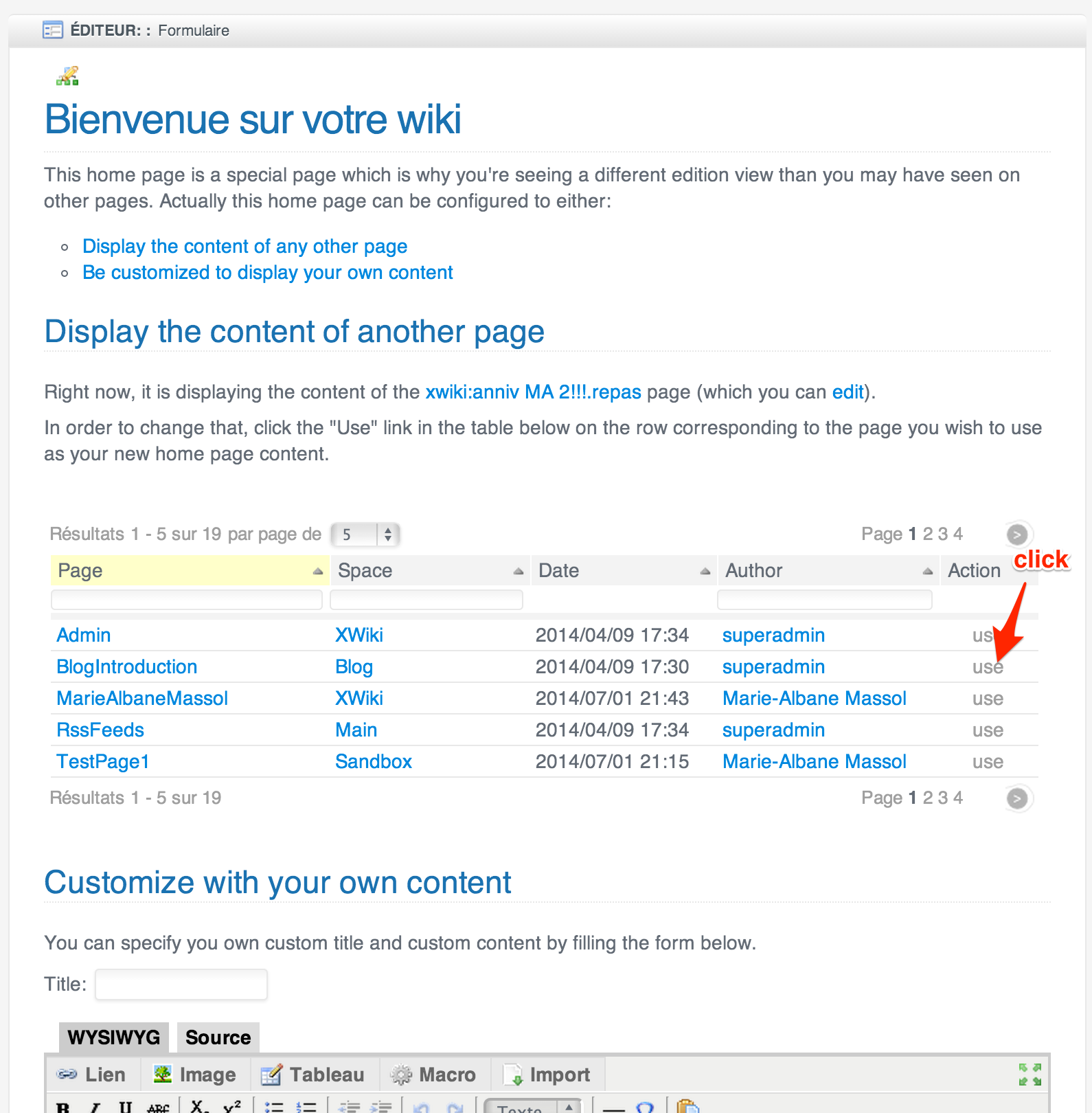
> > The second exercise I gave her was about changing the wiki’s home page
> to be her own content.
> >
> > I tested it with several options:
> > - option 1: clicking edit on Dashboard.WebHome (XE 6.1)
> > - option 2: clicking edit on Main.WebHome (XE 6.1)
> > - option 3: clicking edit on Main.WebHome but forcing the “inline” mode
> (XE 6.1)
> > - option 4: clicking edit on Main.WebHome but with the proposal of
> http://jira.xwiki.org/browse/XWIKI-10586
> >
> > Results in short:
> > - option 1: She selected the text she wanted to change with the mouse
> and hit backspace… resulting in navigating to the previous page in the
> browser. Her rationale: she had clicked edit first so she thought she was
> in edit mode…
> > - option 2: The WYSIWYG appears, she again selected the text to change
> and hit backspace… resulting in the whole include macro being removed… Then
> she didn’t understand what happened…
> > - option 3: The dashboard appears in inline mode but a warning is
> displayed with technical explanations that confused her and same problem as
> with option 1 anyway.
> > - option 4: She couldn’t use the first version I did because she didn’t
> understand why when she clicked edit she wasn’t in the standard edit view
> (as with other pages she had edited before). I tuned the text leading to
> http://jira.xwiki.org/secure/attachment/28082/step2.png and thereafter
> she could use it just fine.
> >
> > Conclusion
> > ===========
> >
> > This was very useful to me. It was worse than I imagined… but I now
> better understand how newcomers think when they see XWiki. To summarize we
> need to:
> > - explain the concept of “space” or replace it by “folder” which is an
> already known concept.
>
> I had the same immediate reaction but since we still have traces of "Web",
> we should probably swallow hard and accept that we need to explain what a
> "Space" is.
>
> > - show titles everywhere in the UI instead of page names (this is very
> confusing for the user): top menu, index livetables, etc
>

> This is going to run us into a performance issue since titles are often
> computed.
>

Maybe using "identifier" instead of "name" in this case ... ? Or explain
what a page name really is, like for space. Because people usually don't
understand at first what is a space (or web), but they THINK they
understand what is a page name (because it's common wording), while in fact
they don't - and they realize that later. I think 99% of my new users
believe a page name (when they first create a page), is its title. Some
still think it is, years later ;-)
If you "hide" the page name and show the title everywhere in UI, when they
will perform a page "rename", they may be confused again... (though rename
is for advanced users I must admit).


>
> > - add ways to navigate between pages more easily (either by changing the
> top level menu or introducing some navigation panels)
>
> +1
>
> > - there might be something to improve on the top level menu: She saw it
> as navigation only whereas it’s not fully and thus it’s not obvious that it
> contains actions that can be done at a given level (because it displays the
> current position and not generic terms such as “spaces”, “pages”.
>
> +1 for changing it, there are enough visual queues of where you are.
>
>
> Thanks,
> Caleb
>
>
> >
> > Thanks
> > -Vincent
> >
> >
> >
> >
> > _______________________________________________
> > devs mailing list
> > [email protected]
> > http://lists.xwiki.org/mailman/listinfo/devs
> >
> _______________________________________________
> devs mailing list
> [email protected]
> http://lists.xwiki.org/mailman/listinfo/devs
>
_______________________________________________
devs mailing list
[email protected]
http://lists.xwiki.org/mailman/listinfo/devs