Hi Caty,

I was talking about the "Configure" link in your snapshot (to access the menu to
configure the AppBar).  Since it's in the screenshot, it means that my question
is already solved so that's good :-) (or at least planned).
Thanks,
On Fri, Oct 24, 2014 at 01:03:20PM +0300, Ecaterina Moraru (Valica) wrote:
> On Fri, Oct 24, 2014 at 12:21 PM, Jean SIMARD <[email protected]> wrote:
>
> > It sounds good and simple enough to be intuitive. The hardest part will
> > probably
> > be to find the menu.  Is it only accessible in the Admin panel (click on
> > the top
> > button, then click on "Admin the wiki" then click on left on the
> > "Application
> > panel menu")?  It would be good to have it accessible from the panel
> > itself (but
> > maybe there is already something?).
> >
>
> Not sure what you mean, but just for the record AppBar come in the
> leftpanels by default, so no need to find it and add it.
> Regarding the easiness to configure it, currently we don't have it like
> that, but in the original proposal the configure link was in the 'More'
> section, see
> http://design.xwiki.org/xwiki/bin/download/Improvements/Skin4x/profileDesktopSnapshotAnnotationsAppBar.png
>
> Thanks,
> Caty
>
>
> >
> > Anyway, nice work!  I'm also +1 to commit that.
> > On Thu, Oct 23, 2014 at 06:17:09PM +0200, Guillaume "Louis-Marie"
> > Delhumeau wrote:
> > > Hello.
> > >
> > > I have worked a bit on http://jira.xwiki.org/browse/XWIKI-10333
> > > <http://jira.xwiki.org/browse/XWIKI-10844>, to be able to remove some
> > > applications from the left bar. I wanted to propose it before 6.3M2 is
> > > released, so I have made a prototype (without doing a proper proposal)
> > > which is working quite well.
> > >
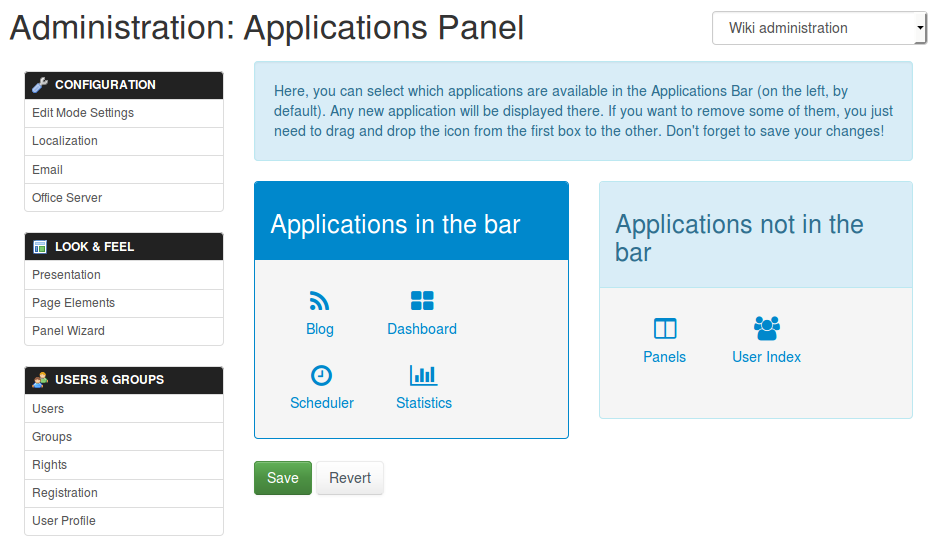
> > > You can see a screenshot there:
> > > http://jira.xwiki.org/secure/attachment/29296/customizable-app-bar.png
> > >
> > > The principle is very simple: on the left, you have the applications that
> > > you want to have in the app bar. On the left, the others (stored in a
> > > blacklist actually). You just need to drag&drop the icon from the left to
> > > the right, or from the right to the left, to change your settings. Then
> > you
> > > click on "save" and voila.
> > >
> > > It is written with jQuery and jQuery-ui (loaded via a webjar).
> > >
> > > If you like it, I can commit it on master. FYI, you can already see the
> > > code there: https://github.com/gdelhumeau/xwiki-platform/compare/panels
> > >
> > > Here is my +1 to put it on master.
> > >
> > > WDYT?
> > >
> > > Thanks
> > >
> > > --
> > > Guillaume Delhumeau ([email protected])
> > > Research & Development Engineer at XWiki SAS
> > > Committer on the XWiki.org project
> > > _______________________________________________
> > > devs mailing list
> > > [email protected]
> > > http://lists.xwiki.org/mailman/listinfo/devs
> >
> > --
> > Jean Simard
> > [email protected]
> > Research engineer at XWiki SAS
> > http://www.xwiki.com
> > Committer on the XWiki.org project
> > http://www.xwiki.org
> > _______________________________________________
> > devs mailing list
> > [email protected]
> > http://lists.xwiki.org/mailman/listinfo/devs
> >
> _______________________________________________
> devs mailing list
> [email protected]
> http://lists.xwiki.org/mailman/listinfo/devs

--
Jean Simard
[email protected]
Research engineer at XWiki SAS
http://www.xwiki.com
Committer on the XWiki.org project
http://www.xwiki.org
_______________________________________________
devs mailing list
[email protected]
http://lists.xwiki.org/mailman/listinfo/devs