Thanks, Andy.

WinWarbler was first released in July 2000, with monthly (or better)
updates since then.
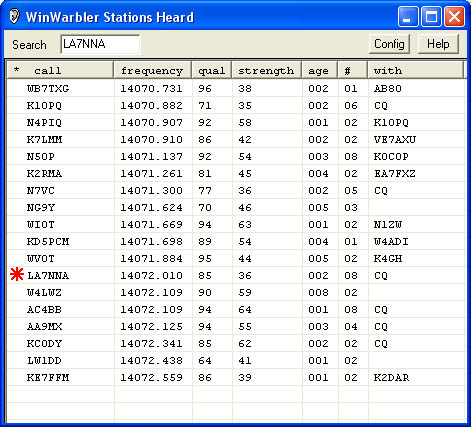
Many PSK ops find WinWarbler's most useful capability to be its "Station's Heard" window, which displays a list of all callsigns decoded on the current band and the callsign of the station with whom each is in QSO. For an example, see http://www.dxlabsuite.com/winwarbler/Heard.jpg Double-clicking an entry in the "Station's Heard" window sets up WinWarbler for a QSO with that entry's station, displaying all text already decoded on the QSO frequency. You can optionally configure WinWarbler to create a local entry in SpotCollector when it discovers a PSK station, making it easy to quickly identify needed new ones. 73, Dave, AA6YQ --- In [email protected], "Andrew O'Brien" <[EMAIL PROTECTED]> wrote: > > I'm not sure how long Winwarbler has been around, but it has to be > quite a few years since it was first released. I have not used it > frequently since I have tended to use Zakanaka, MixW, or Multispk > user over the years. > > Because Multipsk works very well with the DX Lab Suit, I have > recently been using DX LAB applications more and more. I have > vacillated between Logger32 and DX Keeper as my default logging > software. > > As much as I like Logger32, I have found some aspects of DX Lab Suite > more suitable to my needs and now use DX Keeper, Spotcollector, and > Multipsk most of the time. The DX Lab Launcher makes updating the > suite of applications so easy that I recently clicked on "upgrade" and > updated Winwarbler. > > This weekend, I wanted to try and mop up a few needed states via the > NAQP CW contest. I decided to use my DX Keeper log to track needed > stations and use the very useful feature in Spotcollector and > Pathfinder that identify stations known to use LOTW. Since > Winwarbler just looks "cool", I decided to use the nice layout for > some CW macros in the contest. I can report that Winwarbler > interfaces very easily with my Microkeyer and the on-board Winkey > chip. Nice sent CW, and no lags or missed characters. I found the > quick QSL interface with QRZ.com very useful, it allowed me to "cheat" > in NAQP, a tad , since I had a head start on what the person's name > and state was likely to be. > > So with CW transmit working well, I thought I would give Winwarbler a > whirl on PSK31 and RTTY this morning. It has been years since I used > it. I know the authors of software like us to actually read the help > files but I like to poke around and see what can be done before > actually having to read the file. Winwarbler is fairly easy to figure > out. A few quick mouse clicks and I had changed the apparent default > waterfall display from monochrome to colour (choose "synthetic" under > WATERFALL DISPLAY in the PSK Config area) and the method that > identifies where you are on the waterfall to "markers" rather than > the default "trace" method . At first I thought that the PSK did not > receive as well as Multipsk but I think it was just poor conditions. > Below is the decode of a weak 20M signal. > > Winwarbler > NAME îCARLOS, CARLOS > . QTH IS PONT > CELGADA > . AZORµ - HM77DR > . BTU, > I1S I1FRS DE CU2AO CU2AO > K > > > Multipsk: > NAME IS CAR, CARLOS > . QTH IS PONTA DELGADA > . AZORES - HM77DR > . BTU, > I1FRS I1FRS DE CU2AO CU2AO > K > > The squelch settings on Winwarbler were "slider 31" and in Multipsk > the squelch was a '1'. They appear to decode weak signals about the > same. > > For RTTY, set up was just as easy and performance as good as one would > expect. I used the default settings > > In Multipsk with a squelch setting of 3, the decode of a weak signal was > > CQ CQ CQ DE RZ3AFK RZ3AFK RZ3AFK PSE K > CC CQ CQ DA RZ3AFKIMZ3AFK RZ3AFK PSE K > CQ CQ DE RZ3AFK RZ3AFK RZ3AFK NSE K > > In Winwarbler > > CQ CQ DE RZ3AFKRZ3AFK RZ3AFK PSE K > CQ DAFK RZ3AFK PSE K > CQ DE RZ3AFK RZ3AFK RZ3AFK PK J > > Again, not a whole lot of difference and squelch settings not set for > exact matching. > > > On this Yahoogroup, we often get people that are totally new to > digital modes and are looking for something easy to start with, > usually just PSK31. I usually suggest Digipan because it is so easy > to set-up and the newcomer can be up and running in no time. I think > I will now add Winwarbler to that list of software recommended for the > newcomer It is very easy to set-up, GREAT on the eyes, interfaces > very well with your electronic keyer, When used with it's siblings (DX > Keeper, Spotcollector, DXView, Pathfinder and Propview ) you have some > very powerful applications that I suggest the "expert" digital > operators should give a try. > > Winwarbler supports decoding of BPSK31 BPSK61 QPSK31 QPSK63, > RTTY,MTTY (23 Hz RTTY), and various filtered adjustments for RTTY > affected by multipath and "fluttered" signals" > > > Andy K3UK > Skype Me : callto://andyobrien73 > www.obriensweb.com >