On Mon, Nov 25, 2013 at 3:11 PM, Ben Z en de rest
<[email protected]> wrote:
> Just to update what I did to try and solve this problem (with no luck yet)
>
> I did read that the problem could be related to the need for Python OpenGL
> support. I did install Python OpenGL (and OpenGL accelerator) from
> http://pyopengl.sourceforge.net  but that gave me a "X windows system error"
> on all Gnuradio examples that I tried.
>
> Had to remove Python OpenGL to solve that "X windows system error" but the
> waterfall sink still only shows blue lines.
>
>
> Then I had Synaptic install the Python OpenGL but with the same "X windows
> system error" as result. So I had it removed and now I am back at my first
> problem.
>
> Kind regards,
>
> Ben
Ben,
Yes, it's probably related to OpenGL issues. Sounds like your system
doesn't like OpenGL much at all.

Try disabling it in the WXGUI plots by editing
$prefix/etc/gnuradio/conf.d/gr-wxgui.conf and changing "style = auto"
to "style = nongl".

Tom


> 2013/11/24 Ben Z en de rest <[email protected]>
>>
>> Hi,
>>
>> Installed Gnuradio 3.7.2 from source. Had some troubles loading files from
>> earlier versions so I started from scratch with the FM receiver from author
>> 2h20. Added a bandpass filter to filter the 19 kHz pilot tone (just for fun)
>> but want to add the waterfall sink to see / show 57 kHz RDS carrier (also
>> for fun / getting experience).
>>
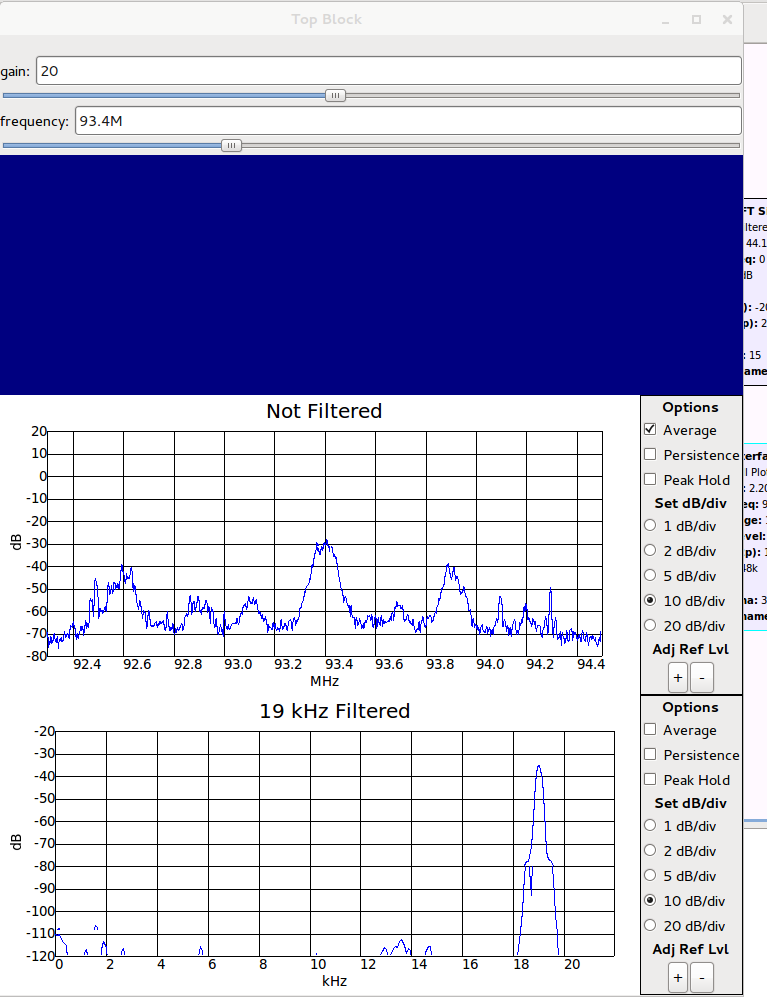
>> The waterfall sink only shows a blue screen. Tried different range
>> settings, different ref scale settings and FFT sizes. Stole the settings
>> from this example
>> http://www.kj6msg.com/2013/09/gnu-radio-rtl-sdr-and-mac-os-x.html but still
>> no output. The waterfall also shows no scale information or labels.
>>
>> Found another problem about this on the list where the question was what
>> happened if a signal source was connected to the waterfall sink without
>> anything else, I tried that also but even there only a blue screen is filled
>> but no signal and no labels and so on are showed.
>>
>> The output window is here:
>> http://www.pe2bz.nl/hamradio/uploads/images/Selectie_001.png
>>
>> Thanks for any advice,
>>
>>
>> Ben
>
>
>
> _______________________________________________
> Discuss-gnuradio mailing list
> [email protected]
> https://lists.gnu.org/mailman/listinfo/discuss-gnuradio
>

_______________________________________________
Discuss-gnuradio mailing list
[email protected]
https://lists.gnu.org/mailman/listinfo/discuss-gnuradio