jclyle;579007 Wrote:
> I connected the touch to wifi network. Ipeng now sees the player :)
>
> Still can't connect the laptop running Squeezeserver. It seems like a
> setting issue. What settings should I look into?
Wait a moment. If iPeng can see the player it's either under
"unconnected players", then you can't use it and it will not play
music.
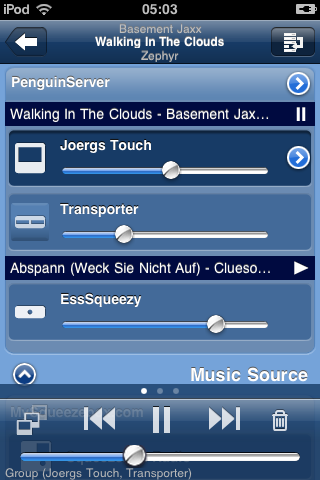
Otherwise iPeng should tell you which server the player is connected
to, what do you see on the MultiPlayer screen (this one:
http://penguinlovesmusic.de/wp-content/gallery/ipeng-1-2/img_0321.png
)?

Do I understand your setup correctly that you have a Laptop that should
run the server and to which the USB drive is connected and a Touch that
should connect to that Laptop and the iPod should also connect to the
same network and control the thing.

You say you are connecting the Laptop and the Touch with a switch, does
this mean you use a wired network connection between the two? How is all
this connected to a router if you have one or where is the DHCP server
(the one handing out the network addresses) located on your network and
how is WiFi connected to the fixed part of the network?


--
pippin

---
see iPeng, the Squeezebox iPhone remote, at penguinlovesmusic.com
------------------------------------------------------------------------
pippin's Profile: http://forums.slimdevices.com/member.php?userid=13777
View this thread: http://forums.slimdevices.com/showthread.php?t=82221

_______________________________________________
discuss mailing list
[email protected]
http://lists.slimdevices.com/mailman/listinfo/discuss