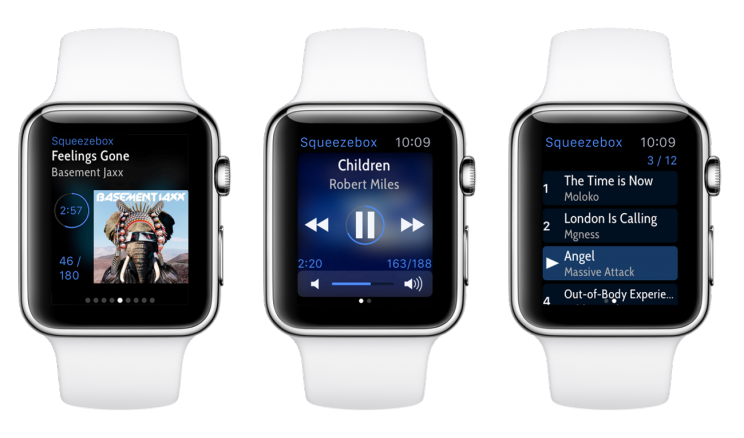
After running an announcement thread during the wait for release, here's
now the official announcement for iPeng on the Apple Watch:
The release of the Apple Watch in April brought some new chances and challenges for iPeng too: How could we realize a quickly manageable version of iPeng for the watch making the best use of its UI (which is like no other UI before attuned to the presence of the user), and which would be the most important use cases with iPeng? Well, the biggest advantage (compared to the iPhone) of this "most personal device Apple has ever designed" certainly lies in its availability and the easy access to information and menu content it provides. Apple Watch has been designed to be worn, thus it offers the chance to simplify daily, frequent actions and interactions that are related to functions users care about the most. On the other hand, it implies a lot of limitations and restrictions (with regards to space, speed etc.), and besides that, the creation of Apps is limited by the capabilities WatchKit offers. [image: http://penguinlovesmusic.de/wp-content/uploads/2015/05/device_three_main_med-744x438.png] SO, FOR THE FIRST VERSION OF IPENG FOR IWATCH, WE DECIDED TO CONCENTRATE ON THE FOLLOWING (AND IN OUR EYES BASIC) FUNCTIONS: - NowPlaying Screen with info about the currently playing title; play-/pause-, skip to next-/previous track- and volume-buttons. - current playlist to show and select tracks - context menu with two functions: - Choose Player. You can useSelect Player or QuickSwitch to continue listening in another room. - Switch Players on/off. You can either only switch a single player off or switch off all players (Leave Home-function). - Glance gives you a quick overview of whats currently playing and a simplified way to launch the App. As you will notice, familiar iPeng features have been preserved, like the volume control for synchronized groups for instance: If you control a group of synced players, all players will change the volume, not just one. Or the popular QuickSwitch feature. We expect that the most frequent use cases will be to quickly start or stop music on a player, go to the next track, or change the volume without having to look for your iPhone. Within your own WiFi -Network, you dont even need to have your iPhone with you, which makes the whole thing even more interesting (because you can use it in different rooms). PLEASE LET ME KNOW, WHAT YOUD LIKE TO SEE IN IPENG ON THE WATCH! We are going to maintain and further improve the app in the future, at the moment features like a search- and favorites-function are planned, further (possible) features could be - Ratings, adding tracks to favorites, loveing tracks etc. - Changing shuffle- and repeat-states for the current playlist Feel free to tell us your suggestions with regards to preferred use cases and let us know how iPeng works with Apple Watch for you! http://penguinlovesmusic.de/2015/06/07/watch-out-for-ipeng-8-2/ https://itunes.apple.com/us/app/ipeng-7/id767266886?mt=8&uo=4&at=10l56j As usual: have fun with iPeng on your Apple Watch! --- learn more about iPeng, the iPhone and iPad remote for the Squeezebox and Logitech UE Smart Radio as well as iPeng Party, the free Party-App, at penguinlovesmusic.com *New: iPeng 8, the Universal App for iOS 7 and iOS 8* ------------------------------------------------------------------------ pippin's Profile: http://forums.slimdevices.com/member.php?userid=13777 View this thread: http://forums.slimdevices.com/showthread.php?t=103778
_______________________________________________
discuss mailing list
[email protected]
http://lists.slimdevices.com/mailman/listinfo/discuss