Hi Markus,

we are using dblatex with which we never had such problems.
Maybe you give it a try.
regards

Robert

-----Ursprüngliche Nachricht-----
Von: [email protected] [mailto:[email protected]]
Gesendet: Samstag, 16. Juli 2011 01:17
An: [email protected]
Betreff: [docbook-apps] ragged index with recent fop snapshots

Hi,

I'm about to finish a larger DocBook project. Now that the contents
are almost complete, I'm looking for ways to get everything rendered
nicely as PDF. The latest fop release has a nasty bug which causes
ragged paragraph margins if the lines contain forward links, see this
thread:

http://www.mail-archive.com/[email protected]/msg15826.html

This has been fixed months ago in the nightly fop builds. This is nice
to have as my project uses xref liberally.

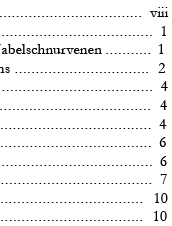
However, there is a regression which isn't much better. The right
margin of the table of contents now looks somewhat ragged. Not much,
but still visible. I've uploaded an example right here:

http://www.abload.de/img/docbook-fop-ragged-ind4un1.png

The longer the title of a chapter or section, the bigger the offset
from the right. Is there a solution for this problem?

I'm currently using DocBook V 5.0, docbook-xsl-ns-1.76.1 stylesheets,
fop-20110715 (same problem with fop-20110304 though). The font used in
the document is Garamond which does not cause any other problems.

regards,
Markus

--
Markus Hoenicka
http://www.mhoenicka.de
AQ score 38

---------------------------------------------------------------------
To unsubscribe, e-mail: [email protected]
For additional commands, e-mail: [email protected]


---------------------------------------------------------------------
To unsubscribe, e-mail: [email protected]
For additional commands, e-mail: [email protected]