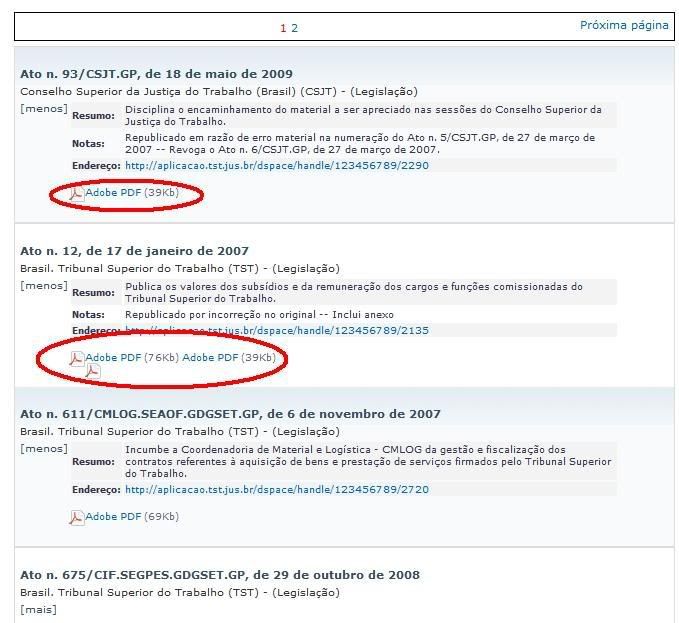
Steven,

Thanks.
I've already added vertical-align="middle" to your format-icon class in my CSS.
The issue is not vertical alignment. The problem is that items don't stay below
each other (see images).
I also couldn't insert description, i don't know why. I used the code, but
nothing appeared.
As i'm not a programmer or something like that, maybe i'm doing something wrong.
The code for the slider in theme's XSL is below. Thanks.
____________________________________
<!-- Generate the metadata slider (aka popup) text about the item from the
metadata section -->
<xsl:template match="dim:dim" mode="itemMetadataPopup-DIM">
<table class="ds-includeSet-metadata-table">
<!-- is version of -->
<xsl:if test="dim:fie...@element='relation' and
@qualifier='isversionof']">
<tr class="ds-table-row even">
<td><span
class="bold"><i18n:text>xmlui.dri2xhtml.METS-1.0.item-isVersionOf</i18n:text>:</span></td>
<td><xsl:copy-of select="dim:fie...@element='relation' and
@qualifier='isversionof'][1]/child::node()"/></td>
</tr>
</xsl:if>
<!-- referenced item -->
<xsl:if test="dim:fie...@element='relation' and @qualifier='uri']">
<tr class="ds-table-row odd">
<td><span
class="bold"><i18n:text>xmlui.dri2xhtml.METS-1.0.item-relationUri</i18n:text>:</span></td>
<td>
<xsl:for-each select="dim:fie...@element='relation' and
@qualifier='uri']">
<a>
<xsl:attribute name="href">
<xsl:copy-of select="./node()"/>
</xsl:attribute>
<xsl:copy-of select="./node()"/>
</a>
<xsl:if
test="count(following-sibling::dim:fie...@element='relation' and
@qualifier='uri']) != 0">
<br/>
</xsl:if>
</xsl:for-each>
</td>
</tr>
</xsl:if>
</table>
<br/>
<xsl:variable name="context" select="ancestor::mets:METS"/>
<xsl:variable name="data"
select="./mets:METS/mets:dmdSec/mets:mdWrap/mets:xmlData/dim:dim"/>
<xsl:apply-templates select="$data" mode="detailView"/>
<xsl:variable name="primary" select="$context/mets:structm...@type =
'LOGICAL']/mets:d...@type='DSpace Item']/mets:d...@type='DSpace Content
Bitstream']/mets:fptr/@FILEID" />
<xsl:variable name="bitstream-count"
select="count($context/mets:structm...@type = 'LOGICAL']/mets:d...@type='DSpace
Item']/mets:d...@type='DSpace Content Bitstream'])" />
<xsl:choose>
<!-- If one exists only display the primary bitstream -->
<xsl:when
test="$context/mets:METS/mets:fileSec/mets:fileg...@use='CONTENT']/mets:fi...@id=$primary]">
<xsl:if test="$bitstream-count<2">
<xsl:call-template name="buildBitstreamOnePrimary">
<xsl:with-param name="context" select="$context"/>
<xsl:with-param name="file"
select="$context/mets:fileSec/mets:fileg...@use='CONTENT']/mets:fi...@id=$primary]"/>
</xsl:call-template>
</xsl:if>
<xsl:if test="$bitstream-count>1">
<xsl:call-template name="buildBitstreamSingle">
<xsl:with-param name="context" select="$context"/>
<xsl:with-param name="file"
select="$context/mets:fileSec/mets:fileg...@use='CONTENT']/mets:fi...@id=$primary]"/>
</xsl:call-template>
<a class="slider-bitstream-count"
href="{ancestor::dri:object/@url}">
(mais arquivos)
</a>
</xsl:if>
</xsl:when>
<!-- Otherwise, iterate over and display some (4) of
them -->
<xsl:otherwise>
<xsl:for-each
select="$context/mets:fileSec/mets:fileg...@use='CONTENT']/mets:file">
<xsl:sort
select="./mets:floc...@loctype='URL']/@xlink:title"/>
<xsl:if test="position()<5">
<!-- Add File Format icon, based on MIME Type -->
<xsl:call-template
name="getFileFormatIcon">
<xsl:with-param
name="mimetype">
<xsl:value-of
select="substring-before(@MIMETYPE,'/')"/>
<xsl:text>/</xsl:text>
<xsl:value-of
select="substring-after(@MIMETYPE,'/')"/>
</xsl:with-param>
</xsl:call-template>
<!-- Display Type of File (e.g. PDF)-->
<a onclick="javascript:pageTracker._trackPageview(this.href);
window.open(this.href); return false;" onkeypress="window.open(this.href);
return false;">
<xsl:attribute name="href">
<xsl:value-of select="mets:floc...@loctype='URL']/@xlink:href"/>
</xsl:attribute>
<xsl:call-template name="getFileTypeDesc">
<xsl:with-param name="mimetype">
<xsl:value-of select="substring-before(@MIMETYPE,'/')"/>
<xsl:text>/</xsl:text>
<xsl:value-of select="substring-after(@MIMETYPE,'/')"/>
</xsl:with-param>
</xsl:call-template>
</a>
<!-- Display File size immediately after title (in
parens)-->
<!-- File size always comes in bytes and thus needs
conversion -->
<span class="bitstream-filesize"><xsl:text> (</xsl:text>
<xsl:call-template name="getFileSize">
<xsl:with-param name="file" select="."/>
</xsl:call-template>
<xsl:text>)</xsl:text></span>
</xsl:if>
</xsl:for-each>
<xsl:if test="$bitstream-count>4">
<a class="slider-bitstream-count"
href="{ancestor::dri:object/@url}">
(mais arquivos)
</a>
</xsl:if>
</xsl:otherwise>
</xsl:choose>
</xsl:template>
________________________
> De: Williams, Steven D <[email protected]>
> Assunto: Re: [Dspace-tech] Organize icons and add file descriptions in browse
> and search results
> Para: "Dspace Tech" <[email protected]>
> Data: Terça-feira, 18 de Agosto de 2009, 17:13
> Hello Fabricio,
>
> Try adding vertical-align="middle" to your format-icon
> class in your CSS. The file description issue has been
> corrected with the following patch http://jira.dspace.org/jira/browse/DS-156.
> The patch is
> easy to apply in your theme XSL. The section of XSL
> that displays the file description is below...
>
> ///////////////////////////////////
> <!-- Display the contents of 'Description' as long as at
> least one bitstream contains a description -->
>
> <xsl:if
> test="$context/mets:fileSec/mets:fileGrp/mets:file/mets:FLocat/@xlink:label
> != ''">
>
> <xsl:value-of
> select="mets:floc...@loctype='URL']/@xlink:label"/>
> </xsl:if>
>
> ////////////////////////////////////
>
> Hope this helps.
>
> Steven Williams
> Webmaster
> Technology Integration Services
> University of Texas Libraries
> University of Texas at Austin
> PCL 1.128G
>
> -----Original Message-----
> From: Fabricio Costa [mailto:[email protected]]
>
> Sent: Tuesday, August 18, 2009 9:17 AM
> To: [email protected]
> Subject: [Dspace-tech] Organize icons and add file
> descriptions in browse and search results
>
>
> Hi,
>
> We are using a theme based on Kubrick. It uses sliders to
> show details about the items.
>
> We're trying to show "file format icon + file type
> description + file size + file description) instead of
> "title + filename.pdf + file size) with no success.
>
> We tried some code tricks, but it doesn't align items. They
> appear incorrectly. The file description doesn't appear
> too.
>
> The code is here
> (http://aplicacao.tst.jus.br/dspace/themes/Tst_legis/Tst_legis.xsl)
>
> And a sample image is here:
> http://i8.photobucket.com/albums/a23/brizziodf/Rascunho/sample_dspace001.jpg
>
>
> Any help?
>
>
>
>
>
> ____________________________________________________________________________________
> Veja quais são os assuntos do momento no Yahoo! +Buscados
> http://br.maisbuscados.yahoo.com
>
> ------------------------------------------------------------------------------
> Let Crystal Reports handle the reporting - Free Crystal
> Reports 2008 30-Day
> trial. Simplify your report design, integration and
> deployment - and focus on
> what you do best, core application coding. Discover what's
> new with
> Crystal Reports now. http://p.sf.net/sfu/bobj-july
> _______________________________________________
> DSpace-tech mailing list
> [email protected]
> https://lists.sourceforge.net/lists/listinfo/dspace-tech
>
> ------------------------------------------------------------------------------
> Let Crystal Reports handle the reporting - Free Crystal
> Reports 2008 30-Day
> trial. Simplify your report design, integration and
> deployment - and focus on
> what you do best, core application coding. Discover what's
> new with
> Crystal Reports now. http://p.sf.net/sfu/bobj-july
> _______________________________________________
> DSpace-tech mailing list
> [email protected]
> https://lists.sourceforge.net/lists/listinfo/dspace-tech
>
____________________________________________________________________________________
Veja quais são os assuntos do momento no Yahoo! +Buscados
http://br.maisbuscados.yahoo.com
------------------------------------------------------------------------------
Let Crystal Reports handle the reporting - Free Crystal Reports 2008 30-Day
trial. Simplify your report design, integration and deployment - and focus on
what you do best, core application coding. Discover what's new with
Crystal Reports now. http://p.sf.net/sfu/bobj-july
_______________________________________________
DSpace-tech mailing list
[email protected]
https://lists.sourceforge.net/lists/listinfo/dspace-tech