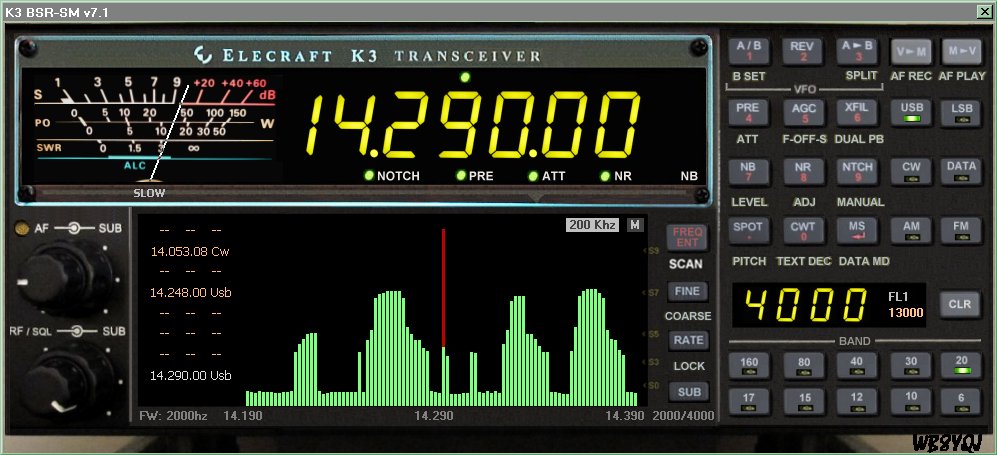
Nope, it's not the P3, nor LP-PAN, but a single receiver SWEEP
function that you can download right now. It takes just under
12 seconds to sweep the range either (50, 100, 200, or 400 khz)
and the receiver is muted during that time, like Jupiter, IC746, and
some others.
Unlike some others, you can click on the display to set the K3
to the activity indicated on the display.

No additional hardware is needed, just a K3 and a PC.

Click "SWEEP" to sweep. Click the "100 Khz" label to change
the sweep range.

Today, during the contest, we saw a few huge blobs with so
many stations so close together. But this evening on 20m, the
"fishfinder" located many Pacific stations that showed nothing
but clear space around them.

The RED line is the K3 starting frequency. The SWEEP starts
at half the sweep value lower in frequency, runs through the
starting point to half the sweep value higher in frequency, then
returns to the starting point. Click on the display to set a new
frequency, that spot will color BLUE to indicate your position.

The RED (starting point) will remain, clickable for return.

Photo here:

http://www.zerobeat.net/wb8yqj/k3pluss.jpg

Software here:

http://www.zerobeat.net/mediawiki/index.php/MEGA_K3_VIRTUAL_TRANSCEIVER

Apologies to those who were hoping I'd keep the decorative but useless
main tuning knob on the virtual rig. ;-)


______________________________________________________________
Elecraft mailing list
Home: http://mailman.qth.net/mailman/listinfo/elecraft
Help: http://mailman.qth.net/mmfaq.htm
Post: mailto:[email protected]

This list hosted by: http://www.qsl.net
Please help support this email list: http://www.qsl.net/donate.html