branch: elpa/evil-nerd-commenter
commit 1cff8e027d774e5377cbc165fd9e911b4c42d5d0
Author: Chen Bin <[email protected]>
Commit: Chen Bin <[email protected]>
    updated README
---
 README.org | 38 ++++++++++++++++++--------------------
 1 file changed, 18 insertions(+), 20 deletions(-)

diff --git a/README.org b/README.org
index be1c05f172..ccda0d1418 100644
--- a/README.org
+++ b/README.org
@@ -2,45 +2,45 @@

 *This program could be used independently WITHOUT evil-mode!*

-This program is [[http://www.vim.org/scripts/script.php?script_id=1218][Nerd
Commenter]] simulator which help you comment lines efficiently.
+It's [[http://www.vim.org/scripts/script.php?script_id=1218][Nerd Commenter]]
simulator which help you comment lines efficiently.

-Other useful utilities are added to make it better than the original VIM
plugin. For example, you can copy and comment lines in one step
+Other utilities are added to make it better than the original VIM plugin. For
example, you can copy and comment lines in one step

-I recommend you use it with [[http://gitorious.org/evil][evil]] though evil is
optional.
+I recommend you using it with [[http://gitorious.org/evil][evil]] though evil
is optional.

-Evil is a Vim simulator which makes text manipulation very efficient. For
example, you can press key `,,99j` or `99,ci` to comment out 99 lines.
+Evil is a Vim simulator which makes text manipulation efficient. For example,
you can press key `,,99j` or `99,ci` to comment out 99 lines.

 * Why evil-nerd-commenter is better?
 ** A simple use case on the efficiency
-Say you want to comment out nine lines. Instead pressing "C-space M-9 C-n
M-;", now you can press "M-9 M-;" or ",,9j" or "9,ci".
+If you want to comment out nine lines. Instead pressing "C-space M-9 C-n M-;",
now you can press "M-9 M-;" or ",,9j" or "9,ci".

-The key point is you need *NOT* mark any text to comment line(s)!
+The point is that you need *NOT* mark any text to comment line(s)!

 So you strike less keys than the original "M-x comment-dwim".

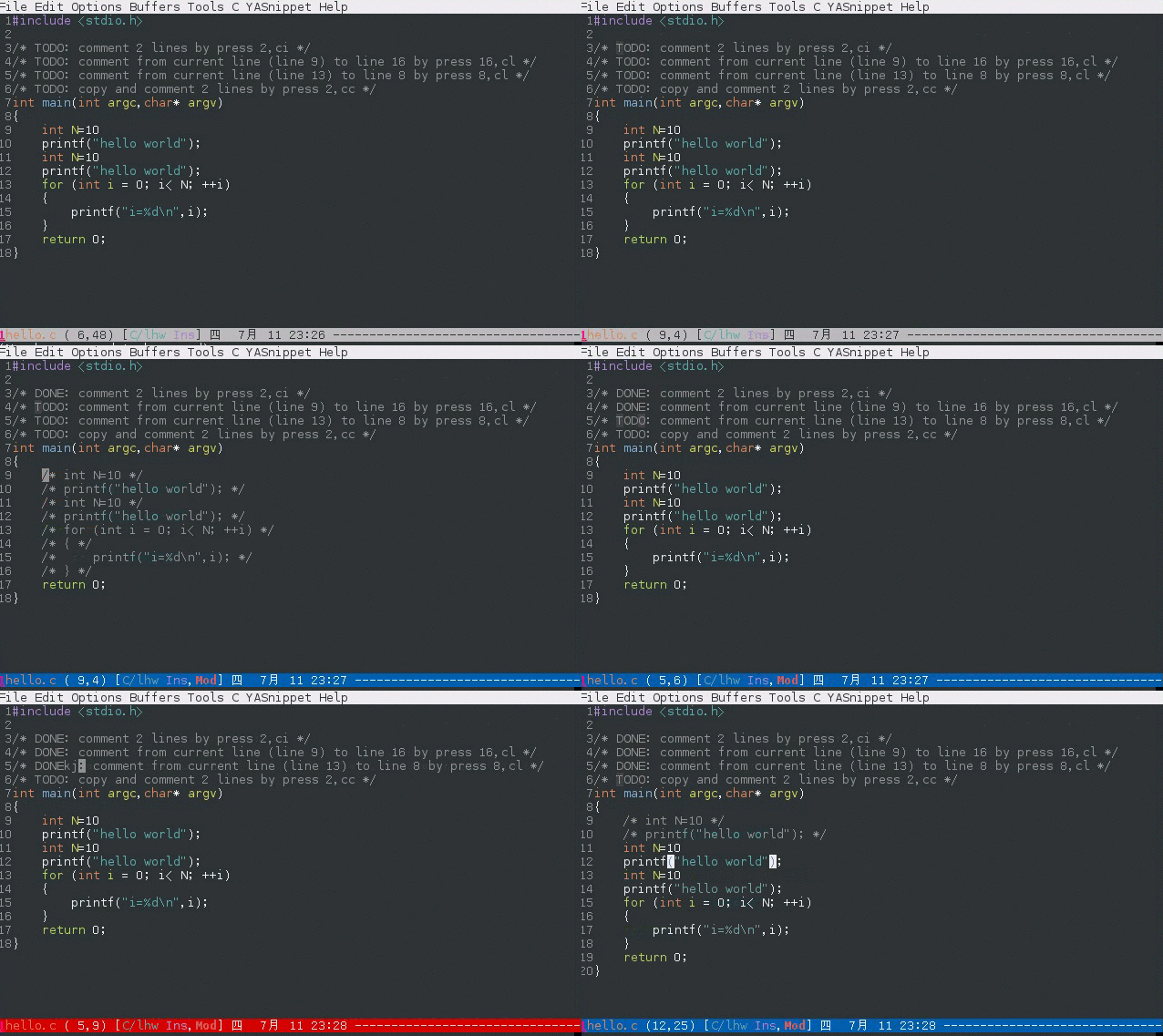
-Here is the live demo:
+Live demo:

[[https://raw.github.com/redguardtoo/evil-nerd-commenter/master/evil-nerd-commenter-demo.gif]]
 ** It will even fix Emacs bug for you
-I'll provide long-term support for this plugin for *ANY language* in the
future. Here is a example how I work around
[[https://github.com/redguardtoo/evil-nerd-commenter/issues/3][a bug in
autoconf.el]].
+I'll provide long-term support for *ANY language* in the future. Here is an
example how I work around
[[https://github.com/redguardtoo/evil-nerd-commenter/issues/3][a bug in
autoconf.el]].

 ** Perfect integration with org-mode
-The programming language embedded in org file will automatically be detected
and *correct* comment syntax will be used!
+The code snippet embedded in org file will automatically be detected and
*correct* comment syntax will be used!

 * Install
-evil-nerd-commenter is already uploaded to [[http://melpa.milkbox.net/]]. So
the best way to install it is using Emacs' package manager.
+evil-nerd-commenter is already uploaded to [[http://melpa.milkbox.net/]]. The
best way to install it is using Emacs' package manager.

 * Set up
 ** The easy way (RECOMMENDED)
-Nothing to set up if install it in the way as I suggested.
+Nothing to set up.

-You may add one line of emacs lisp code into ~/.emacs to let
evil-nerd-commenter assign hot keys for you:
+You may add one line of emacs lisp code into ~/.emacs to use default hot keys,
 #+BEGIN_SRC lisp
 (evilnc-default-hotkeys)
 #+END_SRC

 And *that's ALL*!

-Further explanation, the content of evilnc-default-hotkeys is:
+The content of evilnc-default-hotkeys is:
 #+BEGIN_SRC lisp
 (defun evilnc-default-hotkeys ()
   "Set the hotkeys of evil-nerd-comment"
@@ -59,11 +59,10 @@ Further explanation, the content of evilnc-default-hotkeys
is:
 #+END_SRC

 As you can see, the default hot key for commenting lines is "M-;" when you
don't use [[http://emacswiki.org/emacs/Evil][evil-mode]].
-The advantage of use "M-;" is you can set mark on the first line and scroll
several pages down and comment all the lines in that region by "M-;". The key
point here is you save the extra two key strikes to make marked region wrap the
whole content of first and last line.

-I prefer vi key binds. So I also use
[[http://emacswiki.org/emacs/Evil][evil-mode]]. Evil-mode is only *optional*!
Some people don't use it because they prefer emacs native key binding.
+You can set mark on the first line, scroll down, and comment *all the lines*
instead of selected region by "M-;".

-Feel free to copy the content of evilnc-default-hotkeys into your .emacs
instead calling it directly. So you can define your own hotkeys.
+You can copy the content of evilnc-default-hotkeys into .emacs instead calling
it directly.

 ** The hard way
 If you don't use emacs package manager please insert below code into your
~/.emacs:
@@ -98,7 +97,7 @@ The hotkey is ",ci" in evil-mode and "M-;" (M means Alt key)
in emacs normal mod
 *** evilnc-quick-comment-or-uncomment-to-the-line  (RECOMMENDED)
 comment/uncomment from current line to the user-specified line. You can input
the rightest digit(s) to specify the line number if you want to type less.

-For example, say current line number is 497. "C-u 3 M-x
evilnc-quick-comment-or-uncomment-to-the-line" will comment to the line 503
beause the rightest digit of "503" is 3.
+For example, say current line number is 497. "C-u 3 M-x
evilnc-quick-comment-or-uncomment-to-the-line" will comment to the line 503
because the rightest digit of "503" is 3.

 The hotkey is ",cl" or ",ll" in evil-mode and "C-c l" (C means Ctrl key) in
emacs normal mode.

@@ -228,7 +227,7 @@ Thanks for Andrew Pennebaker (aka mcandre) providing this
tip.
 Please check my project
[[https://github.com/redguardtoo/evil-matchit][evil-matchit]]. You can press
",si" to select a region between tags and press "M-/" to comment the region.

 All the popular programming languages are supported;
-** Tip 4, use evil-leader if you prefer the "\" as the leader character in
evil-mode
+** Tip 4, use evil-leader if you use the *backslash* as the leader key in
evil-mode
 - Install [[https://github.com/cofi/evil-leader][evil-leader according to its
README]].
 - Remove line "(evilnc-default-hotkeys)" from your ~/.emacs.
 - Insert below code into you ~/.emacs,
@@ -251,6 +250,5 @@ All the popular programming languages are supported;
   )
 #+END_SRC

-
 * Contact me
-You can report bugs at [[https://github.com/redguardtoo/evil-nerd-commenter]].
+You can report bugs at [[https://github.com/redguardtoo/evil-nerd-commenter]].
\ No newline at end of file