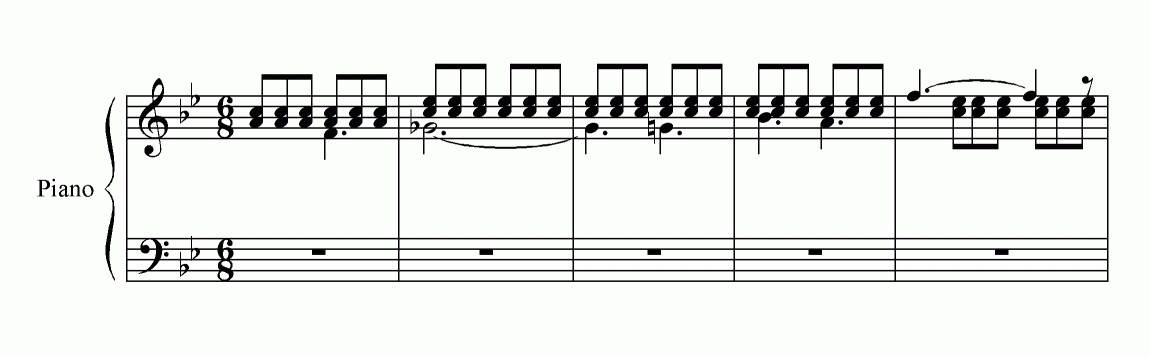
Many thanks to all who responded to my spacing problem.

In a way I'm reassured that it isn't just me that has this problem - but
concerned that something as ordinary as this can still produce such ugly
results.
The main answer seems to be to avoid having chords in layer 2. Re-doing
the same bar with only a single note on the first beat in later 2 as
Christopher Smith suggested puts the spacing exactly where it ought to
be - many thanks. Maybe I'll have to upgrade after all!

As always, the help provided by the members of this list is amazing!
Many thanks.

Michael Withers

-----Original Message-----
From: [EMAIL PROTECTED] [mailto:[EMAIL PROTECTED] On Behalf
Of Klaas de Jong
Sent: 06 September 2004 21:35
To: [EMAIL PROTECTED]
Subject: Re: [Finale] Spacing problem WinFin2k3


Hello Michael,
You should experiment with the values in: options/doc.options/music
spacing/spacing widths. I could replicate your results in finmac2k3,
when the the bottom button was activated and the reference value was
1024; making this smaller, 512 gave an acceptable result and also
choosing the upper button in this dialog window was o.k. Apparently the
values of these options work against an automatic broadening of your
example measures in 6/8 time. Making the measures larger, making more
room for everything, also works. hope this helps, klaas de jong.

> From: "Michael Withers" <[EMAIL PROTECTED]>
> Reply-To: [EMAIL PROTECTED]
> Date: Mon, 6 Sep 2004 16:37:39 +0100
> To: "Finale" <[EMAIL PROTECTED]>
> Subject: [Finale] Spacing problem WinFin2k3
>
> Dear list experts,
>
> I'd be very grateful if anyone can find the time to take a quick look
> at this spacing example:
>
> http://www.michaelwithers.f2s.com/SpacingTest.gif
>
> I guess we're all fairly used to some of Finale's quirks in spacing
> accidentals in layers, but I'm at a loss to know what is causing the
> two problems in this example.
>
> In bar 4, the Layer 2 Bb is touching the second note in Layer 1. I
> would have expected the spacing algorithm to add some space there.
>
> The Layer 2 spacing in bar 5 is simply dreadful, and I cannot see what

> is causing it. The file was clean, and there are no extra layers or
> hidden layers.
>
> Is this just my system or can anyone else replicate it? (I've tried it

> on two PCs and it's exactly the same on each). If it's a genuine
> spacing problem in Finale, can anyone suggest a workaround that will
> provide a satisfactory spacing without the need to hand-tweak every
> occurrence?
>
> Very grateful for any help.
>
> Thanks
>
> Michael Withers
>
>
> _______________________________________________
> Finale mailing list
> [EMAIL PROTECTED]
> http://lists.shsu.edu/mailman/listinfo/finale

_______________________________________________
Finale mailing list
[EMAIL PROTECTED]
http://lists.shsu.edu/mailman/listinfo/finale


_______________________________________________
Finale mailing list
[EMAIL PROTECTED]
http://lists.shsu.edu/mailman/listinfo/finale