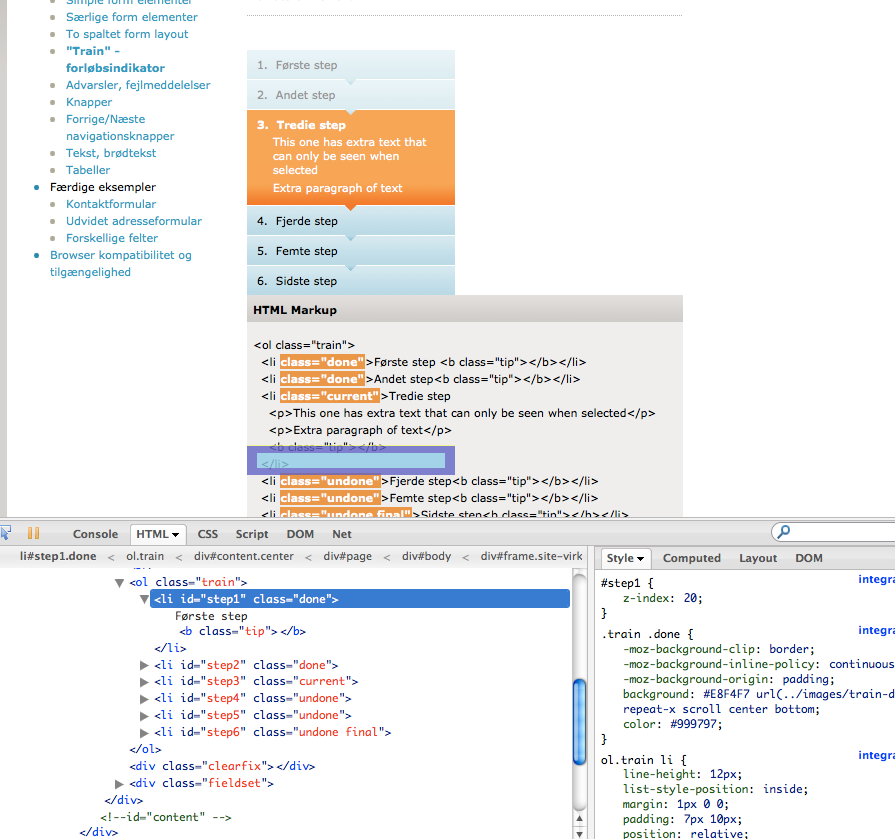
I found a bug that can be related to release 1.5a26:

It seems that the inspect element feature is sometimes off and shows
border-box the wrong place.
Look at this image where I hover over an element in the firebug window
(Firebug 1.5a26 on Firefox 3.5.3 mac).

http://justaddwater.dk/wp-content/uploads/2009/10/Screen-shot-2009-10-13-at-1.03.35-PM.png

Notice how the box that visualizes margin/padding is placed way down
on the HTML page.

Page for testing: http://xmltools2.oio.dk/virk/htmlguide/train.html
1. press "inspect element (Command+Shift+C)
2. In the Firebug HTML inspector, try to hover over the colored boxes
(<li> items in the <ol class="train">)
3. In the browser window, the boxes that visualize margin/padding are
positioned way below their physical HTML element

Can anybody reproduce that issue or explain me why I get this bug?


Kind regards,
Jesper Rønn-Jensen
www.justaddwater.dk
PS. I'm not sure if this issue is related to Firebug 1.5a26, but
that's the version I discovered it with.


On Oct 10, 12:34 am, John J Barton <[email protected]>
wrote:
> http://blog.getfirebug.com/2009/10/09/firebug-1-5a26/
>
> The last alpha for 1.5 is out.
> jjb
--~--~---------~--~----~------------~-------~--~----~
You received this message because you are subscribed to the Google Groups
"Firebug" group.
To post to this group, send email to [email protected]
To unsubscribe from this group, send email to
[email protected]
For more options, visit this group at
http://groups.google.com/group/firebug?hl=en
-~----------~----~----~----~------~----~------~--~---