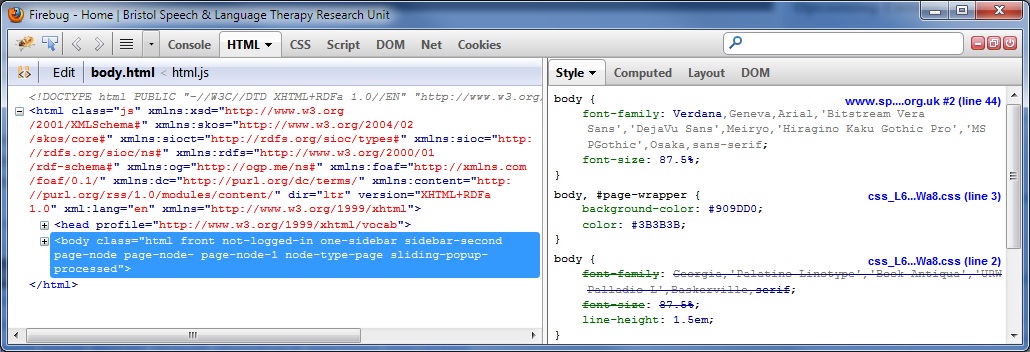
Hi
I use the same steps as you. Where do I find the First Aid page.

Thanks
Julie
On Friday, September 28, 2012 12:48:37 PM UTC+1, Sebastian Zartner wrote:
>
> This first screen shot shows Firebug as it was working for me, I got this
>> screen shot from https://getfirebug.com/css, you see it show the css
>> file global.css. This second screen shot shows what I am seeing now
>> (FB-not-working.png) I can only see the URL of the site and not the
>> specific css file. The URL for this site is
>> http://www.speech-therapy.org.uk/. I am just pressing F12 to get Firebug
>> up and then you can see the rest from the screenshot. Thank you for looking
>> into this for me.
>>
>
> Hmm, I can't reproduce that using FF 15.0.1 + FB 1.10.3 on Win7.
>
> My steps:
>
>     Opened Firebug at http://www.speech-therapy.org.uk/
>     Switched to the HTML panel and there to the Style side panel
>
> The result is shown below.
>
> Do you have different steps?
> If not, I assume your problem is caused by another extension or a specific
> setting. In this case you should follow the steps on our "first aid" page
> to find the culprit.
>
> Sebastian
>
>
> <https://lh6.googleusercontent.com/-3aBmpB3gOB4/UGWObGXwT1I/AAAAAAAAADw/7Eg_rK7GWCk/s1600/Style+side+panel+source+link.jpg>
>

--
You received this message because you are subscribed to the Google
Groups "Firebug" group.
To post to this group, send email to [email protected]
To unsubscribe from this group, send email to
[email protected]
For more options, visit this group at
https://groups.google.com/forum/#!forum/firebug