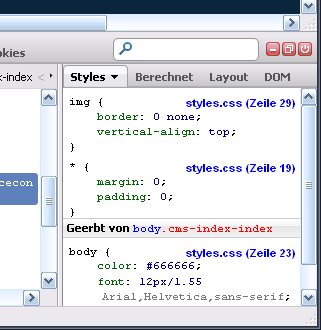
Hello Sebastian,

the problem is solved.
The problems with my macbook air not showing the stylesheet with the
corresponding row number are caused by my umts provider vodafone or my wlan
router Huawei E5. I just started firebug on my macbook using my wlan at
home (network provider kabeldeutschland) and everything is fine: the
correct stylesheet with corresponding row number is shown.

I will now look how to setup the vodafone connection to overcome the
problem when I am not at home. I already read in another forum that
vodafone somehow seems to compress the data somehow.

Thank you

Clemens

Am Freitag, 30. November 2012 09:55:19 UTC+1 schrieb Clemens Heilmann:
>
> Thank you Sebastian,
>
> I will check your advice on my macbook air.
>
> Currently, I am working on my mac pro with same firefox 17 and same
> firebug 1.10.6. When I load here the page I provided to you the stylessheet
> with row numbers is correctly shown (see attached screenshot). I would take
> that as a hint it has something to do with the firebug settings...
>
> Again thank you for your engagement.
>
> Ciao
>
> Clemens
>
>
> <https://lh3.googleusercontent.com/-D50aofykDLg/ULh0ZQKhDzI/AAAAAAAAEJg/zNVGchnMXug/s1600/firebug_macpro.jpg>
>
>
> Am Freitag, 30. November 2012 00:44:03 UTC+1 schrieb Sebastian Zartner:
>>
>> Ah, forgot the screenshots. :-) Here they are:
>>
>>
>> <https://lh4.googleusercontent.com/-zcFEp6xfJFg/ULfy00MNb_I/AAAAAAAAAG0/l9-HJZBCJS4/s1600/stylesOnMagentoShop.png>
>>
>>
>> <https://lh5.googleusercontent.com/-R0MuHwOaEzs/ULfy4BpZxhI/AAAAAAAAAG8/EmjzA5p2QoM/s1600/magentoShopRequestsFilteredByCSS.png>
>>
>> <https://lh5.googleusercontent.com/-R0MuHwOaEzs/ULfy4BpZxhI/AAAAAAAAAG8/EmjzA5p2QoM/s1600/magentoShopRequestsFilteredByCSS.png>
>>
>

--
You received this message because you are subscribed to the Google
Groups "Firebug" group.
To post to this group, send email to [email protected]
To unsubscribe from this group, send email to
[email protected]
For more options, visit this group at
https://groups.google.com/forum/#!forum/firebug