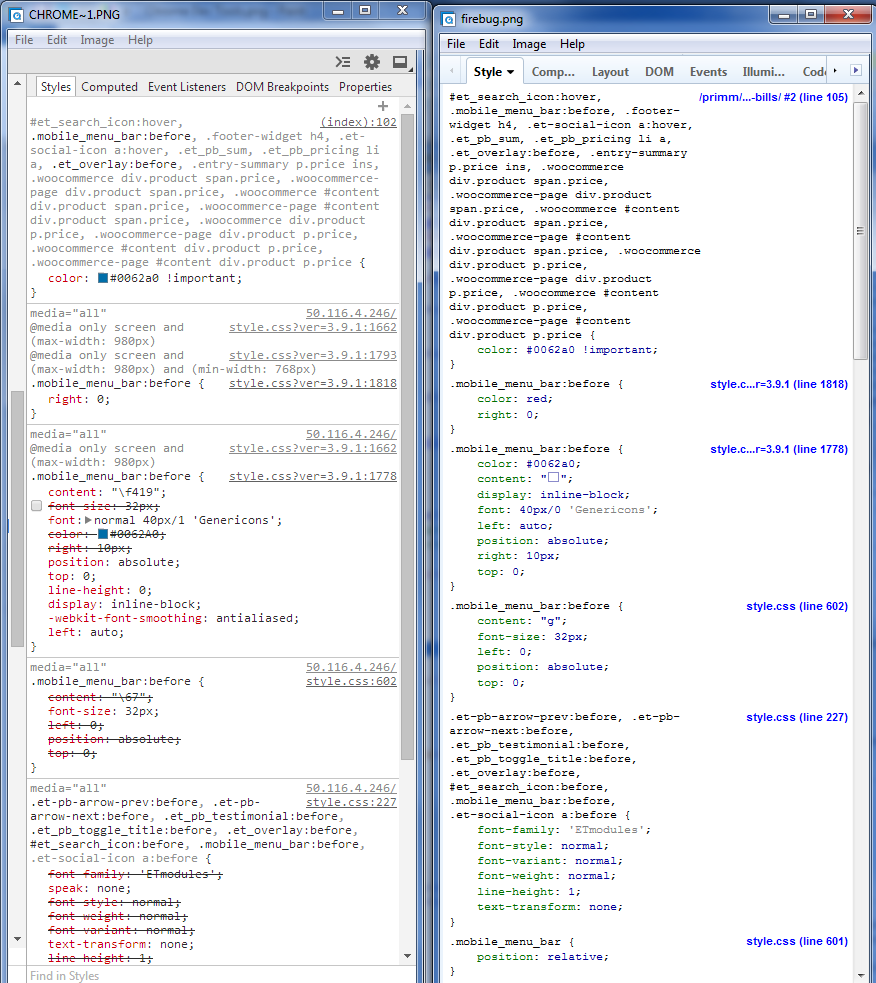
I'm working on a site with lots of Cascading Style Sheet (CSS) overwrites.
   Normally when a CSS rule is superseded based on Specificity rankings the
Firebug Style tool shows the old CSS line in font strikeout mode.  This
indicates you should look elsewhere for the actual CSS rule in place.
 Unfortunately this tool doesn't work correctly for any element with pseudo
elements of the form '.mobile_menu_bar:before'    The firefox browser
functions correctly but you really can't tell from firebug which rule is in
effect.  This strikeout display function works fine in Chrome Developer
Tools.  Is this a bug or intended function?  If intended, why is firebug
designed this way?
See attached image an example with the stacked sandwich icon for my mobile
display navigation:  Chrome Dev Tools on the left (with strikeouts on
numerous elements) Firebug on the Right with none.  Without those strikeout
lines its sort of difficult to determine which element is controlling the
display.
<https://lh6.googleusercontent.com/-hfZ_qVdM24c/U7CSM12C7GI/AAAAAAAAAB8/HmksifIXiDw/s1600/firebugstrikeout.png>

And I'm sure someone is going to ask, why do overwrites on CSS in the first
place? Glad you asked.  When working on a heavy content purchased theme in
Wordpress, any customization should be done on a child theme.  That way
upgrades to the themes become simple plug ins.  Additionally it makes it
much easier to troubleshoot problems.. did the issue come from the theme or
did it come from theme customization?  The other place you will see lots of
CSS overwrites is when using @media...

thanks,
Zip.

--
You received this message because you are subscribed to the Google Groups
"Firebug" group.
To unsubscribe from this group and stop receiving emails from it, send an email
to [email protected].
To post to this group, send email to [email protected].
Visit this group at http://groups.google.com/group/firebug.
To view this discussion on the web visit
https://groups.google.com/d/msgid/firebug/2f9a76a7-bbeb-4b2e-abc0-3d3e8df98f62%40googlegroups.com.
For more options, visit https://groups.google.com/d/optout.