Hi Brandon,
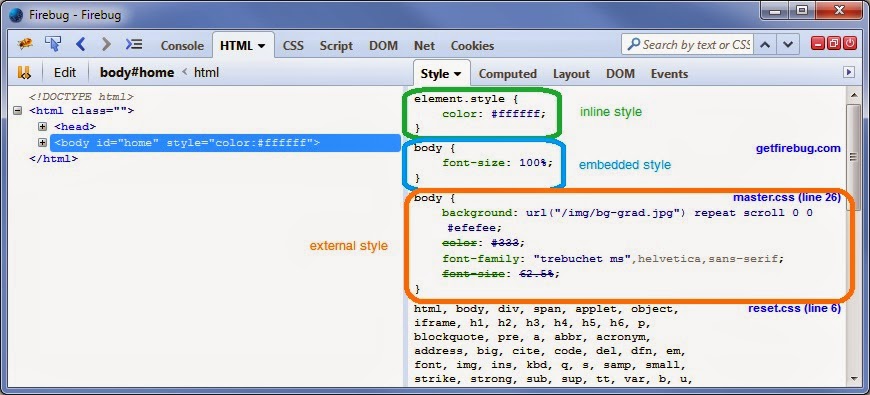
note that this element rule you point at isn't a normal CSS rule. It lists
all the styles, which got applied via the style attribute on the HTML
element. You can see that at the left side within your screenshot. It says
style="color:#ffffff;background-color:....

Other inline styles (or embedded styles) like the second one in your
screenshot displayed as inline:1670 are enclosed by a <style> tag embedded
within your HTML. So to find these CSS styles and the ones described above
you need to search within your HTML output.

Rules from external CSS files, i.e. files included via <link> tags, will be
displayed with their name, e.g. styles.css:123.

After that being said I want to note that your screenshot does *not* show
Firebug <https://getfirebug.com/> but the DevTools
<https://developer.mozilla.org/docs/Tools> built into Firefox.
In Firebug the display is a bit different:

<https://lh3.googleusercontent.com/-zemPiA3EHxk/U_GhP65CtAI/AAAAAAAAAbU/SPLiT6MbR_U/s1600/styles.jpg>
You can read more about this in the Firebug wiki
<https://getfirebug.com/wiki/index.php/Style_Side_Panel>.

Sebastian

On Friday, August 15, 2014 2:09:27 AM UTC+2, Brandon Palmer wrote:
>
> Hey,
>
> A bit new to coding. Working on this page:
> http://www.eatmorebliss.com/blog/chia-seeds-ancient-superfood-secret/
>
> Trying to change the color of the "Download" button in the right sidebar.
>
> Firebug says the code is "inline," which I think means it's controlled via
> the html for the plugin. But how do I use firebug to find the correct file?
>
> Let me know what other information could help.
>
> Thanks!
>
>
>

--
You received this message because you are subscribed to the Google Groups
"Firebug" group.
To unsubscribe from this group and stop receiving emails from it, send an email
to [email protected].
To post to this group, send email to [email protected].
Visit this group at http://groups.google.com/group/firebug.
To view this discussion on the web visit
https://groups.google.com/d/msgid/firebug/6c245bf3-4e3c-4f11-b41b-c90607d92a88%40googlegroups.com.
For more options, visit https://groups.google.com/d/optout.