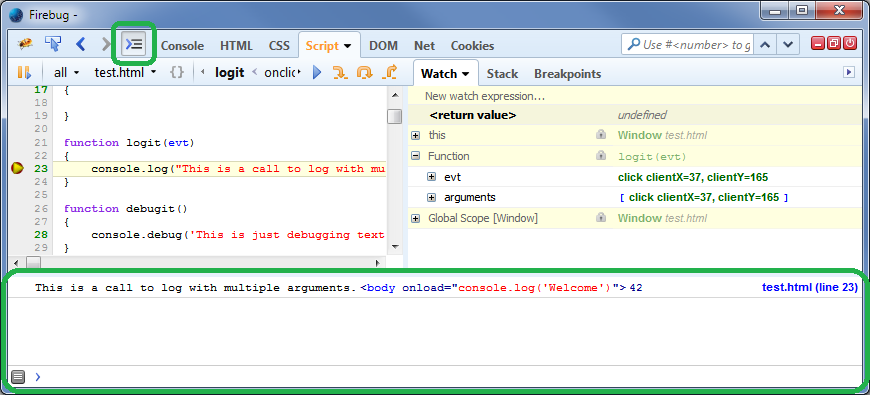
Luckily Firebug already has a feature like this. We call it *Command Line
Popup* <https://getfirebug.com/wiki/index.php/Command_Line> and you can
open it via the button with the arrow and the three lines:
<https://lh5.googleusercontent.com/-P4zG_vXFR-Y/U_Gu7UmmFII/AAAAAAAAAbg/mbc6Y6IgB7M/s1600/commandLinePopup.png>
There's a known conflict
<https://code.google.com/p/fbug/issues/detail?id=5315> in regard of the Console
API <https://getfirebug.com/wiki/index.php/Console_API> between Firebug and
the built-in DevTools. The DevTools console outputs a warning about that
saying "The Web Console logging API (console.log, console.info,
console.warn, console.error) has been disabled by a script on this page."
This issue will probably be fixed within the next major version of Firebug.

Sebastian

On Thursday, August 14, 2014 9:37:38 PM UTC+2, San wrote:
>
> Oops, I should have experimented more before posting. I just discovered
> that the reason the Firefox split-console stayed blank on page load was
> because I *also* had a Firebug console window that I'd previously opened
> for another Firefox window. Apparently, the first console window (Firefox
> or Firebug) that's opened preempts any subsequent consoles from the other
> toolset, even if they're opened on different browser windows.
>
> So it turns out that the built-in Firefox tools *do* allow me to view the
> Console and the Debugger simultaneously. Which seemed great -- until I
> discovered that the Debugger pane didn't actually work for some reason. It
> stayed frozen at the first breakpoint, with none of the buttons (Step Into,
> Step Over, or Step Out) working, nor their keyboard shortcuts, and no
> Continue button at all. Oh well.
>
> I still wish there were some way to do that in Firebug (Console + Debugger
> panels), with both actually *working* simultaneously. That would be
> great. Or is that a feature in the new version that I haven't gotten to yet?
>
> Lawrence San
> Business Writing: Santhology.com
> <http://www.google.com/url?q=http%3A%2F%2FSanthology.com&sa=D&sntz=1&usg=AFQjCNEOEhXPX6OzncltXTJDCjjsS70-Ww>
> Cartoon Stories for Thoughtful People: Sanstudio.com
> <http://www.google.com/url?q=http%3A%2F%2FSanstudio.com&sa=D&sntz=1&usg=AFQjCNHdSHVo1mUrPByzGNN2v-eF77EuMA>
>
>
>
> On Thu, Aug 14, 2014 at 3:09 PM, San wrote:
>
>> There's a two-page article in The Register
>> <http://www.theregister.co.uk/2014/08/14/browser_tools_bake_off/>
>> comparing web development tools in different browsers. Misleading clickbait
>> headline, and article doesn't go into much depth, but otherwise not bad. It
>> focuses mostly on the built-in tools of Firefox vs. Chrome, but also
>> mentions (and links to) Firebug.
>>
>> One thing that intrigued me was this sentence, referring to the built-in
>> Firefox and Chrome tools:  "Both make the Console available within any
>> other panel as well."
>>
>> I've often wanted to be able to look at the debugger panel (or the Watch
>> panel) while also watching the Console at the same time. Fooling around
>> with the Firefox built-in tools (in FF 28), I finally found a way to split
>> the pane, with the debugger on top and a console on bottom -- but the
>> console didn't show any of the logs in the JS file as the page loaded (yes,
>> I checked off "Logs" and all the other stuff in the dropdown menu). The
>> console split-pane stayed blank; the only thing it seemed to do was respond
>> to stuff I typed directly into it. Maybe I was doing something wrong?
>>
>> Anyway, I mostly use Firebug. I wish there was some way to have the
>> Firebug Console and the Debugger pane show (and be active) simultaneously,
>> so I wouldn't have to keep tabbing back and forth while moving through
>> breakpoints. Is this possible?
>>
>

--
You received this message because you are subscribed to the Google Groups
"Firebug" group.
To unsubscribe from this group and stop receiving emails from it, send an email
to [email protected].
To post to this group, send email to [email protected].
Visit this group at http://groups.google.com/group/firebug.
To view this discussion on the web visit
https://groups.google.com/d/msgid/firebug/0d734ebc-ae36-486e-ab08-d7eeaae8c971%40googlegroups.com.
For more options, visit https://groups.google.com/d/optout.