Thanks Sebastian.

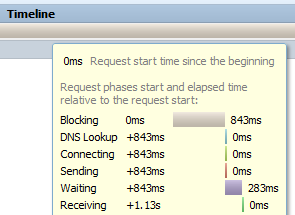
Just a minor clarification - the issue is with both Connect time and DNS.
It sounds like I might have to go back to a Firefox release that is about 2
years old in order to get a working version.   That worries me!   Is there
another group I should post a message on to see if there is any hope of
getting this fixed?  I wonder if the W3C Navigation Timings are bogus too.

I realize that tracking performance when the platform includes things such
as DNS prefetch and anticipatory connections can become very complex.  I am
hoping that the Firefox team considers providing accurate performance
information as a priority.

- Les

On Monday, November 10, 2014 8:30:47 PM UTC-7,
[email protected] wrote:
>
> I am trying to verify that the timings in the Network panel are accurate.
>  This is for an application performance analysis utility I am developing
> for a client.
>
> I am using a network emulator to force additional artificial latency into
> the network.
>
> My test preconditions are to clear the windows DNS (ifconfig /flushdns),
> and set Firefox not to cache any DNS entries (network.dnsCacheExpiration
> and network.dnsCacheEntries both set to 0).
>
> I am trying to validate what I see in the net panel is correct by using
> Wireshark to see the actual network traffic.  The results prove that the
> DNS lookup and connect are being lumped into blocking time.
>
> I am using a static image from my own website to test.  I am adding about
> 225ms of RTT latency.
>
>
> http://www.eperformancegroup.com/blog/wp-content/plugins/slideshow-gallery/views/default/images/left.gif?test=xxx
>
> The FB network panel shows blocking of 843ms, waiting of 283ms
>
> Wireshark shows DNS lookup time of 567ms
> Wireshark shows TCP connect of 275ms.  Add in DNS time and the total is
> 842ms.
> Wireshark shows response time of 284ms
>
> So - the total times match up - but the network panel lumped both the DNS
> time and the TCP connect time into blocking.
>
> Can this be easily fixed / is there a workaround I might use?    HAR file
> is attached.
>
> FF 33.1,  Firebug 2.0.6
>
> In a repeat test, I can confirm that this is repeatable.
>
> FB net panel shows blocking of 620ms, wait of 284ms
>
> "timings": {
>           "blocked": 620,
>           "dns": 0,
>           "connect": 0,
>           "send": 0,
>           "wait": 284,
>           "receive": 0
>         },
>
> For the repeat test:
>
> Wireshark shows DNS of 341 ms
> Wireshark TCP connect time of 274 ms - a total of 615ms
> wireshark shows response time of 283 ms
>
>
> <https://lh5.googleusercontent.com/-d9v5R_kJSK4/VGGA2Xhq64I/AAAAAAAAAAM/ROyp-c_ZgGM/s1600/FB%2Bnetwork%2Bpanel.png>
>
>
>
>
>
>
>
>
> <https://lh5.googleusercontent.com/-1_ADrfv5OKQ/VGGA5xNczhI/AAAAAAAAAAU/Hj1V73S8Ubc/s1600/DNS%2Blookup%2B576ms.png>
>
>
>
> <https://lh6.googleusercontent.com/-WK_RIPk6KhI/VGGA_-O9z-I/AAAAAAAAAAc/CXMTVp26GHk/s1600/TCP%2Bconnect%2B275ms.png>
>
>
>
> <https://lh6.googleusercontent.com/-yJE4gR-dDAs/VGGBC2a5T1I/AAAAAAAAAAk/m3k_bcboS7E/s1600/response%2B284ms.png>
>
>
>
>
>

--
You received this message because you are subscribed to the Google Groups
"Firebug" group.
To unsubscribe from this group and stop receiving emails from it, send an email
to [email protected].
To post to this group, send email to [email protected].
Visit this group at http://groups.google.com/group/firebug.
To view this discussion on the web visit
https://groups.google.com/d/msgid/firebug/98a275be-bf0a-471d-a644-a84a6299615a%40googlegroups.com.
For more options, visit https://groups.google.com/d/optout.