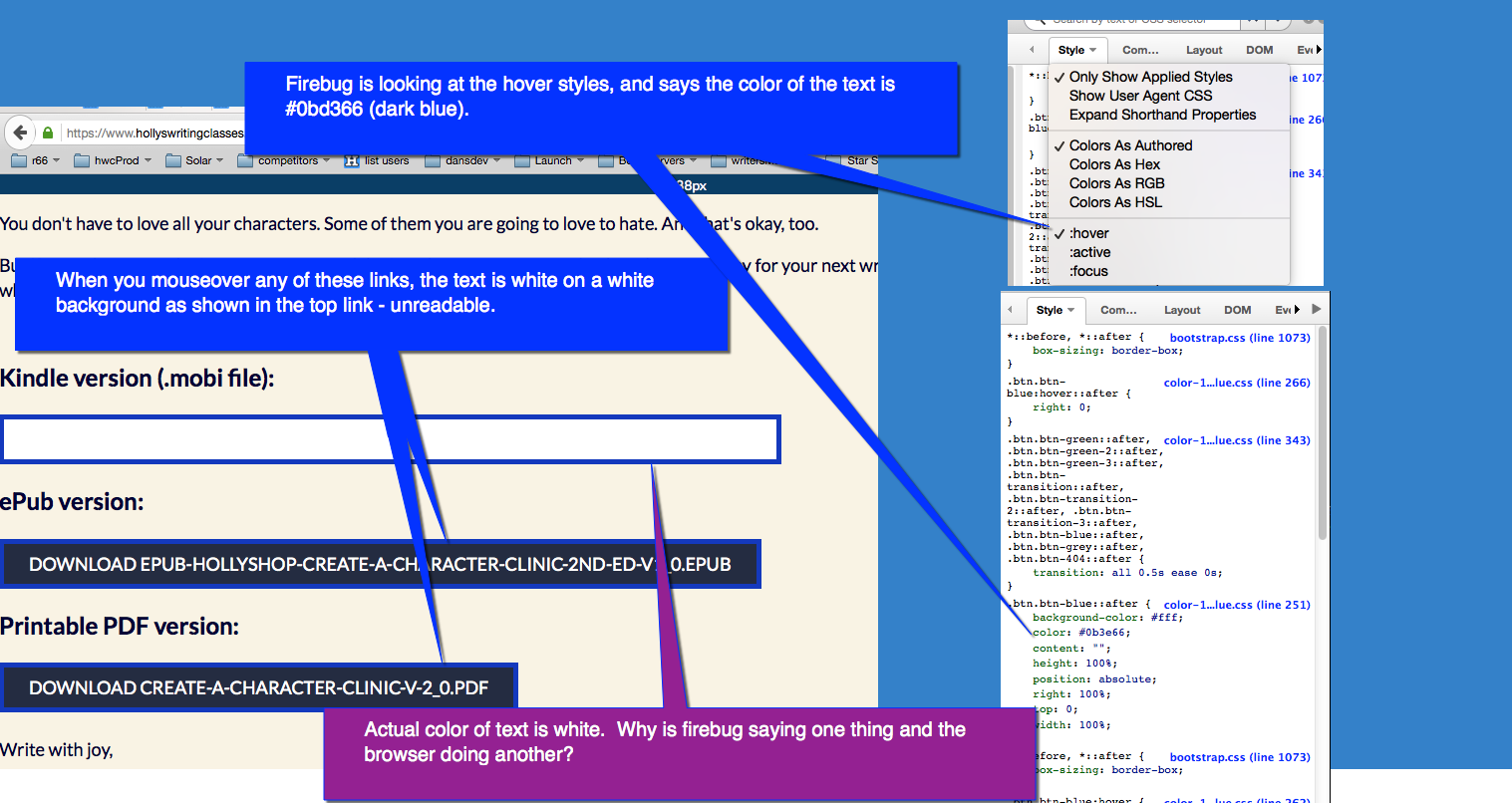
When I hover the buttons using Firefox 44.0.2 + Firebug 2.0.14 on Windows 7
I see the text in dark blue. Note that the actual rule making the text blue
is .btn.btn-blue:hover, not .btn.btn-blue::after.
If you didn't change anything in that page in the meantime, which fixes the
issue, I suggest you create a new Firefox profile
<https://support.mozilla.org/en-US/kb/profile-manager-create-and-remove-firefox-profiles>

and try out there. If the text is blue there, it must be some setting or
extension that causes the text to be white.
Some more steps to track the issue down are available within the first aid
guide for Firebug <https://getfirebug.com/firstaid>.

Sebastian

On Wednesday, February 24, 2016 at 8:25:04 AM UTC+1, Dan Allen wrote:
>
> This page shows the problem.
> <https://www.hollyswritingclasses.com/zdevDanAllen/firbug_bug.html>
> https://www.hollyswritingclasses.com/zdevDanAllen/firbug_bug.html
>
> If you mouse over the links to the downloads, the background changes to
> white.  The color is supposed to be dark blue.  Firebug says it is dark
> blue.  Actual color is white and readable.
>
> UNREADABLE TEXT:  FIREBUG REPORTS WRONG COLOR FOR TEXT.
>
>
> <https://lh3.googleusercontent.com/-QUfcU2dxmW0/Vs0FJNeg4rI/AAAAAAAABZk/BGNq2dI4ub0/s1600/firebug_bug.png>
>
>
>
>
>
>
>
>

--
You received this message because you are subscribed to the Google Groups
"Firebug" group.
To unsubscribe from this group and stop receiving emails from it, send an email
to [email protected].
To post to this group, send email to [email protected].
Visit this group at https://groups.google.com/group/firebug.
To view this discussion on the web visit
https://groups.google.com/d/msgid/firebug/536382ce-578c-433b-b5e3-7224deab9821%40googlegroups.com.
For more options, visit https://groups.google.com/d/optout.