jason wrote:
>> jason wrote:
>>> Where I work we have monitors in reception that are playing videos of
>>> specials, promotions, CEO talking about stuff and so forth.
>>> They are just a series of .VOB files running off of a VLC player on a Win
>>> XP box on the rack.
>>>
>>> My boss has asked that I create a Winform that allows someone to enter text
>>> and submit. This will then create a scrolling ticker across the bottom of
>>> the screen while the video is playing.
>>>
>>> Now I know that I could use Java or C# for this  - but I would so love to
>>> use C++ and FLTK - simply because I am looking for any excuse to advance my
>>> knowledge in both (and managed languages are too boring and restrictive.)
>>>
>>> Any ideas?
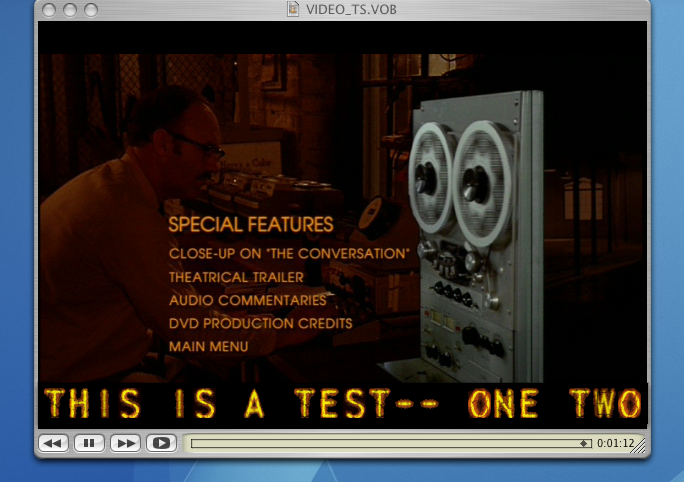
>>      Two easy things come to mind: a borderless window (similar to my
>>      'nixieclock' app) placed over the top of your video playback window
>>      so that it can draw whatever it wants; double buffering for smooth
>>      scrolling, anti-aliased fonts, etc. eg:
>>
>>      http://seriss.com/people/erco/fltk/tmp/video-overlay.png
>>
>>      ..where I just placed the nixieclock borderless window
>>      over a video playback.
>>
>>      But that won't really let you have letters "superimposed"
>>      over the video. The letters would have to be on a rectangle,
>>      similar to closed-captioning. There might be native OS calls
>>      you can use to make the FLTK windows 'see through'; I have
>>      no details on that though.
>>
>>      The other way would be drawing into the overlay planes,
>>      like the way a screen-capture app lets one drag out a
>>      rubber band selection over the entire screen.
>>
>>      But I don't know if FLTK supports rendering text into the
>>      overlay plane.. might only support shapes and vectors in
>>      very limited colors, not sure.
>
>
> Thank you very much. The "borderless window" idea is a great start.
>
> Step 1: Create main window as borderless
        That should be as simply as:

            yourwindow->clear_border();

> Step 2: Figure out how to make it draggable without a title bar at the top

        Here's what the nixieclock does: any click down followed by a drag
        moves the window around. Just this little bit of code in the
        window's handle() function is all it takes to make the window
        draggable..


// HANDLE EVENTS IN THE WINDOW
int YourWindow::handle(int e)
{
    static int xoff = 0, yoff = 0;
    int ret = Fl_Double_Window::handle(e);
    switch ( e ) {
        // DOWNCLICK IN WINDOW CREATES CURSOR OFFSETS
        case FL_PUSH:
            xoff = x() - Fl::event_x_root();
            yoff = y() - Fl::event_y_root();
            ret = 1;
            break;

        case FL_DRAG:
            // DRAG THE WINDOW AROUND THE SCREEN
            position(xoff + Fl::event_x_root(), yoff + Fl::event_y_root());
            redraw();
            ret = 1;
            break;

        case FL_RELEASE:
            show();             // raise
            ret =1;
            break;
    }
    return(ret);
}

> Step 3: Figure out how to animate the "scrolling" of the text

        Smooth sideways scrolling will be an interesting challenge.
        There are some easy cheats such as overriding draw() and
        using fl_draw() to draw the text string at different x()
        positions.

> Step 4: Consider making the scrollwindow "transparent" some how so that
> the text can appear to float on the v[i]deo.

        On OSX I'm pretty sure there's some simple native OSX calls
        to make windows of variable transparency which may work with FLTK
        too, not sure.
_______________________________________________
fltk mailing list
[email protected]
http://lists.easysw.com/mailman/listinfo/fltk