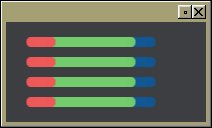
On 02/26/13 12:28, Greg Ercolano wrote:
>     http://seriss.com/people/erco/fltk/tmp/alpha-progress-bar.jpg
>     I'll see if I can post the code for that widget..
        OK, try this:
        http://seriss.com/people/erco/fltk/#MultiColorBarGraph

        Tested on linux.. too tired to test on OSX and Windows,
        though it should work on those too.

        Quoting the description:

"""
Demonstrate how to use inline representations of alpha channel images
to draw nice widgets with antialiased curved lines with simple FLTK
drawing techniques. In this case, a multicolored bar graph widget.

This shows several things in one example; how to construct a simple shape
using an image of fixed color with just the alpha channel to define
the shape (in this case a disk, but it could be anything). Also, how to make
a 'modern looking widget' using simple image manipulation techniques to get
antialiased 'see through' edges. And finally, how to make a multiple bar graph
widget with overlapping bars.

Our goal is to draw a bar graph that can have multiple overlapping bars,
similar to a CPU usage bar that shows separate 'user' and 'system' cpu use
in the same bargraph, but using round-ended 'bars' instead of flat rectangles.
This is done by taking just the alpha channel of a circle or disk (saved from
a paint program, e.g. Gimp), encoding the data as inline code.
"""

        There are other example widgets that show how to 'nice' looking widgets
        on the cheat page; one is "Fl_Gel_Tabs", and another is
"Fl_Matte_Button"
        which both use gradients:
        http://seriss.com/people/erco/fltk/Fl_Gel_Tabs/
        http://seriss.com/people/erco/fltk/Fl_Matte_Button/
_______________________________________________
fltk mailing list
[email protected]
http://lists.easysw.com/mailman/listinfo/fltk