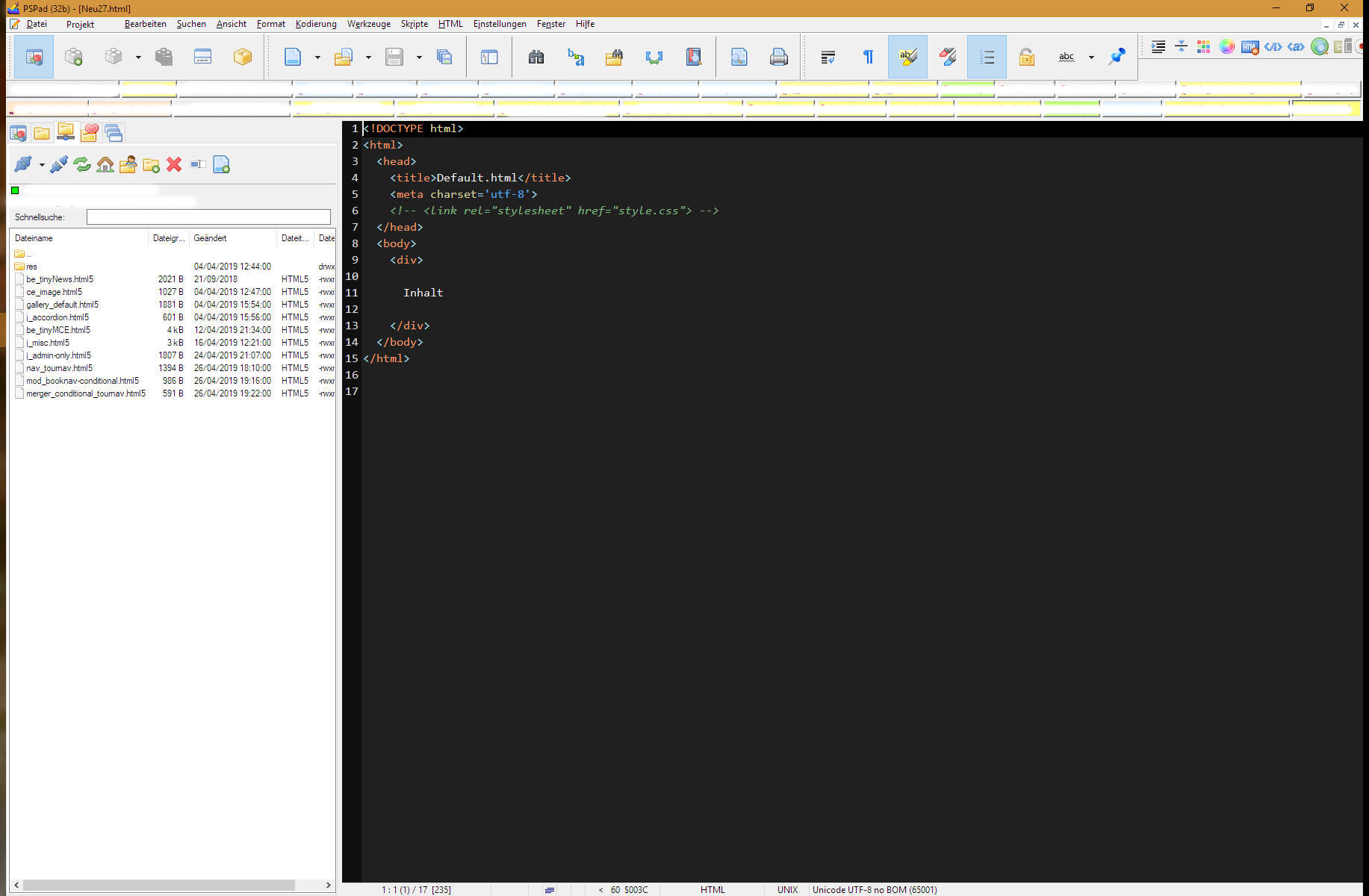
Hello Jan, can you please again take a look at this issue?

My laptop:
Size _15.2_"
Scaling _125_% (recomended)
Resolution 1920 x _1080_ (16/_9_)
My laptop with _extern monitor_ in use:
Size _27_"
Scaling _100_% (recomended)
Resolution 1920 x _1200_ (16/_10_)

Settings:
Program (part1):
Toolbar icon set: _Silk_24_
Menu icon set: _Silk_

I have to start my laptop with display opened. Once started I have to close the
display so the extern monitor comes in use. Now as you can see in next image
some of the toolbars have wrong sizes. I don't want them to be this big. I want
them all to be like the HTML toolbar.

Link to screenshot:
https://public.andreasburg.de/pspad/Screen-2019-04-28_18-03-57.png
screenshot:
(viz https://public.andreasburg.de/pspad/Screen-2019-04-28_18-03-57.png )

There is no special DPI scaling setting on my Windows 10. Those settings are the
default one.

--
<https://forum.pspad.com/read.php?4,71403,71477>
PSPad freeware editor https://www.pspad.com