Hi

We are looking into this and we will get back to you after investigation.
Thanks
Amit jha

Sent from Outlook Mobile<https://aka.ms/blhgte>


On Thu, Mar 24, 2016 at 12:04 PM -0700, "[email protected]"
<[email protected]<mailto:[email protected]>>
 wrote:

Send Framers mailing list submissions to [email protected]
To subscribe or unsubscribe, visit
http://lists.frameusers.com/listinfo.cgi/framers-frameusers.com You
can reach the person managing the list at
[email protected] When replying, please edit your
Subject line so it is more specific than "Re: Contents of Framers
digest..."

Today's Topics:

   1.  FW: Negative Spread/Run-In Paragraph Problem in  FrameMaker
      2015 (Rick Quatro)
   2. Re:  FW: Negative Spread/Run-In Paragraph Problem in
      FrameMaker 2015 (Lin Sims)
   3. Re:  FW: Negative Spread/Run-In Paragraph Problem in
      FrameMaker 2015 (Jeff Coatsworth)


----------------------------------------------------------------------

Message: 1
Date: Thu, 24 Mar 2016 10:52:01 -0400
From: "Rick Quatro" <[email protected]>
To: <[email protected]>
Subject: [Framers] FW: Negative Spread/Run-In Paragraph Problem in
        FrameMaker 2015
Message-ID: <00bb01d185dc$ba4ad220$2ee07660$@com>
Content-Type: text/plain; charset="us-ascii"

Hello Framers,


Anyone from Adobe monitoring the list? I got the email below from a client
of mine and can confirm what he is seeing. Something has changed from
FrameMaker 12 to 2015 that is causing the issue below. I have a sample file
that I can forward if someone wants to take a look at it. Please let me know
if you have any questions or comments. Thank you very much.


Rick


Rick Quatro

Carmen Publishing Inc.

585-366-4017

[email protected]


I would dearly love to have your feedback on a problem I'm having with
FrameMaker 2015. In Version 11, I successfully developed numbered bullets,
and as part of my research for this, I remember contacting you, which you
may or may not recall since it's been so long.


Numbered bullets are constructed as two paragraphs.


The first paragraph contains just one character (a bullet), in a font called
BigBullet2.ttf. That first paragraph is a run-in paragraph.


The second paragraph starts with a tab, followed by an autonumber, followed
by another tab. The autonumber is white.


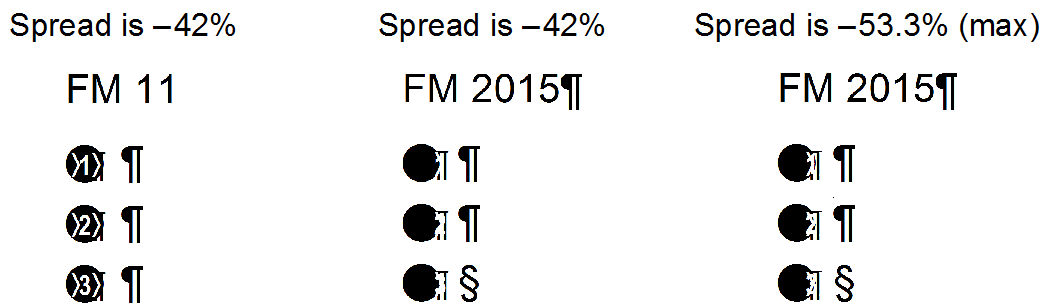
Setting the spread in the first paragraph to -42% enables me to achieve the
effect of having the white autonumber center over the black bullet.


But with FrameMaker 2015, the spread feature when used in conjunction with a
run-in paragraph no longer works properly. At -42%, the autonumber hangs out
at the right edge. I tried increasing the spread, and was able to improve
the position slightly. But the maximum response is at -53.3%, which is not
enough negative spread to center the number.


To illustrate:


In Frame 11 I have produced a whole array of technical manuals with numbered
bullets in them. The prospect of now replacing them with plain bullets is
daunting and of course undesirable.


Of course the best option is for Adobe to fix the spread command/run-in
command so they work together the way they used to.


Do you happen to have any influence with Adobe to ask them to fix the
problem?


I have attached the Frame file, in case you have the time/interest to
experiment and find a solution.


-------------- next part --------------
A non-text attachment was scrubbed...
Name: not available
Type: image/png
Size: 19679 bytes
Desc: not available
URL:
<http://lists.frameusers.com/pipermail/framers-frameusers.com/attachments/20160324/bda1aa2e/attachment-0001.png>

------------------------------

Message: 2
Date: Thu, 24 Mar 2016 11:13:43 -0400
From: Lin Sims <[email protected]>
To: Rick Quatro <[email protected]>
Cc: Frame Users <[email protected]>
Subject: Re: [Framers] FW: Negative Spread/Run-In Paragraph Problem in
        FrameMaker 2015
Message-ID:
        <CA+MomCiJv32=kq5_jedz4_w9+opobf14r8yyrppqyxxsfkz...@mail.gmail.com>
Content-Type: text/plain; charset=UTF-8

Would using a number font that has circle backgrounds work? There are a
whole bunch at this site:

http://www.fontscape.com/explore?3O4

There are several fonts that let you number up to 99 with them, but that
should be plenty.


On Thu, Mar 24, 2016 at 10:52 AM, Rick Quatro <[email protected]> wrote:

> Hello Framers,
>
>
>
> Anyone from Adobe monitoring the list? I got the email below from a client
> of mine and can confirm what he is seeing. Something has changed from
> FrameMaker 12 to 2015 that is causing the issue below. I have a sample file
> that I can forward if someone wants to take a look at it. Please let me
> know
> if you have any questions or comments. Thank you very much.
>
>
>
> Rick
>
>
>
> Rick Quatro
>
> Carmen Publishing Inc.
>
> 585-366-4017
>
> [email protected]
>
>
>
>
>
> I would dearly love to have your feedback on a problem I'm having with
> FrameMaker 2015. In Version 11, I successfully developed numbered bullets,
> and as part of my research for this, I remember contacting you, which you
> may or may not recall since it's been so long.
>
>
>
> Numbered bullets are constructed as two paragraphs.
>
>
>
> The first paragraph contains just one character (a bullet), in a font
> called
> BigBullet2.ttf. That first paragraph is a run-in paragraph.
>
>
>
> The second paragraph starts with a tab, followed by an autonumber, followed
> by another tab. The autonumber is white.
>
>
>
> Setting the spread in the first paragraph to -42% enables me to achieve the
> effect of having the white autonumber center over the black bullet.
>
>
>
> But with FrameMaker 2015, the spread feature when used in conjunction with
> a
> run-in paragraph no longer works properly. At -42%, the autonumber hangs
> out
> at the right edge. I tried increasing the spread, and was able to improve
> the position slightly. But the maximum response is at -53.3%, which is not
> enough negative spread to center the number.
>
>
>
> To illustrate:
>
>
>
>
>
>
>
>
>
>
>
> In Frame 11 I have produced a whole array of technical manuals with
> numbered
> bullets in them. The prospect of now replacing them with plain bullets is
> daunting and of course undesirable.
>
>
>
> Of course the best option is for Adobe to fix the spread command/run-in
> command so they work together the way they used to.
>
>
>
> Do you happen to have any influence with Adobe to ask them to fix the
> problem?
>
>
>
> I have attached the Frame file, in case you have the time/interest to
> experiment and find a solution.
>
>
>
>
> _______________________________________________
>
> This message is from the Framers mailing list
>
> Send messages to [email protected]
> Visit the list's homepage at  http://www.frameusers.com
> Archives located at
> http://www.mail-archive.com/framers%40lists.frameusers.com/
> Subscribe and unsubscribe at
> http://lists.frameusers.com/listinfo.cgi/framers-frameusers.com
> Send administrative questions to [email protected]
>


--
Lin Sims


------------------------------

Message: 3
Date: Thu, 24 Mar 2016 15:21:32 +0000
From: Jeff Coatsworth <[email protected]>
To: "[email protected]" <[email protected]>
Subject: Re: [Framers] FW: Negative Spread/Run-In Paragraph Problem     in
        FrameMaker 2015
Message-ID: <[email protected]>
Content-Type: text/plain; charset="us-ascii"

Did they log it with the Adobe Bugbase? There's also the [email protected]
e-mail that Stefan Gentz has promoted for users to use.

-----Original Message-----
From: Framers
[mailto:framers-bounces+jeff.coatsworth=jonasclub....@lists.frameusers.com] On
Behalf Of Rick Quatro
Sent: March-24-16 10:52 AM
To: [email protected]
Subject: [Framers] FW: Negative Spread/Run-In Paragraph Problem in FrameMaker
2015

Hello Framers,


Anyone from Adobe monitoring the list? I got the email below from a client
of mine and can confirm what he is seeing. Something has changed from
FrameMaker 12 to 2015 that is causing the issue below. I have a sample file
that I can forward if someone wants to take a look at it. Please let me know
if you have any questions or comments. Thank you very much.


Rick


Rick Quatro

Carmen Publishing Inc.

585-366-4017

[email protected]


I would dearly love to have your feedback on a problem I'm having with
FrameMaker 2015. In Version 11, I successfully developed numbered bullets,
and as part of my research for this, I remember contacting you, which you
may or may not recall since it's been so long.


Numbered bullets are constructed as two paragraphs.


The first paragraph contains just one character (a bullet), in a font called
BigBullet2.ttf. That first paragraph is a run-in paragraph.


The second paragraph starts with a tab, followed by an autonumber, followed
by another tab. The autonumber is white.


Setting the spread in the first paragraph to -42% enables me to achieve the
effect of having the white autonumber center over the black bullet.


But with FrameMaker 2015, the spread feature when used in conjunction with a
run-in paragraph no longer works properly. At -42%, the autonumber hangs out
at the right edge. I tried increasing the spread, and was able to improve
the position slightly. But the maximum response is at -53.3%, which is not
enough negative spread to center the number.


To illustrate:


In Frame 11 I have produced a whole array of technical manuals with numbered
bullets in them. The prospect of now replacing them with plain bullets is
daunting and of course undesirable.


Of course the best option is for Adobe to fix the spread command/run-in
command so they work together the way they used to.


Do you happen to have any influence with Adobe to ask them to fix the
problem?


I have attached the Frame file, in case you have the time/interest to
experiment and find a solution.


------------------------------

Subject: Digest Footer

_______________________________________________

This daily digest is from the Framers mailing list

Send messages to [email protected]
Visit the list's homepage at  http://www.frameusers.com
Archives located at http://www.mail-archive.com/framers%40lists.frameusers.com/
Subscribe and unsubscribe at
http://lists.frameusers.com/listinfo.cgi/framers-frameusers.com
Send administrative questions to [email protected]

------------------------------

End of Framers Digest, Vol 120, Issue 14
****************************************
_______________________________________________

This message is from the Framers mailing list

Send messages to [email protected]
Visit the list's homepage at  http://www.frameusers.com
Archives located at http://www.mail-archive.com/framers%40lists.frameusers.com/
Subscribe and unsubscribe at
http://lists.frameusers.com/listinfo.cgi/framers-frameusers.com
Send administrative questions to [email protected]